![CSS-CMYK-logo-2015-2.png]](https://go.christiansteven.com/hs-fs/hubfs/social-suggested-images/CSS-CMYK-logo-2015-2.png?height=40&name=CSS-CMYK-logo-2015-2.png)
Before You Begin
Before accessing the Administration section, ensure that:
- You can sign in to IntelliFront BI.
- Your account has the appropriate administrative permissions.
- You have access to the relevant administrative features.
Note: The options available may vary depending on your account permissions and the installed IntelliFront BI version.
Access the Administration Section
- Sign in to IntelliFront BI.
- From the main navigation menu, locate Administration.
- Select Administration to view the available administrative functions.
- Choose the section you want to manage or review.
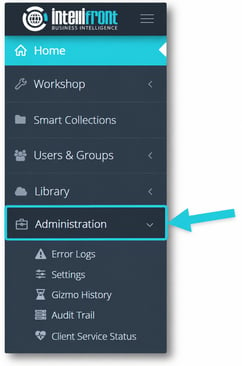
Understand the Administration Functions
The existing article identifies five administration areas:
|
Administration Feature |
Purpose |
|---|---|
|
Error Log |
Review recorded application errors to help investigate system or execution problems. |
|
Settings |
Access IntelliFront BI application configuration options. |
|
Gizmo History |
Review historical Gizmo execution activity. |
|
Audit Trail |
Review recorded user or system activities for auditing purposes. |
|
Client Service Status |
Review the status of IntelliFront BI client services. |
These are the features documented in the current article. We'll verify the options against the updated interface before finalizing their descriptions.