![CSS-CMYK-logo-2015-2.png]](https://go.christiansteven.com/hs-fs/hubfs/social-suggested-images/CSS-CMYK-logo-2015-2.png?height=40&name=CSS-CMYK-logo-2015-2.png)
Before You Begin
Before accessing the Administration section, ensure that:
- You can sign in to IntelliFront BI.
- Your account has the appropriate administrative permissions.
- You have access to the relevant administrative features.
Note: The options available may vary depending on your account permissions and the installed IntelliFront BI version.
Access the Administration Section
- Sign in to IntelliFront BI.
- From the main navigation menu, locate Administration.
- Select Administration to view the available administrative functions.
- Choose the section you want to manage or review.
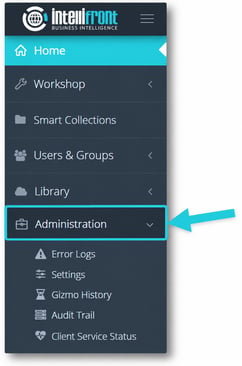
Understand the Administration Functions
Choose the area that matches the task you need to complete:
|
Administration Feature |
Purpose |
|---|---|
|
Error Log |
Review recorded application errors to help investigate system or execution problems. |
|
Settings |
Access IntelliFront BI application configuration options. |
|
Gizmo History |
Review historical Gizmo execution activity. |
|
Audit Trail |
Review recorded user or system activities for auditing purposes. |
|
Client Service Status |
Review the status of IntelliFront BI client services. |
Related Administration Articles
Support an IntelliFront BI API integration
Administrators can use the tools above to investigate services, application errors and report-job activity alongside an integration’s request records. Begin with Troubleshoot IntelliFront BI API Integrations to identify the failing stage.
For connection, authentication, supported operations and working examples, use the IntelliFront BI Developer Portal introduction. Detailed request schemas and code examples are maintained in the developer portal.