

PBRS Customer Portal API

Let Customers Schedule Report Delivery from Your Portal

PBRS Power BI Report Scheduler

Add report scheduling and delivery controls to your SaaS product, customer portal or business application. Your users configure what they need through your interface while PBRS handles report generation, scheduling and secure distribution behind the scenes.

Let customers create and manage report-delivery schedules through your portal.

Apply report parameters, filters, recipients, formats and delivery settings programmatically.

Keep users inside your application without exposing the PBRS administration interface.

Monitor report execution and present status information through your own user experience.
Explore the API documentation →

START FREE TRIAL BOOK A DEMO
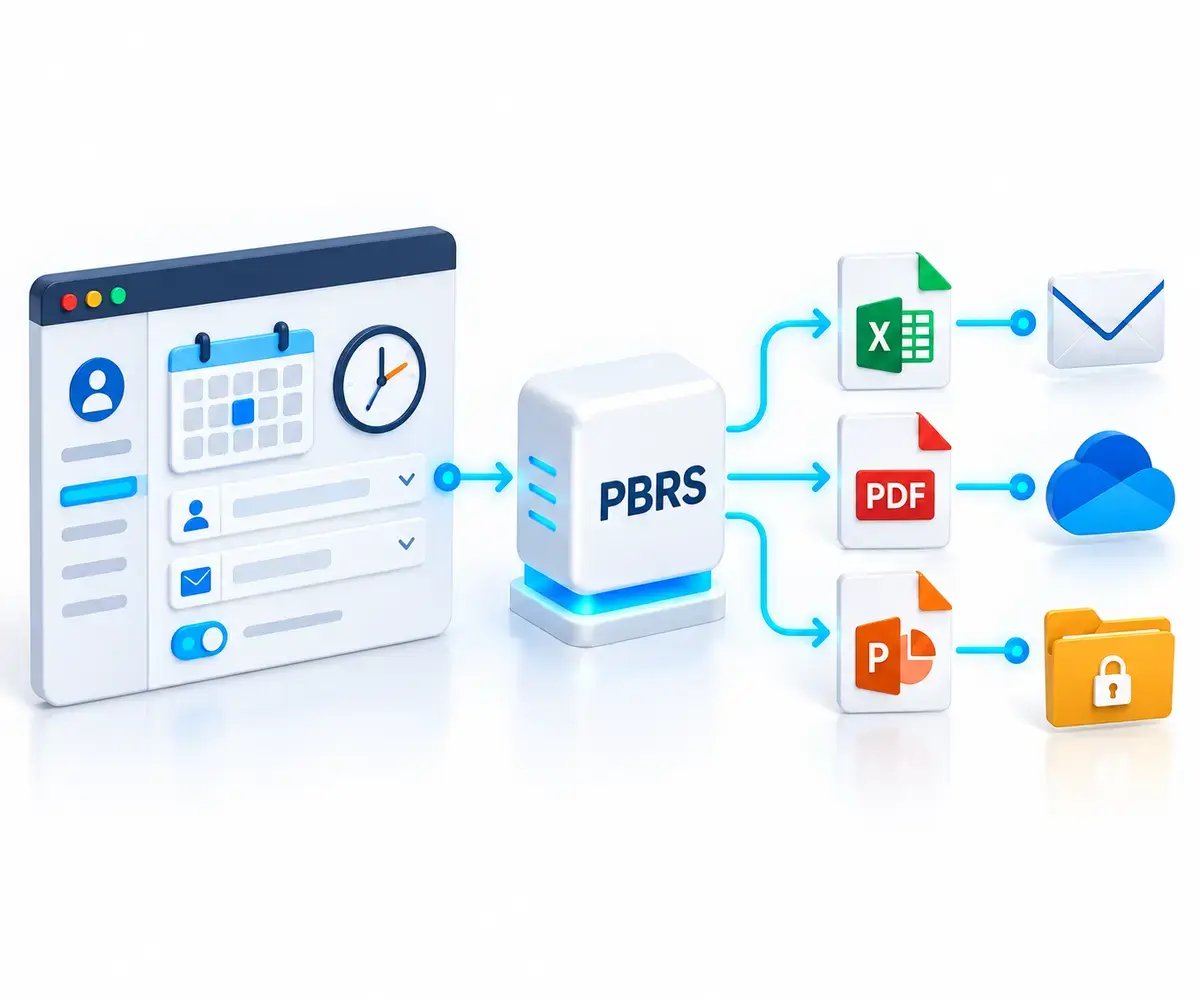
Customer portal scheduling Power BI and SSRS report delivery through PBRS to email, cloud storage and secure folders.

The Customer Reporting Challenge

Your Customers Need Self-Service Reporting. Your Team Shouldn’t Have to Build the Scheduler.

Customers expect to manage reporting from the same portal they already use. But adding schedules, parameters, recipients, delivery rules and execution tracking can turn reporting into a product of its own. PBRS provides the reporting automation layer behind your application.

Customers Expect Self-Service

Customers want to choose their reports, schedules, recipients and delivery preferences without submitting requests to your support or reporting teams.

Every Customer Has Different Requirements

Each customer may need different report parameters, formats, recipients, destinations and delivery times. Those choices must flow from your portal into the reporting process.

Scheduling Becomes a Product to Maintain

Building scheduling logic, report generation, delivery routines and execution monitoring creates an expanding codebase that your development team must continually support.

Portal-Based Scheduling

How Can Customers Schedule Reports from Your Portal?

Your portal collects the customer’s reporting choices and sends the corresponding schedule configuration to the PBRS REST API. PBRS stores and executes the schedule using the reporting accounts and destinations configured in your PBRS installation.

Your server-side integration sends authenticated requests to PBRS while customers continue working in your application.

  • Create new report-delivery schedules from your portal.
  • Retrieve and update existing schedule configurations.
  • Support Power BI, paginated, SSRS and Power BI Report Server schedules.
  • Keep PBRS and its API credentials behind your customer-facing application.

Review the PBRS REST API overview →

 

START FREE TRIALBOOK A DEMO
Customer portal scheduling a personalized report for automated email delivery through PBRS.

Customer-Controlled Reporting

What Reporting Choices Can Customers Control?

Your application decides which reporting options each customer can access. The portal collects their selections and translates them into the appropriate PBRS schedule configuration.

Depending on the report source and schedule type, customers can be allowed to control:

  • The report to run and when it should be delivered.
  • Supported filters, report parameters, bookmarks and rendering settings.
  • Output format, filename and supported export settings.
  • Email recipients, subject, message and sender settings.
  • Supported email and disk delivery destinations.

Your portal can present a simple customer experience while retaining control over which reporting options are available.

Customer portal controls for report schedules, filters, recipients, output formats and secure delivery destinations.

Your Portal Stays in Front

Do Customers Need Access to PBRS?

No. Customers continue working inside your portal or business application. Your backend communicates with the PBRS REST API through an authenticated connection and converts the customer’s approved choices into PBRS operations.

  • PBRS API credentials remain within your server-side integration.
  • Customers do not need access to the PBRS administration interface.

Your application manages customer access. PBRS performs the authorized reporting operations requested by your integration.

Customers use a reporting portal while secured PBRS automation and API credentials remain behind the application.

Customer-Specific Reporting

How Do You Keep Each Customer’s Reporting Separate?

Your application enforces customer-level authorization before submitting requests to PBRS. PBRS then runs the approved configuration and routes the output to the intended recipients.

Authorized customer running a saved report on demand from a portal for immediate email delivery.

BUILD SELF-SERVICE REPORTING INTO YOUR PORTAL

Add Customer-Controlled Reporting to Your Product

PBRS Power BI Report Scheduler

Give customers control over supported schedules, personalization and delivery through the portal experience your team already provides.

START FREE TRIAL BOOK A DEMO
Free 30-day trial. No credit card required.
Runs within your own Windows environment.
Server-side integration through the authenticated PBRS REST API.

Scheduled and On-Demand Reporting

Can Customers Run Reports on Demand?

Yes. Your portal can allow an authorized customer to request the immediate execution of an existing PBRS schedule. This can support actions such as “Run now,” “Generate report” or “Send report” inside your application.

Scheduled and on-demand reporting can use the same underlying PBRS configuration, so your developers do not need to build separate report-generation processes.

  • Execute an existing schedule from an authorized portal action.
  • Use the schedule’s saved report, parameter and delivery settings.
  • Return an execution identifier for status monitoring.
  • Keep execution controls within your existing customer experience.

Your application determines who can request an execution and which saved schedule they are permitted to run.

Customer portal creating personalized filtered reports and routing each version to the correct recipient.

Execution Visibility

How Can the Portal Show Execution Status?

The PBRS REST API allows your application to check individual execution results, view the API execution queue and identify schedules that are currently running.

Your portal can use this information to give customers appropriate visibility into their reporting requests without exposing the PBRS administration interface.

  • Check the result of an individual API-triggered execution.
  • View report requests waiting in the API execution queue.
  • Identify schedules that PBRS is currently executing.
  • Translate PBRS execution information into clear portal status messages.

API availability, scheduler availability and successful report delivery are separate conditions. Your integration should monitor and represent each one accurately.

Customer portal displaying queued, running, completed and failed report executions returned by a secure automation service.

Build the Experience, Not the Infrastructure

Why Use PBRS Instead of Building a Scheduling Engine?

A basic report-export feature can quickly become a substantial software project. Your developers must account for scheduling rules, report parameters, recipients, output formats, delivery routines, execution queues, monitoring and failure handling.

PBRS provides that reporting automation infrastructure behind your application, allowing your team to concentrate on the customer experience and the workflows that differentiate your product.

  • Avoid developing and maintaining recurrence and scheduling logic.
  • Use established report-generation and delivery workflows.
  • Reduce the amount of reporting infrastructure your team must support.
  • Keep reporting controls inside your existing portal and user experience.
  • Focus development resources on the capabilities unique to your product.

Your application remains the customer-facing product. PBRS supplies the specialized report-scheduling and delivery layer behind it.

PBRS handling report scheduling, delivery and monitoring while developers avoid maintaining a complex custom automation system.

Supported Reporting Sources

One API for Your Microsoft Reporting Environment

PBRS gives application teams a consistent way to work with supported cloud and on-premises Microsoft reporting sources. It can provide the reporting automation layer behind your Power BI report automation workflow.

Power BI Service

Let customers schedule supported Power BI reports using reporting accounts configured in PBRS.

Power BI Paginated Reports

Pass supported parameters and delivery settings into structured paginated-report schedules.

SQL Server Reporting Services

Add supported SSRS reports to the customer-facing scheduling and delivery experience.

Power BI Report Server

Bring supported on-premises report-server workflows into the same portal-based reporting process.

Available API operations, filters, parameters, output formats and authentication requirements depend on the PBRS version, report source and deployment configuration.

Built on Reporting Experience

A Proven Reporting Foundation for Your Application

ChristianSteven Software has specialized in automated business reporting for more than two decades. PBRS gives your development team an established reporting automation layer while your application retains control of the customer experience and business logic.

20+

Years of Reporting Experience

Build on experience gained from supporting complex, recurring business-reporting operations.

API

Documentation for Developers

Review API operations, request structures and implementation guidance before beginning your integration.

PBRS

Support for Your Use Case

Validate your proposed workflow, confirm the appropriate configuration and discuss technical questions with the PBRS team.

Visit the PBRS API developer portal →

PBRS Report Automation API FAQ

Questions About Adding Report Scheduling to Your Application

Find answers about using the PBRS report automation API for customer-controlled scheduling, personalized report delivery, on-demand execution and status monitoring inside your application.

What is the PBRS REST API?

The PBRS REST API connects your portal, SaaS product or business application to your PBRS installation. Your application can use it to discover reporting resources, create and update schedules, execute reports, manage supported report packages and monitor processing. Review the PBRS REST API overview.

Can customers schedule report delivery from inside our application?

Yes. Your application can collect the customer’s approved scheduling and delivery choices and send the resulting configuration to PBRS. PBRS stores and executes the schedule while the customer remains inside your portal.

Your application determines which reports, settings and actions each customer can access.

Do customers need access to the PBRS interface?

No. Customers can manage their reporting choices through your application. Your server-side integration communicates with PBRS using an authenticated connection, so customers do not need access to the PBRS administration interface or API credentials.

Which reporting environments can we use?

The API supports schedules for:

  • Power BI Service reports
  • Power BI Paginated Reports
  • SQL Server Reporting Services
  • Power BI Report Server

The available operations, parameters, filters, rendering options and output settings vary by report source and schedule type.

Which report settings can customers control?

Your application can expose only the options appropriate for each customer and workflow. Depending on the report source and API operation, these can include:

  • Report selection
  • Schedule frequency and execution time
  • Filters, parameters and bookmarks
  • Rendering settings
  • Output format
  • Email recipients and message settings
  • Supported email and disk destinations

The exact fields available should be confirmed in the relevant API operation. See the schedule-creation guidance.

Can each customer receive a personalized report?

Yes. Your integration can associate a customer with the appropriate report, filters, parameters, recipients, output settings and delivery schedule. PBRS then processes the saved customer-specific configuration when the schedule runs.

Your application remains responsible for determining which reports and settings each customer is authorized to use.

Can customers run a report immediately instead of waiting for its schedule?

Yes. An authorized action such as “Run now” or “Send report” can execute an existing PBRS schedule through the API. The execution uses the report, personalization and delivery settings stored in that schedule.

This allows scheduled and on-demand requests to use the same underlying reporting configuration.

Can our portal show whether a report is queued, running, completed or failed?

The API provides operations for checking execution results, inspecting queue activity and identifying schedules that are currently running. Your application can translate that information into customer-facing status messages.

An accepted API request does not by itself confirm that the report rendered successfully or reached its destination. Your integration should verify the final execution outcome separately. Review the execution-monitoring guidance.

How is the PBRS REST API secured?

The API supports API client credentials and PBRS user authentication. After authentication, the application sends the resulting bearer token with protected requests. Permissions can restrict access to individual operations.

Credentials and tokens should remain in your server-side application or an appropriate secret store. They should not be exposed in browser code or public repositories.

Where does the API run?

The API runs as a Windows service on the PBRS server. Your application must be able to reach that service, and the PBRS installation must have access to the reporting accounts and destinations used by the workflow.

For network connections, configure HTTPS with an appropriate certificate and reachable server hostname.

Does every PBRS desktop feature have an API endpoint?

No. A capability available in the PBRS desktop application does not automatically have a corresponding public API operation. An operation supported for one report source or schedule type may also be unavailable for another.

Confirm the required workflow against the current API reference before designing the customer interface.

Do we still need to build the customer-facing interface?

Yes. Your team builds the portal controls, customer permissions and business workflow. PBRS provides the reporting automation layer behind that experience, including supported schedule configuration, execution, output delivery and operational monitoring.

This allows your developers to focus on the parts of the application that are specific to your customers rather than building an entire report-scheduling engine.

READY TO AUTOMATE REPORTING FROM YOUR APPLICATION?

Let Customers Manage Report Delivery from Your Portal

PBRS Power BI Report Scheduler

 Connect your portal to PBRS so customers can manage approved schedules, request reports on demand and check execution status through your application. 

START FREE TRIAL BOOK A DEMO
Free 30-day trial. No credit card required.
Runs within your own Windows environment.
Recipients do not need Power BI access.