

PBRS Report Automation API
Automate Power BI and SSRS Reporting from Your Application

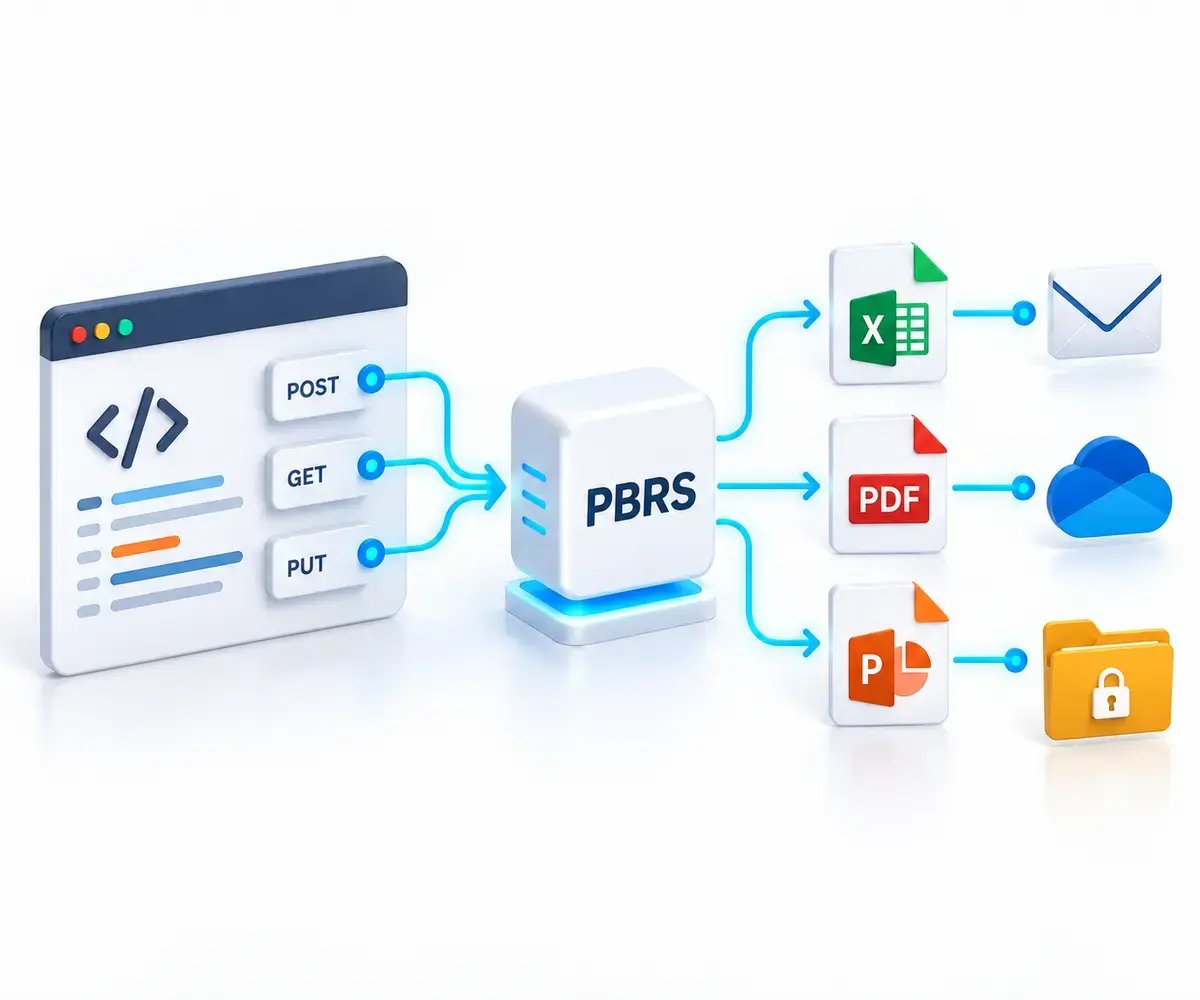
Connect your application to PBRS through its REST API. Create schedules, personalize reports and trigger delivery from your own workflows while PBRS handles report generation and distribution. Build the integration without maintaining a reporting scheduler of your own.
| ✓ | Create and manage report schedules from your application, workflow or internal system. |
| ✓ | Set filters, report parameters and email recipients programmatically. |
| ✓ | Trigger reports when your business process finishes and monitor execution. |
| ✓ | Build report packages across Power BI, paginated reports and SSRS. |
The Reporting Integration Challenge
Your Application Needs Reporting. Your Team Shouldn’t Have to Build the Scheduler.
Generating a report is only part of the job. Your application also needs to manage schedules, apply the right parameters, deliver outputs and track execution. Building and maintaining that infrastructure takes time away from your core product.
Too Much Custom Code to Maintain
A simple export script grows into scheduling logic, recipient management, delivery routines and status tracking. Every new requirement adds more code for your team to build, test and support.
Reporting Requirements Keep Changing
Customers, facilities and departments need different report parameters, recipients and schedules. Those choices need to flow from your application into reporting without someone manually updating each job.
Reports Must Follow Your Workflow
A report may need to run after a batch finishes, a transaction completes or a user requests it. Your application needs a way to trigger execution and check the result, rather than relying on a fixed delivery time.
Choosing the Right Approach
When Native APIs Are Enough—and When PBRS Fits
Microsoft APIs are a sensible choice when your application needs a focused Power BI export workflow and your team is prepared to own the surrounding scheduling, delivery and operational code. PBRS is designed for applications that need a reporting automation layer across supported Power BI and SSRS environments.
Native APIs and Custom Code
A Good Fit for Focused Export Workflows
You need to export a limited set of Power BI reports from your application.
Your team will build and maintain the scheduling, delivery, retry and monitoring services around the export.
A single report source and a small set of delivery requirements meet the need.
The applicable Microsoft capacity, licensing and export requirements fit your workload.
PBRS REST API
Built for Reporting Automation in Your Application
Create, retrieve, update and manage supported report schedules through one API.
Programmatically manage report parameters, email destinations and supported output settings.
Run and monitor supported Power BI, paginated, SSRS and Power BI Report Server schedules from your workflow.
Create packages that bring supported reports and configured delivery into one reporting workflow.
PBRS runs within your reporting environment. Available API operations, report formats and delivery options depend on the report source, PBRS version and deployment configuration.
API Capabilities
Discover, Configure and Run Reporting from Your Application
The PBRS REST API gives your backend the reporting operations it needs to turn approved application choices into configured schedules, personalized outputs and completed report deliveries.
01
Discover Available Reporting
Find configured accounts, folders, reports, visuals and schedules so your application can work with approved reporting resources rather than hard-coded IDs.
02
Create and Manage Schedules
Create, retrieve, update and delete supported single-report and package schedules from your application’s own reporting workflow.
03
Personalize Each Delivery
Apply supported filters and parameters, manage email destinations and configure each report for the customer, department, facility or recipient your application serves.
04
Execute and Monitor
Start supported schedules when your business workflow requires them, then use execution status and queue information to track what happened.
Example Integration Use Cases
Where the PBRS API Fits in Your Application
Connect PBRS to the business processes and applications your organization already uses. These examples show how your backend can turn a completed process, an internal request or a customer’s reporting choices into a supported reporting workflow.
01
Reporting After a Business Process
After a billing cycle, data import or batch process completes, your backend calls PBRS to run the appropriate saved schedule. Record the execution identifier and check the result before marking the reporting step complete.
02
Report Packages from Internal Systems
Let a finance or operations application request a month-end reporting package for a department, facility or business unit. PBRS executes the configured package of supported reports and delivers the outputs to its approved destinations.
03
Customer-Controlled Report Delivery
Let customers choose approved reports, delivery times and recipients inside your portal. Your backend validates their choices and creates or updates the supported PBRS schedule while customers remain in your application.
Your application controls authorization and business rules. Keep PBRS credentials and privileged API calls in your backend, and confirm the required operations for your report sources and PBRS configuration.
Personalized Report Delivery
Give Every Recipient the Right Report
Use your application’s business data to control supported report parameters, recipients and delivery settings. For supported data-driven packages, PBRS can process customer- or department-specific report variations within one configured workflow.
Apply the Right Data Scope
Set supported filters and parameters for the customer, facility, region, account or department represented by the application request.
Control Delivery from Your System
Add or update supported email destinations and recipient lists as the people, roles and reporting requirements in your application change.
Deliver Complete Report Packages
Create supported packages that coordinate Power BI, paginated, SSRS and Power BI Report Server reports in one configured delivery workflow.
Available report sources, output formats and destination settings depend on the PBRS configuration and the report source you use.
Configured Outputs and Delivery
Generate the Output Your Workflow Requires
PBRS can generate and deliver reports using the configured format and destination for each supported workflow. Your application controls the reporting request; PBRS performs the configured report generation and delivery.
Produce Useful Business Files
Configure supported workflows to generate report outputs such as PDF, Excel and PowerPoint, based on the report source and PBRS configuration.
Protect Sensitive Deliveries
Use supported PDF and Excel protection settings when the reporting workflow requires an additional level of control over delivered files.
Deliver to the Right Destination
PBRS can deliver completed reports through configured destinations such as email, cloud storage and network folders, according to the reporting workflow you define.
Output formats, protection settings and delivery destinations vary by report source and PBRS deployment. Confirm the supported combination for the workflow you plan to build.
Reporting Operations
Build an Integration Your Team Can Operate
A reliable reporting integration needs more than a successful API request. Your application should retain the identifiers and configuration needed to trace schedules, review executions and support users when reporting requirements change.
Retain the IDs That Matter
Store the PBRS schedule ID, destination ID and execution ID alongside the relevant application record so your team can trace each reporting workflow.
Monitor Execution
Check execution status and queue information after initiating a report run. Use the returned information to present meaningful reporting status in your application.
Test Configuration Changes
Validate changes to schedules, parameters, recipients and report settings before enabling recurring delivery for production users.
Support Users with Context
Keep your application’s request details, PBRS identifiers and execution result together so support teams can investigate a reporting issue without reconstructing the workflow.
Supported Reporting Sources
One API for Your Microsoft Reporting Environment
PBRS gives application teams a consistent way to work with supported cloud and on-premises Microsoft reporting sources. It can provide the reporting automation layer behind your Power BI report automation workflow.
Power BI Service
Work with supported Power BI reports and configured reporting accounts.
Power BI Paginated Reports
Configure supported parameter-driven paginated report workflows.
SQL Server Reporting Services
Include supported SSRS reports in schedules and report packages.
Power BI Report Server
Bring supported on-premises report-server workflows into the same reporting process.
Available API operations, output formats and authentication requirements depend on the PBRS version, report source and deployment configuration.
Build on Reporting Experience
Reporting Automation Built for Long-Term Use
ChristianSteven Software has focused on automated business reporting for more than two decades. PBRS gives your application a supported reporting automation layer while you retain ownership of your product experience and business logic.
20+
Years of Reporting Automation
Deep experience with the operational details behind recurring business reporting.
API
Documentation for Developers
Explore API reference material and implementation guides before you build.
PBRS
Support for Your Reporting Workflow
Test your use case, validate the right configuration and bring technical questions to the PBRS team.
PBRS REPORT AUTOMATION API FAQ
Questions About Automating Reports from Your Application
Use the PBRS Power BI report automation API to manage schedules, execute reports, build report packages and monitor results across supported Microsoft reporting sources.
The PBRS REST API lets an application work with PBRS programmatically. It can create and manage schedules, execute report automation, manage report packages, and monitor execution activity—without requiring a person to perform each action in the PBRS interface.
Yes. Your application can call the API to start an existing PBRS schedule when its own workflow reaches the appropriate point—for example, after a transaction completes, a file is received, or another internal process finishes.
Yes. The API supports programmatic schedule management, allowing an application to create, retrieve, update, and manage schedules as reporting requirements change.
Yes. An application can use PBRS schedules and packages to support recipient-specific reporting workflows. PBRS handles the report-generation and delivery process; the application can initiate and manage that process through the API.
The API works with PBRS automation for Power BI Service, Power BI Report Server, Power BI Paginated Reports, and SSRS.
Yes. PBRS supports report packages, allowing related reports to be managed as a single automation workflow. This is useful when an application needs to produce and deliver a complete reporting set rather than one individual export.
Your application should retain the execution identifier returned by the relevant API operation and use it to check the final execution result. An accepted request or successful HTTP response does not by itself confirm that the report was generated or delivered. Inspect the execution outcome and verify the expected output and delivery before marking the workflow as successful.
No. The API gives your application a way to control PBRS. PBRS remains the report automation layer for scheduling, generating, packaging, and delivering reports, reducing the custom infrastructure your team has to build and maintain.
The PBRS REST API uses authenticated access with bearer tokens. API clients are configured in PBRS, and access tokens are issued for authenticated requests.
Yes. The API complements the PBRS interface. Teams can use the interface for administration and operational work while applications use the API where reporting needs to be initiated, managed, or monitored programmatically.
READY TO AUTOMATE REPORTING FROM YOUR APPLICATION?
Start Application-Driven Report Automation with PBRS

Connect your application to PBRS to manage schedules, start report automation, work with report packages, and monitor execution across your reporting workflow.
| ✓ | Free 30-day trial. No credit card required. |
| ✓ | Runs within your own Windows environment. |
| ✓ | Recipients do not need Power BI access. |