

CRYSTAL REPORTS QUESTIONS

Can Crystal Reports Run Automatically When Nobody Is Logged into Windows?

Yes. Crystal Reports can run unattended when a reporting service or properly configured scheduled process executes them. The account running the job still needs access to its dependencies.

CRD offers a Windows service scheduling option, letting the morning reports continue after you log off.

  
After you log off

Keep the early shift independent of your desktop

Imagine a production supervisor arriving before you each morning. Her stock report usually appears at six, until the day after you log off the reporting computer. Nothing reaches her mailbox, even though the report worked when you tested it.

The RPT file has not necessarily changed. The process that starts it may depend on your session, or it may rely on a drive, connection or printer available only to your account. Logging off exposes that dependency.

An unattended job needs both an execution method that survives logoff and an identity that can do the work. A Windows service addresses the first requirement. Giving it the appropriate access addresses the second.

Logoff is a useful test

Locking the screen and logging off are different tests. Confirm the behavior the early shift will actually depend on.

  
Your options

Run Crystal Reports without a Windows login

SAP Crystal Server runs scheduled reports through its server services. If the stock report is already there, investigate its instance history and service configuration before adding another scheduler.

Windows Task Scheduler can run an unattended report runner under a configured account. The executable must be designed to work without prompts or desktop interaction. A shortcut that opens the report designer may still wait for somebody to respond.

CRD provides background scheduling and a separate NT Service option. Its Scheduling Service guide describes the setup and checklist for service execution. Choose deliberately: calling a background application a service does not establish that it will operate after logoff.

Keep the availability claim realistic

A running service cannot prevent host shutdowns, failed database connections or mail outages. Decide who investigates a missing report.

  
Set it up

Prove the stock report under its unattended account

Begin with the stock report’s accepted PDF and a controlled destination. Configure the job in CRD, including its database credentials, subreports, reporting period and output. Confirm the correct file arrives before changing the execution method.

Follow the NT Service setup in CRD’s Scheduler options and satisfy its checklist. Give the execution account the required access to the RPT, database, temporary files and destination. A shared folder should use a path that account can reach, rather than relying on your mapped desktop drive.

Schedule a test, log off and let the scheduled time pass. Inspect the received PDF for the correct stock day and a known item. Then check the run history and error notifications, so a colleague has somewhere to start if the next morning’s file is absent.

If printing or a mail integration needs an interactive profile, resolve that dependency explicitly. Success with a local PDF export does not prove that every later delivery step can run unattended.
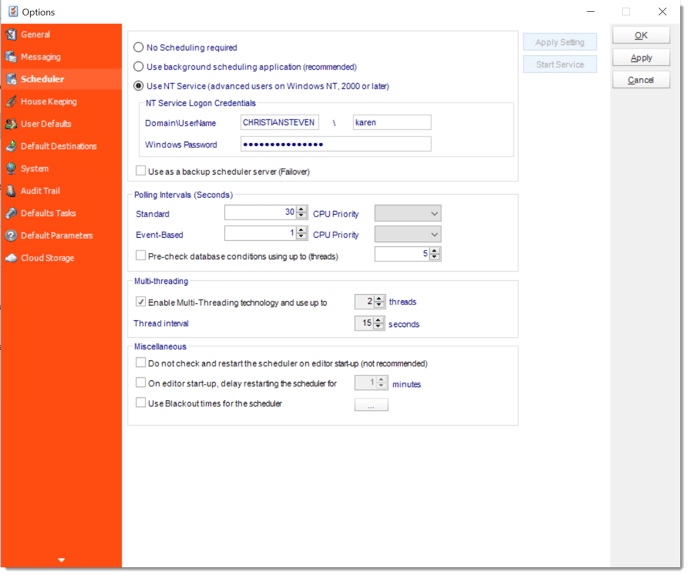

CRD Scheduler options with background and NT Service execution choices.
CRD documentation example. Use the report and destination settings for your own job.

Try the real destination

Test the supervisor’s delivery route using approved test recipients. A local file alone does not establish that network or email access works.

  
Keep it dependable

Remove the last prompts from the morning routine

The supervisor should not need to know whether you are signed in. Give the reporting owner a clear place to see failures and agree when a missing file should be escalated.

A developer can request the same prepared job through the CRD API. That does not remove its unattended runtime or account requirements.

Technical reference: session and account dependencies

Check the installed CRD and Crystal runtime requirements together. Confirm compatible database drivers and machine-visible data connections; a user-only connection may not be available to the service account.

Record the service identity, report paths and destination permissions internally. Keep API credentials on the requesting backend and verify the scheduler is running. Test after a planned restart as well as after logoff.

Make the handover concrete

Write down the stock job name, expected time and failure contact. That gives the early shift an answer when a report is late.

  
Your next step

Let the early shift start without waiting for you

The production supervisor finds her stock PDF before the shift meeting, while you can log off without wondering whether that will stop tomorrow’s delivery.

Use one existing report to evaluate unattended CRD scheduling. Keep a working server schedule if it already meets the requirement; use Crystal Reports automation when the surrounding reporting routine needs a dedicated home.

Contributors:

Christian Ofori-Boateng

Christian Ofori-Boateng

CEO, ChristianSteven Software