

Share this
by Christian Ofori-Boateng on Apr 29, 2026, 9:00:04 AM
Self-service BI tools help business teams answer questions on their own instead of waiting in the IT queue. That sounds simple, but in large organizations, it changes how decisions get made, how fast teams move, and how much trust people place in data.
We've seen the pattern again and again: finance wants faster variance analysis, operations wants daily KPI visibility, sales wants pipeline trends, and IT is stuck fielding one-off dashboard requests. Self-service BI tools solve part of that problem by giving non-technical users a safe way to explore data, build dashboards, and spot trends.
But freedom without structure creates a mess. Duplicate metrics, conflicting definitions, and risky access controls can undo the value quickly. In this guide, we'll explain what self-service BI tools are, what features matter most, where they often fail, and how enterprise teams can roll them out with control intact. We'll also show where IntelliFront BI from ChristianSteven fits into that picture for organizations that need governed analytics, KPI dashboards, and practical business use cases.
What Self-Service BI Tools Are And Why They Matter

Self-service BI tools are platforms that let business users access data, build visualizations, and analyze results without relying on analysts for every question. In plain terms, they move some reporting and analysis power from IT to the people closest to the work.
That matters because most enterprise questions are not rare or exotic. They're constant. Why did margin drop in one region? Which customer segment is growing faster? Where are service tickets piling up? If every answer requires a formal request, decision speed suffers.
A good self-service BI model gives users a controlled environment where they can:
- Access approved data sources
- Filter and compare results
- Build dashboards from trusted metrics
- Run ad hoc analysis without writing code
- Share findings across teams
The business upside is real. Teams move faster, IT spends less time on repetitive requests, and leaders get closer to what is actually happening in the business. Research and industry coverage from sources like IBM continue to reinforce the same point: when people can use trusted data directly, decision cycles shrink.
Still, self-service BI tools are not just about speed. They also support data democratization with guardrails. That balance is the whole game in enterprise settings.
This is where IntelliFront BI becomes relevant. ChristianSteven positions IntelliFront BI as a business intelligence platform for data analytics, KPI dashboards, and reporting. For organizations that want users to explore performance data while preserving governance, it can serve as a structured layer between raw data and daily decision-making.
For example:
- A finance team can monitor budget vs. actuals by department
- An operations team can track service levels and throughput by location
- A sales team can review pipeline movement and regional performance
- An executive team can view company-wide KPIs in one place
If you want a practical starting point, ChristianSteven's IntelliFront BI knowledgebase is useful for understanding how the platform supports dashboards, analytics, and user access in a business setting.
Core Features That Define Effective Self-Service BI Tools
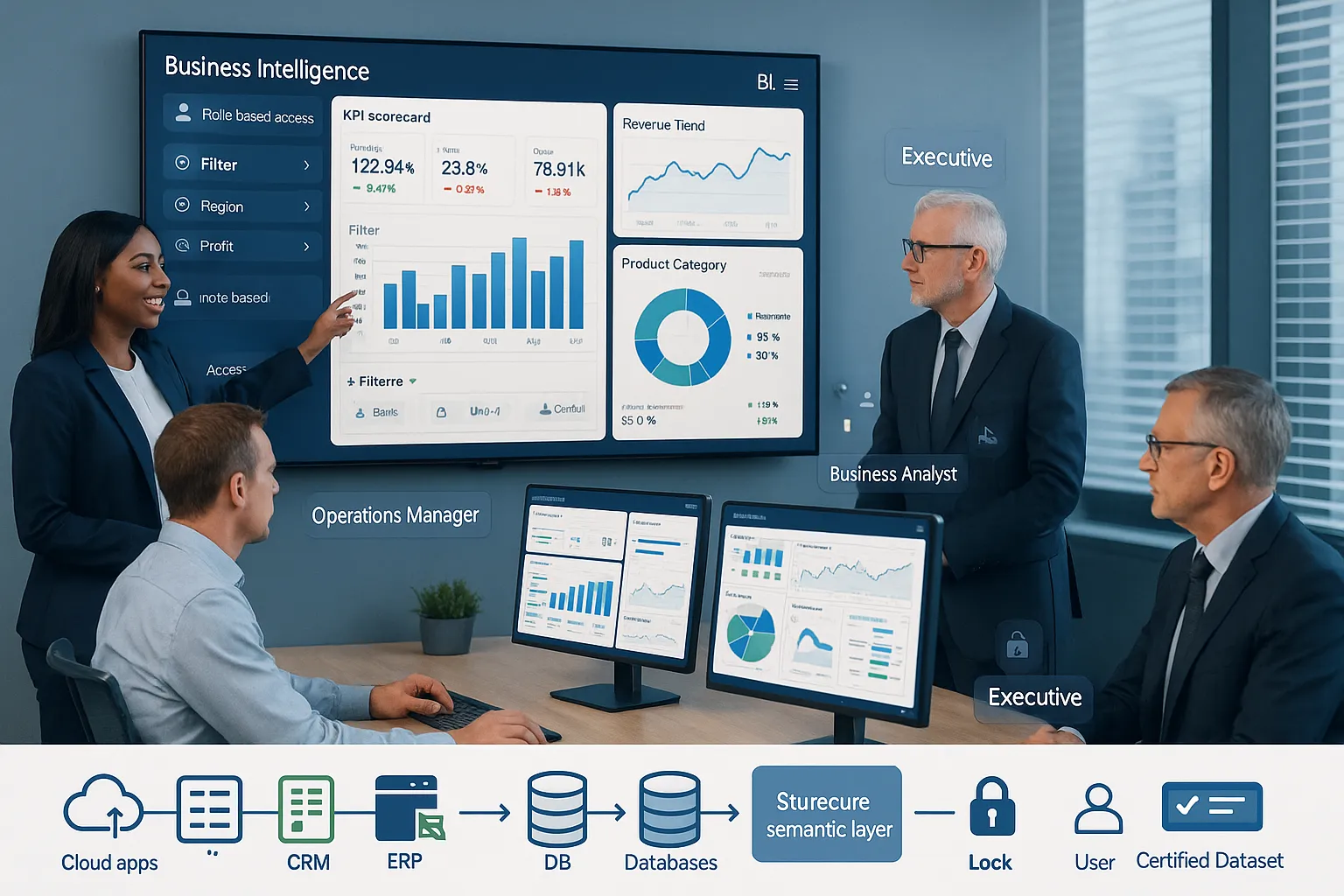
Not all self-service BI tools are equal. Some look friendly on the surface but fall apart when data volume, governance needs, or cross-team usage grows. The best platforms combine ease of use with structure.
Easy Data Access And Preparation
The first test is simple: can users get to the right data without begging for help?
Effective self-service BI tools make it easier to connect to multiple sources, clean data, and prepare it for analysis. That may include databases, cloud apps, spreadsheets, ERP systems, and CRM platforms. The point is not unlimited access. The point is approved, usable access.
What we want here includes:
- Connections to common enterprise data sources
- Simple joins, filters, and field selection
- Reusable datasets or semantic layers
- Low-code or no-code data prep for business users
- Clear labeling so people know what they're looking at
This is especially important in enterprises with fragmented systems. If procurement data lives in one system, sales data in another, and financial data in a third, analysts can bridge the gap. But for self-service to work, business users need a cleaner path.
Interactive Dashboards And Ad Hoc Analysis
Static charts don't make a platform self-service. Users need to ask follow-up questions in the moment.
That means strong self-service BI tools should support:
- Interactive dashboards with filters and drill-downs
- Fast slicing by region, product, team, or time period
- Ad hoc analysis without technical query building
- Visual exploration that helps users spot trends and outliers
- KPI scorecards that connect performance to action
This is where day-to-day value shows up. A supply chain leader notices a fulfillment delay, filters by warehouse, compares labor availability, and finds the issue before it spreads. A revenue leader sees pipeline softening in one territory and drills into stage conversion before quarter-end gets ugly.
IntelliFront BI aligns well with this use case because it is built around dashboards, KPIs, and business reporting. Instead of forcing teams to read raw tables, it helps present data in a form leaders and line managers can actually use.
Governance, Security, And Role-Based Access
Here's the part many teams underweight at first. If anyone can build anything from anything, your self-service BI effort will produce confusion at best and risk at worst.
Strong governance features help enterprises control:
- Who can view sensitive data
- Which datasets are certified
- How metrics are defined
- What content is shared across teams
- How access aligns with roles and departments
Role-based access is not optional in enterprise BI. HR should not see everything finance sees. Regional managers should not automatically access global executive data. And regulated industries need even tighter control.
A useful self-service BI model gives users freedom inside approved boundaries. That balance keeps trust high. It also reduces the classic problem of "multiple versions of the truth."
The Biggest Benefits For Enterprise Teams

When self-service BI tools are implemented well, the gains are not abstract. They show up in meetings, workflows, and response times.
First, decisions happen faster. Business users don't need to wait days for someone to build a custom report or answer a follow-up question. They can inspect trusted data and move.
Second, IT and BI teams get breathing room. Instead of spending their week producing small variations of the same dashboard, they can focus on data architecture, governance, and higher-value analysis.
Third, more people use data well. That's a bigger win than it sounds. A dashboard only helps if the person doing the work can understand and act on it.
Common enterprise benefits include:
- Faster issue detection
- Better operational visibility
- Lower reporting backlog
- More consistency in KPI reviews
- Stronger cross-functional alignment
A few business use cases make this concrete:
- Finance: department heads track spending, revenue, and margin trends without waiting for monthly packet updates
- Operations: managers monitor throughput, backlog, downtime, and service performance across sites
- Sales: leaders compare attainment, pipeline health, and conversion by rep, territory, or product line
- HR: teams watch hiring progress, turnover patterns, and training completion across business units
- Executives: leadership reviews company KPIs from one dashboard instead of reconciling disconnected reports
This is also why self-service BI tools often work best when paired with a platform designed for business-facing analytics. IntelliFront BI supports KPI dashboards and data visibility for teams that need a cleaner, governed way to consume and explore performance information. In an enterprise setting, that can reduce friction between technical teams who manage data and business teams who need answers now.
Common Challenges That Can Undermine Self-Service BI

Self-service sounds great until three departments present three different revenue numbers in the same meeting.
That's the central risk. Without governance, self-service BI tools can multiply confusion instead of insight.
The most common problems include:
- Poor data literacy among users
- Inconsistent metric definitions
- Too many duplicate dashboards
- Weak access controls
- Low trust in source data
- Overly complex interfaces that people abandon
Data literacy is a big one. Giving users access to charts does not guarantee they understand how to interpret trends, variance, seasonality, or outliers. Some teams need training on the basics, not just software clicks.
Another issue is content sprawl. If every manager builds their own version of a KPI dashboard, teams lose a shared definition of success. Certified data models and approved KPI libraries help prevent that.
And then there's the adoption problem. Some self-service BI tools are sold as easy, but everyday users still find them clunky. If it takes too many steps to answer a simple question, people fall back to spreadsheets, email requests, or gut instinct.
We also need to say this plainly: self-service is not a replacement for central BI leadership. It works best when a core team defines data standards, governs access, and supports business users with training and review.
That's one reason platforms like IntelliFront BI can be valuable in enterprise contexts. They are aimed at making business metrics visible and actionable, not just technically accessible. The platform still needs governance around it, of course. Nothing magically fixes bad data discipline.
How To Evaluate Self-Service BI Tools For Enterprise Use
If we're choosing among self-service BI tools, we need a practical evaluation process. Feature checklists alone are not enough. We should test how the platform behaves with real users, real data, and real permission needs.
Scalability, Integration, And Data Reliability
Start here. If a tool cannot support enterprise scale, the rest hardly matters.
We should evaluate:
- How well it handles growing user counts
- Whether it connects to our core systems
- How it supports trusted datasets and metric definitions
- Whether performance holds up with large data volumes
- How clearly it shows data lineage and refresh context
Reliable data matters more than flashy visuals. A fast dashboard that nobody trusts is basically decoration.
Automation, Scheduling, And Report Distribution
For this topic, we need to be careful. These functions can matter in the broader BI stack, but they are not the heart of self-service BI.
Self-service BI tools should first help users explore data directly, answer questions on demand, and interact with dashboards without needing a technical intermediary. If a buying process focuses too much on distribution features, teams can miss the more important test: can business users independently analyze trusted data?
So in our evaluation, we should treat these items as secondary to the core self-service experience. The main question is still whether users can find, understand, and act on insights themselves.
User Adoption And Administrative Oversight
This is where many software selections succeed or fail.
A platform may look impressive in a demo, but if managers, analysts, and executives don't adopt it, it won't deliver value. We should test with real scenarios:
- Can a sales manager filter pipeline by region in under a minute?
- Can a finance lead compare budget vs. actual without analyst help?
- Can an operations director drill from enterprise KPI to site-level issue quickly?
We also need strong admin oversight. That includes:
- User roles and permission controls
- Content governance and certification
- Auditability of shared assets
- A manageable learning curve for admins
IntelliFront BI deserves consideration here for organizations focused on KPI dashboards and business analytics with enterprise structure.
Best Practices For Rolling Out Self-Service BI Successfully
Rolling out self-service BI tools across an enterprise is not a one-week software launch. It's a change in how people work with data.
A few practices improve the odds a lot.
Start with high-value teams. Pick groups with urgent, repeatable questions and visible KPIs. Finance, sales, operations, and executive reporting are common starting points.
Create certified data sources first. Don't ask users to build confidence and dashboards at the same time. Give them approved datasets, shared definitions, and a small KPI framework.
Train for decisions, not just clicks. Users should learn how to read trends, compare periods, question anomalies, and avoid bad assumptions.
Assign owners. Every major dashboard needs a business owner and a data owner. If nobody owns it, quality slips fast.
Set guardrails early. Define naming standards, access rules, publishing rights, and review workflows before dashboard sprawl begins.
A practical rollout plan often looks like this:
- Identify 2–3 high-impact business use cases
- Define trusted data sources and KPI logic
- Launch to a limited user group
- Train users with real scenarios
- Review adoption, content quality, and access issues
- Expand gradually by department or region
For teams using IntelliFront BI, this approach fits well. The platform's emphasis on dashboards and KPI visibility makes it suitable for phased rollout by function. We might begin with executive scorecards, then extend into departmental analytics once governance patterns are proven.
And yes, restraint helps. Not every employee needs full dashboard-building freedom on day one.
Conclusion
Self-service BI tools work best when they give business users real independence without sacrificing trust, security, or consistency. That balance is what separates useful self-service from dashboard chaos.
For enterprise teams, the goal is not just more access to data. It's faster, better decisions from governed data. That requires strong foundations: clean sources, certified metrics, clear roles, user training, and tools people can actually use.
If your organization wants self-service analytics centered on KPI dashboards and business visibility, IntelliFront BI is worth a serious look. You can start with the IntelliFront BI product page and then explore the knowledgebase for implementation detail.
Done right, self-service BI tools don't remove control. They put control where it belongs: in a system where business users can move quickly and leadership can still trust the numbers.
Key Takeaways
- Self-service BI tools empower business users to independently access data, create dashboards, and perform analyses, accelerating decision-making without waiting on IT.
- Effective self-service BI combines ease of use with governance by providing controlled data access, clear metric definitions, and role-based permissions to maintain trust and consistency.
- Interactive dashboards and ad hoc analysis capabilities allow users to explore data dynamically, helping teams identify trends and issues quickly for actionable insights.
- Successful enterprise rollout of self-service BI requires starting with high-impact teams, certified data sources, user training focused on decision-making, and strong ownership of dashboards.
- Common challenges include data literacy gaps, inconsistent metrics, content sprawl, and weak governance, all of which can undermine the value of self-service BI tools.
- Platforms like IntelliFront BI support governed analytics and KPI dashboards, balancing user freedom with enterprise control to enhance performance visibility and data trust.
Frequently Asked Questions about Self-Service BI Tools
What are self-service BI tools and why are they important for businesses?
Self-service BI tools allow business users to access and analyze data independently without relying on IT, speeding up decision-making and enabling teams to respond quickly with trusted insights.
Which key features define an effective self-service BI tool?
Effective tools provide easy access to approved data, interactive dashboards with ad hoc analysis capabilities, and strong governance with role-based security to maintain data trust and consistency.
How do self-service BI tools benefit enterprise teams?
They accelerate insights, reduce IT workload, increase data usage across teams, and foster alignment by enabling faster, data-driven decisions on operational and strategic matters.
What challenges might organizations face when implementing self-service BI tools?
Common challenges include user data literacy gaps, inconsistent metrics, dashboard duplication, weak access control, and poor adoption due to overly complex interfaces or lack of governance.
How can enterprises evaluate self-service BI tools for their needs?
Enterprises should assess scalability, integration with core systems, data reliability, user adoption ease, administrative oversight features, and whether the tool supports business user autonomy without compromising governance.
What are best practices for rolling out self-service BI tools successfully?
Start with high-impact teams, provide certified data sources, train users on data interpretation, assign dashboard ownership, set clear governance guardrails, and expand gradually to ensure sustained adoption and trust.


No Comments Yet
Let us know what you think