

TABLEAU QUESTIONS

Can Tableau’s Export All Extension Run Automatically on a Schedule?

The documented Export All extension workflow is an interactive dashboard download, not a built-in unattended server schedule. It lets a reader create one Excel workbook from chosen sheets and columns. For automatic generation and delivery, use a scheduled integration you maintain or an Advanced Tableau Report Scheduler (ATRS) job; ATRS packages include an option to merge Excel outputs.

For example, finance downloads Sales and Returns into one workbook, then asks for that workbook every Monday at 08:30. Keep both requirements visible: producing the right worksheets and delivering the file without someone opening the dashboard. A scheduler alone does not establish that the workbook has the same contents.

  
THE DIRECT ANSWER

Treat Export All as an interactive workbook download

Start by separating the Export All extension’s useful interactive behavior from the later scheduling requirement. The Tableau Exchange listing describes choosing sheets and columns, then downloading one Excel workbook with a click. The Information Lab’s setup and public implementation follow that dashboard-based model.

For the finance example, configure Sales and Returns and inspect the resulting workbook before changing the delivery process. Confirm the expected columns, date period and totals in each worksheet. “All” refers to the configured export; it should not be read as a promise to include every underlying transaction or reproduce every dashboard visual.

Export All’s Select Columns configuration showing selected and excluded fields for dashboard sheets.

The Export All gallery example shows how an author chooses columns. Use your own Sales and Returns fields when defining the finance workbook.

The extension’s Excel-building code retrieves dashboard summary data and saves a workbook in the browser. That is different from a server job with a recurrence, a delivery destination and an execution record. An extract-refresh schedule updates data; it does not, by itself, perform this workbook download.

If the extension is unavailable, check the applicable Tableau Cloud or Tableau Server extension settings with the administrator. Export All is listed as network-enabled, so use the approved extension URL and site policy. Repairing extension access and creating unattended report delivery are separate tasks.

Keep the two requirements clear

Interactive: Choose the sheets and columns a viewer should download.

Summary: Agree the exported level of detail before asking for all records.

Timing: Define when an unattended job should run.

Delivery: Name the destination where finance expects the completed workbook.

  
REQUIREMENTS AND LIMITATIONS

Compare the complete scheduled reporting job

Finance’s new request adds responsibilities after the export button: run with the intended data context, assemble the workbook, name it, deliver it and explain a failed run. Compare those complete responsibilities rather than treating an open browser tab as the reporting service.

RequirementExtension or owned integrationATRS contribution and checks
Chosen sheets in one interactive workbookExport All is a good fit when a permitted viewer clicks to download the configured summary data.No separate reporting job is necessary for that interactive requirement.
Run without a viewer each MondayAn owned integration can schedule authorized native exports and its own workbook processing.A package keeps report selection, parameters, recurrence and delivery configuration together.
One workbook rather than several attachmentsThe integration must implement and validate any required combination of exports.Merge all Excel Files combines Excel outputs into one XLSX; inspect the actual sheets and layout.
Match the extension’s selected fieldsRecreate the intended source/export specification in the integration; do not assume identical API output.Define the source and Excel output in the ATRS job, then verify that its fields match the extension export.
A failed constituent reportOwned code needs a rule for incomplete assembly, retry and delivery.Configure report-level and package-level exception handling before enabling the job.

ATRS Tableau report packages can deliver separate files, merged Excel, merged PDF or ZIP output. Those choices are different deliverables. For this example, finance still needs one workbook, so choose Excel merging and verify its worksheets; sending two attachments would change the requirement.

Keep the existing interactive extension when readers still use it for ad hoc investigation. A maintained scheduled job can serve the recurring handoff alongside it, using a separately authorized source account and explicitly configured reporting values.

Agree the final file

Workbook: Require one merged file when that is what finance uses.

Attachments: Treat separate outputs as a different agreed deliverable.

Columns: Retain the field specification when changing export routes.

Failures: Decide what happens if one required table is missing.

  
END-USER WORKFLOWS

Build and check a scheduled Excel package in ATRS

Define the sample first: a workbook named finance-sales-returns-2026-10-18.xlsx, containing the approved Sales and Returns tables for the week ending 18 October. Both tables are required. Use this fixed period for the first controlled sample.

Create an ATRS Package Reports Schedule and add the Sales and Returns reports using their Tableau accounts and Item Paths. Select Excel output for each and configure the same required reporting period. Preview the source content so the package does not mix one current week with a prior week. If both published reports expose a WeekEnding date parameter, ATRS Constants include Yesterday for a recurring Monday run. Verify that rule against the reports’ actual parameter names and expected week.

In the package’s Reports section, enable Merge all Excel Files and configure the additional Excel options for the intended workbook. The ATRS package setup guide documents this control. Check the generated worksheet names, columns, values and formatting instead of assuming that merging duplicates the extension’s workbook structure.
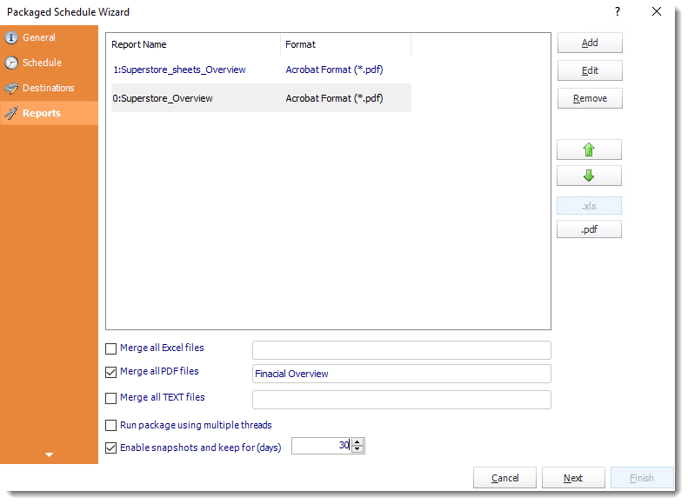
ATRS Packaged Schedule Wizard report list with Merge all Excel files, Merge all PDF files and other package controls.

The ATRS knowledgebase example shows PDF constituents. For the finance job, choose Excel outputs and the separate Merge all Excel files option visible below the report list.

Set a controlled finance destination and a Monday 08:30 recurrence, then define the response if either report fails. Use Tools > Test Package with test destinations. Open the received merged workbook and reconcile both tables. Replace the fixed sample filename with the agreed per-run naming rule before enabling recurrence. Check the next week’s parameter values and name separately; a filename does not select report data.

If the workbook needs a particular template or cell placement, use the Tableau Excel report automation guidance and current host prerequisites. The practical gain is a maintained export, assembly and delivery job. The initial sample still determines whether its result satisfies finance’s one-workbook requirement.

Inspect the merged result

Sheets: Check that Sales and Returns are both present.

Period: Match each table to the intended week.

Numbers: Reconcile the agreed totals and usable data types.

Receipt: Open the file at the controlled destination before enabling recurrence.

  
DEVELOPER AND API WORKFLOWS

Implement exports, assembly and delivery as separate stages

A developer can build the recurring job around native export operations instead of trying to invoke a dashboard extension as a server endpoint. Keep the approved Sales and Returns view identifiers, reporting period and workbook specification in one maintained configuration. An organization that chooses this route owns the scheduler and every stage after export.

For XLSX, Tableau’s Download View Crosstab Excel method returns summary data. Send a separate authorized request for each intended view; a dashboard request returns only its first view, and story-dashboard downloads are unsupported. From API 3.9, non-administrators need Read and ExportData permissions on both the view and its workbook.

GET /api/<api-version>/sites/<site-id>/views/<sales-view-id>/crosstab/excel
X-Tableau-Auth: <tableau-session-token>

Repeat for the Returns view with the intended context, then validate each export before assembling the final workbook with your chosen spreadsheet tooling. Copying two files into one folder does not merge their worksheets. Preserve the required names, data types and totals, and check the combined file before releasing it.

Treat refresh readiness, cached exports and file delivery as separate checks. Decide whether a missing Returns export blocks the whole workbook; do not silently deliver only Sales when both are required. Retain run identifiers and destination evidence so an uncertain response can be reconciled before another send.

If ATRS maintains the reporting configuration, use the ATRS Tableau report automation API workflow to request and track the saved package. Its execution response provides tracking information rather than a report download URL. Keep application authorization and the final destination check alongside the reporting result.

Own each integration stage

Export: Resolve and authorize the intended source views.

Assembly: Implement the required workbook structure explicitly.

Readiness: Verify the source is ready before preparing the file.

Recovery: Reconcile uncertain delivery before retrying the whole job.

  
CHOOSE YOUR NEXT STEP

Choose the route that matches the workbook requirement

Keep Export All for the interactive workbook it already produces when a reader is present. For finance’s unattended Monday handoff, choose an owned scheduled export-and-assembly integration or evaluate the ATRS Tableau report scheduler package workflow.

Bring one approved Sales and Returns workbook to that evaluation. Compare the scheduled result with its worksheets, period, columns and totals, then verify delivery to the intended finance destination. That gives you a concrete basis for choosing the automation route.

Explore scheduled Tableau report packages and Excel merging

Considering ATRS for the recurring finance workbook? Share the guide to review deployment, access and reporting requirements with its report owner and recipient.

Download the ATRS Internal Evaluation Guide

Contributors:

Christian Ofori-Boateng

Christian Ofori-Boateng

CEO, ChristianSteven Software