

Why Does Tableau’s SMTP Test Pass When Emails Still Fail?
A successful Tableau SMTP test can prove that a connection was established without proving that the mail server accepted the message. Tableau documents a false positive when a Postfix server requires TLS but Tableau Server is not configured for it. Check the actual subscription’s error and mail-server trace, then compare its sending configuration with the test.
For example, an administrator sees a successful connection test while finance’s scheduled sales PDF still does not arrive. Follow that real message through rendering, sending and receipt. When Advanced Tableau Report Scheduler (ATRS) produces the report, investigate its configured sending account and destination as a separate reporting route.
- THE DIRECT ANSWER Understand what the connection test actually proves
- REQUIREMENTS AND LIMITATIONS Compare the tested route with the scheduled message
- END-USER WORKFLOWS Test the sending account used by the ATRS job
- DEVELOPER AND API WORKFLOWS Connect the application result to the mail trace
- CHOOSE YOUR NEXT STEP Prove the production route before closing the issue
Understand what the connection test actually proves
Treat a Tableau SMTP test as evidence about the test it performed. Tableau’s tsm email test-smtp-connection attempts to connect to the SMTP server configured for Tableau Server and reports connection status and configuration details. It is not an end-to-end acceptance test for finance’s scheduled PDF.
A connection and a delivered report are different checkpoints
Connect: The reporting host reaches the configured SMTP service.
Accept: The mail service accepts the actual message under its authentication, TLS and sender rules.
Receive: The intended reader obtains and opens the correct report.
Tableau gives a specific Postfix example: the connection succeeds without Tableau being configured for the TLS required by the mail server, but the message is rejected afterward. The tsm email command reference explicitly identifies that false-positive result. A green connection test is therefore a reason to inspect the next step, not to rule out the sending configuration.
Ask the Tableau and mail administrators to correlate the same scheduled occurrence. Retain its time and time zone, recipient, subject and recorded error. First establish that the report rendered; if generation failed, an SMTP test cannot diagnose that earlier failure. If the message was rejected, retain the mail system’s rejection reason.
The TSM command and configuration discussed here apply to Tableau Server. For a Tableau Cloud subscription, identify whether the site uses standard sending or custom SMTP and investigate that route with its administrator. Do not look for a TSM command on a Tableau Cloud site.
Keep the test result in context
Connection: Record the host and result actually tested.
Message: Identify the scheduled report and occurrence.
Route: Compare the sending account and recipients.
Receipt: Check the received report separately.
Compare the tested route with the scheduled message
The administrator’s test and finance’s sales email may differ in more than one respect. Compare the actual settings rather than making several changes at once. That gives the next test a clear purpose and makes the correction reproducible.
| Observed difference | Native Tableau route | ATRS route check |
|---|---|---|
| Connection established, message rejected | Review the mail rejection and whether Tableau Server’s TLS configuration meets the SMTP requirement. | Inspect the configured sending account and its actual destination result. |
| Test and report use different senders | Check the actual subscription sender; a site can override the system-wide From address. | Select the authorized mail account for the Email destination; a displayed sender change does not grant sending permission. |
| A small test succeeds, a report message fails | Compare the real message’s attachments and applicable mail limits. | Test the intended output through the schedule’s selected account. |
| Test and production audiences differ | Compare the receiving domains and mail-system trace for the approved recipient. | Use controlled tests of the relevant route and inspect the received file. |
| A send is reported but nothing reaches the reader | Investigate the actual message in the receiving mail system. | Compare the sending record and destination result with mailbox receipt. |
Tableau Server’s SMTP setup supports STARTTLS. Have the administrator match the documented configuration to the mail server’s requirements and apply the required pending changes. Tableau notes that SMTP configuration requires a restart of its services, so a successful test of an earlier configuration does not verify unapplied changes. Use Tableau’s SMTP setup instructions for that administration task.
Tableau also documents a TLS-related case where Background Tasks for Non Extracts can indicate that subscriptions are being sent while the SMTP command fails. Read the recorded error and mail trace together. The subscription troubleshooting guide describes that limitation; the summary alone is not evidence of receipt.
Compare like with like
Host: Use the production sending route.
TLS: Match the mail server’s required settings.
Sender: Check the permitted From address.
Size: Use a representative report message.
Test the sending account used by the ATRS job
If ATRS produces finance’s sales PDF, start with the account the job actually uses. Options > Messaging holds the default messaging configuration. In the schedule’s Email destination, inspect Mail Server because the job can select an added SMTP account instead of that default. A successful test of one account does not establish that a different selected account can send the report.
For a separately maintained SMTP account, go to System > SMTP Servers, add or review the intended configuration, and use Test. Supply the host, account, sender, port and other settings approved by the mail administrator. The ATRS multiple-server guide explains selecting that account in the destination.
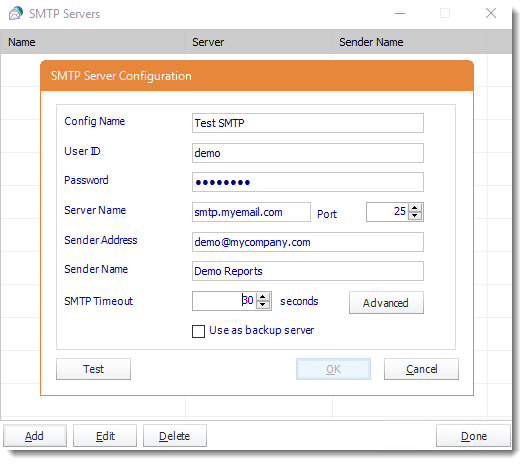
Configure and test the account the report destination will use. The sample values shown are examples; use your mail administrator’s settings.
For Office 365 modern authentication, the ATRS messaging guide describes choosing Office 365 and the configured integration account, then using Test Settings. Choose the route required by your organization rather than transferring credentials from an unrelated test.
Next, use Tools > Test on the prepared report with a controlled destination. Inspect the PDF and the received message, then review the job’s result. This tests the report-and-destination combination that the account-only test did not establish. In System Monitor > History View, expand the run to distinguish generation from a failed destination; consult the History View guide.
If the schedule changes displayed sender details, check that the selected account is authorized to send that way. The Email destination guide cautions that sender customization can conflict with mail-server rules. Maintaining the correct account and message together is a practical reason to use a Tableau report scheduler for repeated report production.

Check the schedule’s account
Default: Identify the default messaging configuration.
Override: Inspect the Email destination’s selected server.
Test: Use a controlled destination for the real report.
History: Review the report and destination results.
Connect the application result to the mail trace
For Tableau Server, an authorized administrator can use the documented connection check as one diagnostic input:
tsm email test-smtp-connectionRetain its connection status and configuration details with the actual subscription’s failure evidence. The command’s known TLS false-positive condition is why an application or operations dashboard should not convert that result into “finance received the report.” Verify the real subscription separately through the appropriate administration workflow.
If an application requests an ATRS job, preserve its original request reference, schedule and returned execution identifier. Inspect the result payload and each destination result. Keep any available mail-message or trace identifier alongside that record so the mail administrator can follow the same occurrence beyond the reporting application.
A reporting execution identifier and a mail trace identifier describe different systems. Map them in your application’s own record when the sending route exposes the necessary information; do not assume that an SMTP success response contains proof of mailbox delivery. Confirm the final document and reporting period with the receiving process.
After a lost response or uncertain send, reconcile history and the receiving system before repeating the job. A second request can duplicate a message already accepted. The ATRS Developer Hub documents execution tracking; use the selected mail provider’s trace for the separate mail handoff.
Retain evidence for one occurrence
Request: Keep the application’s original reference.
Execution: Retain the reporting execution result.
Mail: Record a message or trace reference if available.
Recovery: Check prior delivery before submitting again.
Prove the production route before closing the issue
For finance’s sales PDF, close the issue only after the actual scheduled route produces a message that the intended reader receives and can open. Record which setting or policy caused the failure, the corrected configuration and the representative test result. Confirm that the next scheduled report still uses that route.
Native Tableau subscriptions remain suitable when their PNG/PDF delivery meets the need. Evaluate ATRS when recurring reporting also needs maintained sending accounts, message design, export settings or destination results. Its account test is a starting point; the full report handoff is the result to evaluate.
Explore ATRS report email design and sending
Evaluating recurring report email delivery? Share the guide with the colleagues responsible for deployment, report production and the sending account.
Contributors:
Christian Ofori-Boateng
CEO, ChristianSteven Software
