

TABLEAU QUESTIONS

How Do You Export Tableau Reports to PowerPoint Automatically?

The management meeting is tomorrow, and your analyst is still downloading the same Tableau views for its presentation. The figures are ready, but the reporting file is not.

Advanced Tableau Report Scheduler (ATRS) can produce and deliver the recurring Tableau Cloud PowerPoint export.

  
THE PROBLEM AND ANSWER

Prepare the figures the management presentation needs

Imagine the operations analyst assembling the monthly management presentation. The same service views belong in it every month, yet someone still has to select the period, download the presentation and send it before the meeting.

Tableau can export PowerPoint for an occasional request. The repeated preparation becomes apparent when the management pack is expected at the same point in every close.

ATRS can keep the Tableau Cloud report selection, PowerPoint output, naming and destination with a reporting schedule. The analyst can work on the commentary while the recurring export is prepared.

Conceptual illustration: Report files routed to the people and locations that use them.

Conceptual illustration: Report files routed to the people and locations that use them.

Ask what management edits

A static chart image and an editable chart are different deliverables. Agree which one the meeting needs.

  
YOUR OPTIONS

Choose an exported deck or a different reporting file

Use Tableau’s native PowerPoint download when the analyst needs a one-off export while exploring the workbook. Its exported sheets are images on slides, which can be suitable for a static meeting presentation.

Automating that recurring handoff does not make the charts fully editable PowerPoint objects. If management needs editable charts, live interaction or a specially assembled corporate deck, establish that separate requirement before choosing the output.

ATRS is useful when the accepted Tableau presentation needs to be produced and delivered each month. Finance can receive a separate workbook and managers a PDF when those files support work beyond the slides.

PowerPoint output and rendering limits

Tableau’s download guide describes PowerPoint exports as selected-sheet images on slides, reflecting the applicable selections. It also documents unsupported PDF/PowerPoint extension and web-content behavior. Check the actual report rather than assume every interactive object appears in the export.

The ATRS PowerPoint guide documents PPTX output, file properties, naming and related packaging choices. It does not establish editable-chart generation, automatic slide commentary, corporate-template population or PowerPoint deck merging.

ATRS supports Tableau Cloud. Keep the view and period used for the presentation explicit.

Keep commentary in view

The export supplies the report presentation. People still provide the explanation the meeting depends on.

  
SET IT UP

Build the recurring PowerPoint delivery

Start with the Tableau report and a presentation file the management team has accepted. In ATRS, select the Tableau Cloud account and report, then supply the completed-month values that report supports.

Choose PowerPoint in the destination’s output Format and give the file a recognizable reporting period. Send the first copy to your own test destination so you can see the presentation the managers will receive.

Open it in their intended PowerPoint application. Read the labels at presentation size, compare a familiar service total and inspect the final slide. Try a busier month when a chart or table contains more information.

Once the exported deck supports the meeting, choose the recurring run after the close is ready. Keep the analyst’s commentary and any separate corporate-deck assembly in its agreed process rather than assume the export performs that work.
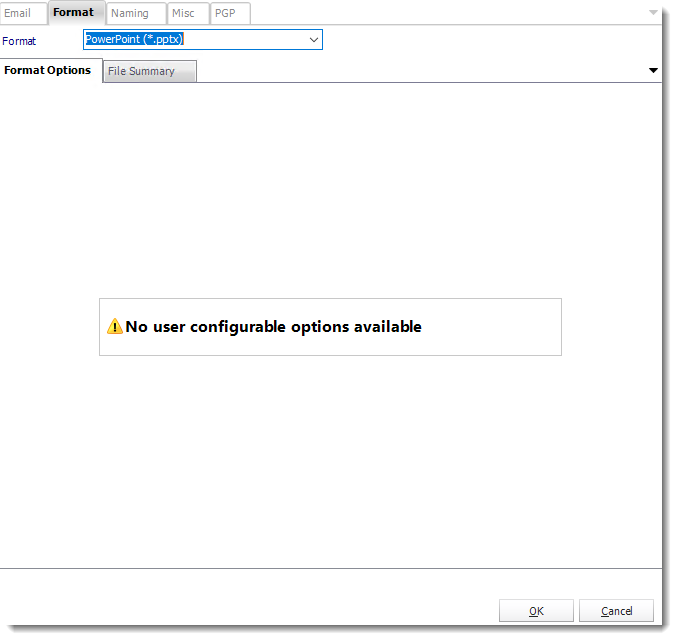
Choose the PowerPoint output for the destination, then review the actual presentation delivered to management.

Choose the PowerPoint output for the destination, then review the actual presentation delivered to management.

Related outputs and delivery

Report packages can deliver related report files together. Documented merge options apply to PDF and Excel, not an assumed merge of PowerPoint decks.

Custom filenames and date/time suffixes help identify the presentation. Configure any required ZIP or PGP protection with the recipient’s opening process, and check the final file against mail or storage limits.

Read it at meeting size

A slide that looks fine in a file list may have labels the room cannot read.

  
FOR DEVELOPERS

Let the meeting application request another presentation

Your meeting application may need an extra copy after the monthly figures are corrected. It can request the saved PowerPoint job while the reporting owner maintains the source and destination.

Keep the reason for that replacement with the execution so the meeting owner can distinguish it from the earlier presentation.

API example: request the saved PowerPoint export

Use the tested single-report schedule ID in place of 101. Configure and test PowerPoint output and the reporting period before calling the job.

POST /api/Schedule/ExecuteScheduleAsync
Authorization: Bearer <ATRS-access-token>
Content-Type: application/json

{
  "ScheduleType": "report",
  "UniqueId": 101,
  "RunBy": "Management presentation"
}

GET /api/Schedule/GetExecutionStatus?ExecutionId=<returned-id>
Authorization: Bearer <ATRS-access-token>

This execution starts the saved output. It does not add editable charts, slide text or a PowerPoint template override to the request, and it returns no presentation bytes.

Follow the ATRS execution guide. Keep the token on an authorized backend. Monitor within a defined deadline and decode ResultJson; Completed can contain Result=false. Check the expected files and destinations before reporting delivery. Reconcile an uncertain execution before submitting another copy.

Identify the reporting month

Keep the month and execution reference together when an application requests another deck.

  
YOUR NEXT STEP

Spend the meeting discussing performance

The analyst can begin the management review with the monthly presentation available and its figures checked. Time before the meeting can go into explaining the service results instead of another download-and-send routine.

Bring one accepted Tableau presentation and its reporting timetable. Use them to explore the recurring PowerPoint output and delivery in ATRS.

Explore ATRS presentation-file delivery

Contributors:

Christian Ofori-Boateng

Christian Ofori-Boateng

CEO, ChristianSteven Software