

How Do You Send Each Customer a Personalized Package of Tableau Reports?
Your account manager spends the first morning of every month assembling separate sales and returns reports for each customer. The review is waiting while another pack is checked and addressed.
Advanced Tableau Report Scheduler (ATRS) can prepare customer-specific Tableau Cloud report packages from maintained reporting instructions.
- THE PROBLEM AND ANSWER Prepare the whole customer conversation
- YOUR OPTIONS Choose a package that fits each customer
- SET IT UP Build one customer pack before opening the wider run
- FOR DEVELOPERS Let your account application request the maintained package
- YOUR NEXT STEP Begin the customer review with the complete pack
Prepare the whole customer conversation
Imagine the account manager preparing a distributor’s monthly review. Sales is one report, Returns is another, and each must cover the same customer and period. A useful email contains the complete pack, rather than whichever attachment was ready first.
That assembly repeats for every distributor. ATRS Data-Driven Package Schedules can use maintained records to supply the reporting values and delivery instructions, then prepare the related Tableau Cloud reports together.
The customer should be recognizable throughout the work: in the report selections, filenames, message and destination. Keeping those instructions together helps the account team maintain the service as the customer list changes.

Conceptual illustration: Related reports brought together into a complete review pack.
Start with the complete review
Ask the account manager which reports must be present for the customer conversation to be useful.
Choose a package that fits each customer
For one customer with a fixed set of reports, an ordinary package may be enough. It can maintain the reports and delivery the account manager would otherwise assemble by hand.
A data-driven package is useful when the same reporting service repeats across customers or locations. Its driver supplies the values needed for each version, and grouping can bring reports for the same email address together.
Decide how the customer reads the pack. Separate Sales and Returns attachments may suit a detailed review; merged PDFs can provide one reading copy, while merged Excel outputs give finance one workbook. Choose that arrangement with the recipient before configuring the wider run.
Grouping, merging and the data driver
The Data-Driven Package guide documents the unique Key Column, recipient grouping and optional merging of grouped PDF or Excel outputs. Grouping by email address disables embedded report bodies for that grouped delivery; the outputs are attachments.
An email address can legitimately be shared by several customer contacts. Confirm that the grouping key and selected reports match the intended disclosure of data. Do not assume grouping by address provides customer isolation.
Use the actual parameters supported by each report. The customer and reporting period must select corresponding figures across Sales and Returns. ATRS supports Tableau Cloud only.
Let the customer choose the arrangement
Separate attachments and a merged file support different reading and reconciliation habits.
Build one customer pack before opening the wider run
Start with one distributor and a month the account manager knows. Assemble its Sales and Returns reports in an ATRS Data-Driven Package and use controlled test destinations for the first records.
Connect the driver to the maintained reporting query and inspect the selected rows. Choose the Key Column and map the customer, period and delivery values. Add the reports and preview their intended selections before combining them.
Set the attachment or merge arrangement the distributor accepted. Use meaningful report or worksheet names and a short message explaining the review period. Add the archive destination when the account team needs its own retained copy.
Open the complete delivery with the account manager. Then add a second customer and verify both packs side by side. A missing report and a wrong customer selection are different problems; try the failed-member response as part of the handover before enabling the full list.
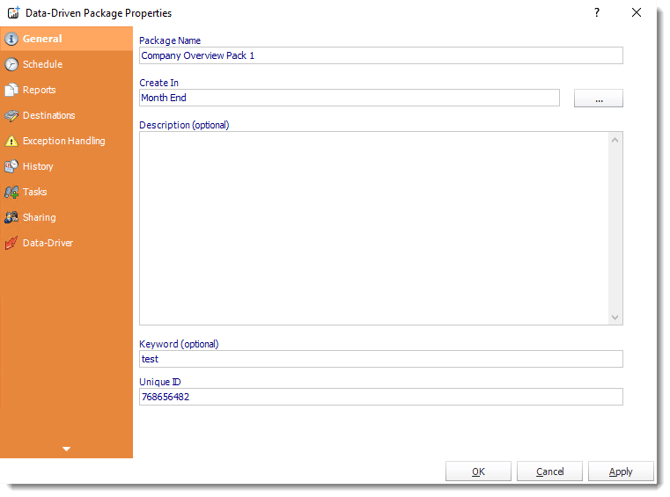
The Data-Driven Package wizard keeps the package configuration together. Build its driver from the customer assignments your team maintains.
A usable pack and its exception response
Package settings cover separate attachments, PDF/Excel merging and ZIP preparation. Excel Data Only can include templates, placement, totals and formats when a customer needs a prepared workbook.
Keep individual-report blank/export-failure handling and the overall package response with the job. Decide whether a missing required member makes a customer’s pack incomplete. Test the final merged output, protection and destination limits, not only the individual previews.

Compare two customers
Distinct customer totals help establish that the driver selects the right contents as well as the right mailbox.
Let your account application request the maintained package
The account application may need another review pack between monthly runs. It can request the stored package after authorizing the intended audience and reporting scope.
The reporting owner maintains the customer selections, merge and destinations while the application follows the package execution.
API example: execute the approved report package
Replace 201 with the tested package-level UniqueId. The ATRS package guide documents ScheduleType package for this execution route.
POST /api/Schedule/ExecuteScheduleAsync
Authorization: Bearer <ATRS-access-token>
Content-Type: application/json
{
"ScheduleType": "package",
"UniqueId": 201,
"RunBy": "Customer review package"
}
GET /api/Schedule/GetExecutionStatus?ExecutionId=<returned-id>
Authorization: Bearer <ATRS-access-token>Executing the package uses its saved driver and audience. This payload does not select a single customer from a wider batch; create or configure the appropriate scope before offering a customer-specific action.
Follow the ATRS execution guide. Keep the token on an authorized backend. Monitor within a defined deadline and decode ResultJson; Completed can contain Result=false. Check the expected files and destinations before reporting delivery. Reconcile an uncertain execution before submitting another copy.
Keep the requested scope clear
An extra customer request should not silently become a second delivery to the entire monthly audience.
Begin the customer review with the complete pack
The account manager can open the monthly conversation with the customer’s complete review pack in front of them. The recurring assembly is maintained, leaving time to discuss why returns changed.
Bring one accepted customer pack and the records that identify its audience. They give you a practical starting point for personalized packages in ATRS.
Contributors:
Christian Ofori-Boateng
CEO, ChristianSteven Software

