

Why Is the PDF Missing from My Tableau Subscription Email?
If your Tableau subscription PDF is missing, check that the subscription requests a PDF or both formats, that attachments are enabled, and that the message fits the applicable size limits. An inline image alone does not mean a PDF was attached. If a PDF was sent, trace whether the receiving mail system removed or blocked it.
For example, finance receives Monday’s sales snapshot in the email but needs a PDF to retain with its weekly review. Follow that document from the selected subscription format to the received attachment. Advanced Tableau Report Scheduler (ATRS) offers a separately configured PDF export-and-delivery route when the job also needs maintained filenames, document controls or other destinations.
- THE DIRECT ANSWER Check whether a PDF was requested and allowed
- REQUIREMENTS AND LIMITATIONS Find the limit that affected this attachment
- END-USER WORKFLOWS Configure and test the PDF delivery in ATRS
- DEVELOPER AND API WORKFLOWS Separate PDF export from application email delivery
- CHOOSE YOUR NEXT STEP Verify the attachment the reader actually receives
Check whether a PDF was requested and allowed
If a Tableau subscription PDF is missing, start with the saved subscription rather than the appearance of the email. Find the existing subscription under My Content > Subscriptions and review or change its snapshot format. For a new controlled sample, open the published view and choose Watch > Subscriptions. Tableau offers PNG, PDF or both; select the PDF option required by finance, along with the intended view or workbook. Choose its paper size and orientation, then save the subscription settings.
An email can contain two different outputs
Inline image: A snapshot that the reader can see in the message body.
PDF attachment: A separate document that the reader downloads and retains.
Acceptance: For finance’s weekly review, locate and open the PDF rather than treating the inline image as its substitute.
Confirm that attachments are allowed. On Tableau Server, the administrator must enable the attachment options in TSM and allow them for the site. The site option is Let users add attachments to subscribed workbooks and views. A site administrator cannot select that option if attachments have not first been enabled in TSM. See Tableau Server subscription setup.
The recipient also needs View and Download Image/PDF permissions. A working interactive dashboard link alone is not the permission check for the subscribed snapshot. The native subscription instructions cover formats and access.
If the format and attachment settings are correct, compare the sent and received message with the mail administrator. A PDF absent from the produced message points to generation or configuration; a PDF present before the receiving system handled it points to that later handoff. Record evidence for the same occurrence so Monday’s missing attachment is not confused with a different test.
Name the expected document
Format: Confirm PDF or both formats was selected.
Scope: Identify the current view or entire workbook.
Period: Match the PDF to the weekly review.
Receipt: Inspect the actual received attachment.
Find the limit that affected this attachment
A larger weekly report can cross a limit that a small test never reached. Inspect the actual message and document size, and identify which sending route is in use. The report’s size on disk and the size of the complete email are different measurements.
| Reporting condition | Native Tableau route | ATRS delivery implications |
|---|---|---|
| Tableau Cloud standard sending | The documented maximum email size is 2 MB; a PDF can be omitted when the message exceeds the limit. | Its own sending route has applicable mail limits; changing scheduler does not remove them. |
| Tableau Cloud with custom SMTP | The documented route introduced in 2024.1 allows a maximum email size of 10 MB. | Configure the approved sending account and evaluate the finished message against its real limits. |
| Tableau Server | Review the administrator’s configured PDF attachment maximum and the email server’s limit. | Inspect both PDF production and the chosen Email destination. |
| A complete document is required | Do not accept an attachment merely because some PDF content arrived. | Open and check the finished PDF; a configured export or delivery result is not a content-completeness test. |
| The required report is too large for email | Reduce the agreed scope or use an approved alternative delivery process. | A configured folder, transfer or storage destination can provide another authorized handoff. |
The Cloud figures above are email limits, not promises that a PDF of that exact size will arrive. The Cloud troubleshooting guide also says that custom SMTP may attempt a subset of an oversized attachment, without guaranteeing it can send one. If finance needs the complete weekly review, inspect all required pages and totals.
On Server, the documented configuration key is subscriptions.max_attachment_size_megabytes. Have the administrator review it alongside the sending and receiving limits; do not apply the Cloud figures as a universal Server cap. Server attachment troubleshooting explains that distinction.
If a smaller representative subscription succeeds but the full report does not, retain both results for the administrator. Agree which views are required before removing content simply to make a message smaller. An authorized file location can be more useful than an email attachment that no longer contains the report finance requested.
Check the complete message
Cloud: Identify standard sending or custom SMTP.
Server: Ask about the configured attachment limit.
Mail: Check sending and receiving restrictions.
Content: Verify the whole intended report is present.
Configure and test the PDF delivery in ATRS
Use the native subscription when its PDF meets the requirement. Consider a Tableau report scheduler when the recurring job also needs a consistent filename, chosen PDF controls or a maintained delivery destination. ATRS produces and sends its own configured reporting output; it does not change a native subscription’s attachment settings.
For finance’s weekly copy, create or review an ATRS Single Schedule using the permitted Tableau account and sales report. Set the reporting-period values and preview the selected content. Add an Email destination, select PDF as the report output and choose the approved recipients and sending account. The Single Schedule instructions describe the report setup.
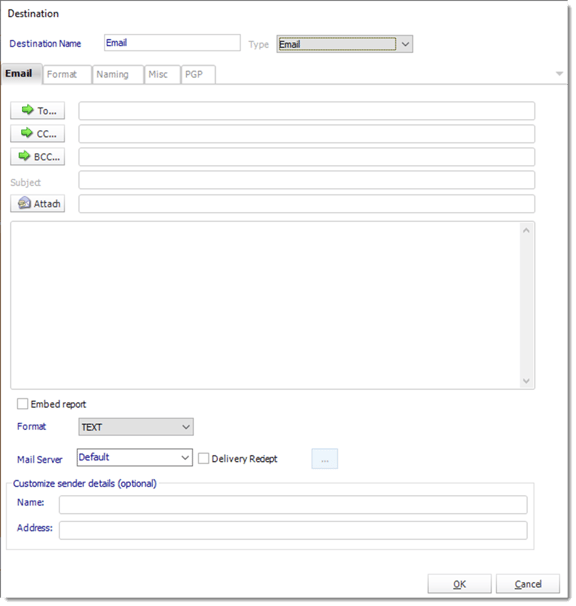
Configure the addresses, message and mail server in the ATRS Email destination. Review the report’s PDF output separately.
If the design also embeds a report in the message body, check Include Attachment for the additional file. The ATRS Email destination guide explains that embedding a report does not include an attachment by default. A setting for the message body is not itself a choice of the PDF document finance should retain.
Give the PDF a recognizable reporting-period filename and apply only the document controls the reader needs. Use Tools > Test with a controlled destination, then open the received file and check the period, pages and totals. If an opening password is required, test that experience in the intended reader as well. The ATRS PDF workflow covers document settings and their limits.
When the full report exceeds the approved email route’s limits, evaluate an accessible file destination with finance instead of assuming another send will solve the size problem. The export account and receiving location still need appropriate authorization.

Test the final deliverable
Output: Choose PDF as the report output.
Message: Treat an inline snapshot and attachment separately.
Account: Select an authorized sending account.
Sample: Open the received PDF before recurring delivery.
Separate PDF export from application email delivery
A developer investigating the missing file can check PDF production separately from email composition. Tableau’s Query View PDF operation returns a PDF of the selected view. It does not create a subscription or send an email. Use an authenticated account permitted to access the intended content, and keep its credentials on the application server.
GET /api/<api-version>/sites/<site-id>/views/<view-id>/pdf?type=A4&orientation=Landscape
X-Tableau-Auth: <tableau-session-token>Replace the placeholders with the supported API version, site identifier, view identifier and Tableau sign-in token. This illustrative request chooses A4 landscape output. Check the HTTP response and application/pdf content type, save the file and open it. Do not rename an error response with a .pdf extension and treat it as the generated report.
Repeated PDF requests can return cached output. Review the operation’s maxAge behavior when validating a changed view, and confirm the reporting period inside the received PDF. Cache settings do not prove that an underlying data refresh completed. The Query View PDF reference defines the export request.
If the application sends that PDF itself, inspect its separate attachment construction and the mail handoff. If it instead requests a prepared ATRS job, retain the returned execution identifier and inspect both the result payload and destination result. The ATRS Developer Hub documents that execution workflow. A successful export answers whether a file was produced; the received message answers whether finance obtained it.
Keep export and email separate
Request: Use the intended view and authorized account.
Response: Validate status and PDF content type.
File: Open the produced document.
Delivery: Track the separate sending and receiving result.
Verify the attachment the reader actually receives
Close the investigation with the attachment finance actually needs: the Monday sales PDF, for the intended period, with the required pages and readable totals. Confirm that the subject and filename identify the same report, then check that the normal recurrence remains correct.
Keep the native PDF subscription if the settings and applicable limits meet that need. Evaluate ATRS when the recurring document also needs maintained naming, document controls or another delivery route. Test the whole representative file, including a larger reporting period, before relying on the schedule.
Explore ATRS PDF report automation
Considering ATRS for recurring PDF delivery? Share the guide with the colleagues who will review report output, deployment and the receiving workflow.
Contributors:
Christian Ofori-Boateng
CEO, ChristianSteven Software
