

LEARN CRYSTAL REPORTS

How to Schedule Crystal Reports Around Working Days and Month-End

Schedule Crystal Reports around working days and month-end by choosing a business-calendar rule, rather than assuming a fixed day of the month means the same thing.

CRD supports working-day schedules, monthly patterns and custom or exception calendars. Keep the run date separate from the reporting period selected inside the report.

  
Your reporting task

Make the finance calendar explicit

Imagine finance receiving its close report on the fourth working day of each month. A schedule for the fourth calendar day works in some months, but a weekend or holiday can move it ahead of the completed close.

Ask what “working day” means for this reporting team. It may exclude weekends, local holidays or company closure days. That definition should be part of the calendar rather than an adjustment someone remembers each month.

Also agree which figures the report should contain. Running in November does not automatically mean the report selects October’s completed accounts.

Write the rule in everyday language

For example: the fourth working day after month-end, once the ledger is ready. That exposes both the calendar rule and the data-readiness requirement.

  
Your options

Choose recurrence and exceptions together

Your existing Crystal Server or BusinessObjects scheduling environment may already offer the recurrence and calendar facilities you need. A script can calculate business dates too, but someone must maintain its holiday rules and check the next runs.

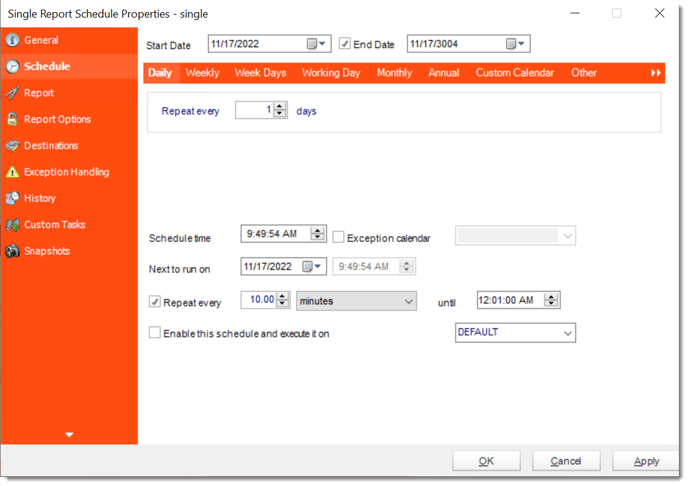
CRD documents weekday schedules, a specified working day of the month, monthly patterns such as the last Thursday, and custom calendars. An exception calendar identifies dates when the job should not run.

Those controls schedule execution. An exception calendar prevents a run on excluded dates; do not assume that it also moves the job to the next working day. Use an explicit custom calendar when holiday-adjusted dates need to be specified, and verify the resulting run dates.

Relative date parameters determine the period the report selects, while a separate readiness condition handles a close that finishes late.

The CRD scheduling guide explains the recurrence choices.

Keep a calendar owner

Public holidays and company shutdowns change. Assign someone to maintain the reporting calendar before the affected month.

  
Put it into practice

Prepare the month-end reporting job

Select the finance report, configure its previous-month parameters and choose the intended destination. Then set the working-day or monthly recurrence that represents the reporting agreement.

Review the start date, execution time and relevant custom or exception calendar. Check the scheduled host’s time-zone settings against the time finance expects; do not assume a time written in a job description establishes the configured zone.

Inspect the next dates across an ordinary month, a weekend boundary and a holiday period. Use controlled runs to check the selected accounting period as well as the date the report arrives.

crd single schedule

Check the awkward month

A holiday near the beginning of a month is a better calendar test than a month with no exceptions.

  
Keep it dependable

Keep late data from becoming an early report

A correct working-day calculation cannot confirm the ledger is closed. If the close varies, agree how finance signals completion and whether the reporting job should wait, alert or follow another approved response.

CRD event-based scheduling can use configured conditions for readiness. Combine that with the reporting calendar deliberately, rather than describing a later clock time as proof that the data is complete.

Technical reference: calendar boundaries

Verify the working-day definition and custom or exception calendar behavior in the installed configuration. Check year boundaries and daylight-saving changes where they affect the expected delivery time.

Keep run timing, report-selection dates and readiness as separate settings. Test the interaction between them before making the close report dependent on the new routine.

Explain the exception to finance

Agree who receives a delay notification and what the team should do when the normal arrival time passes.

  
Your next step

Let the close report follow the business calendar

Finance should receive the intended month’s report on the agreed business day, with a clear response when the figures are not ready.

Explore CRD scheduling with your next few month-end dates and real holiday exceptions.

Contributors:

Christian Ofori-Boateng

Christian Ofori-Boateng

CEO, ChristianSteven Software