

How to Export Power BI Reports Without Dedicated Capacity
You do not necessarily need dedicated capacity to produce a Power BI PDF. An authorized manual export may cover an occasional file, an eligible PPU subscription may cover an email attachment, and PBRS offers alternative rendering for applicable Pro and PPU reports that need recurring file delivery.
If your finance team needs a Friday PDF in its shared folder, PBRS can save that report preparation and delivery as a weekly job. This is a separate approach from Microsoft’s standard-report ExportTo API, whose capacity requirements still apply when you use that API.
- THE PROBLEM AND ANSWER Solve the Friday report problem before choosing infrastructure
- YOUR OPTIONS Understand where capacity is required
- PRACTICAL SETUP Set up a representative Pro or PPU report in PBRS
- DEVELOPER AND API WORKFLOWS Trigger the working PBRS job from your application
- YOUR NEXT STEP Choose the approach that delivers the report you need
Solve the Friday report problem before choosing infrastructure
Imagine a small finance team using Power BI Pro. The manager can open the sales report, but a flow intended to save Friday’s PDF fails at the export step because of the workspace’s hosting. Buying capacity may seem like the obvious next step, yet the business requirement is a file in a folder, not necessarily that particular export API.
Separate the task from the method. Can someone produce the occasional PDF manually? Would a subscription attachment meet the need? Or does the report need to be generated and saved every week without someone being present?
PBRS is worth considering for that recurring job because its applicable alternative rendering options can work with Pro or PPU reporting setups. You keep the report, selected pages, PDF name, folder and timing in a saved schedule.
Start with the actual finance report. A successful trial of that report, using the account and destination you intend to keep, is more useful than choosing infrastructure based only on the word “Premium.”
Describe the result in everyday terms
“The current sales PDF in the finance folder before Friday’s review” is a clearer starting point than choosing a license before deciding how the file will be used.
Understand where capacity is required
Power BI Pro, Premium Per User and dedicated capacity are different licensing and hosting arrangements. PPU provides Premium features per user, but it does not make standard Power BI reports eligible for Microsoft’s Export to File REST API. The paginated-report API has a separate limited PPU allowance, including one call every five minutes per user.
| The task | An approach to consider |
|---|---|
| Produce an occasional finance PDF | Use an authorized interactive export if its available options meet the need. |
| Email a recurring complete attachment | Check whether an eligible PPU subscription covers the report and recipients. |
| Save a weekly PDF from an applicable Pro/PPU report | Try PBRS’s supported alternative rendering and folder delivery. |
| Use Microsoft’s standard ExportTo endpoint specifically | Provide the supported capacity and report/model hosting that operation requires. |
Power Automate coordinates actions, but its standard-report export action still follows Power BI’s export prerequisites. Retrying the same unsupported workspace configuration will not change that.
Subscriptions have their own attachment and recipient rules. A preview image in an email is different from the complete PDF, and receiving a file is different from opening the interactive report. Compare the actual output your manager needs.
Include ongoing work in the cost comparison: PBRS needs a license and Windows deployment, plus maintained source sign-in, updates and destination access. A custom flow also needs someone to maintain its connections and handle failures.
Check the workspace as well as the user
The user’s license name does not tell you where the report and its related models are hosted. Both matter when evaluating a Microsoft export operation.
Set up a representative Pro or PPU report in PBRS
For the Friday finance PDF, use a working PBRS installation and an account authorized to access the Power BI Service report. Then try the complete route from source to folder.
- Select the finance report. Create a Single Report Schedule and choose the account, workspace and report.
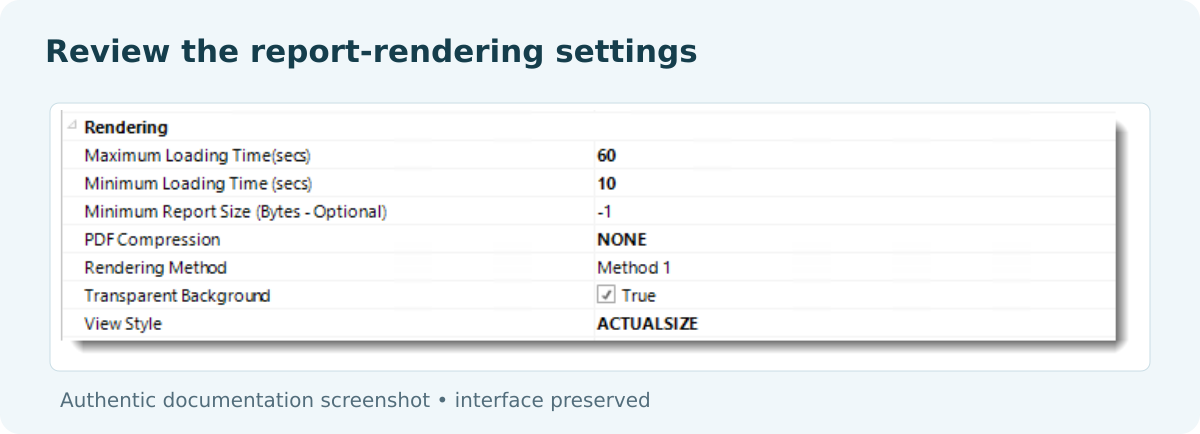
- Choose the applicable rendering method. In Settings, use the alternative method supported for this report and your Pro or PPU setup. If the appropriate option is unclear, confirm it with the installation owner.
- Preview the required pages. Check that the finance summary and detail you need are readable.
- Choose the destination. Add Disk, select Acrobat Format (*.pdf), and use a recognizable Finance file name.
- Try unattended delivery. Execute to a test folder, open the PDF and check its period and a familiar total. Repeat under the conditions in which the weekly job will actually run.
The Single Report Schedule guide explains the source, Rendering Method, timing and destination controls. Once the output works, set the Friday recurrence after the data is ready.
The method matters. Selecting a PBRS rendering option that uses Microsoft’s capacity-dependent export service does not remove that service’s requirements. The alternative route should be tested with your actual report features and sign-in; support for an applicable Pro/PPU scenario is not a promise that every report will render identically.
Test the report you intend to keep
Use the real page selections, visuals and destination. A simple demonstration report cannot establish compatibility for a more complex finance report.
Trigger the working PBRS job from your application
If your application knows when Friday’s data is ready, it can start the PBRS schedule that already produces the finance PDF. The application calls PBRS’s API, while the saved job uses the rendering and destination settings you tested above.
POST {pbrsBaseUrl}/api/Schedule/ExecuteScheduleAsync
Authorization: bearer {pbrsAccessToken}
Content-Type: application/json
{
"ScheduleType": "report",
"uniqueid": 101,
"RunBy": "Friday finance PDF"
}
GET {pbrsBaseUrl}/api/Schedule/GetExecutionStatus?ExecutionId={ExecutionId}
Authorization: bearer {pbrsAccessToken}Replace the example ID and connection values with your configured job. Keep PBRS authentication and ExecutionId separate from Microsoft tokens and export identifiers. Follow the execution guide to monitor status and inspect the result.
If an existing Microsoft call still fails, identify the operation and report type before changing code. Check its authentication, source access and hosting requirements in the Microsoft export documentation. When that endpoint is essential, its supported hosting needs to be resolved. When the requirement is the delivered PDF, the working PBRS job offers a different implementation.
A successful API login is only the connection step. Build on the report job that has already produced the file your finance manager needs.
Reuse the proven reporting job
Connect the application after the PBRS schedule works on its own. That keeps API troubleshooting separate from report-rendering problems.
Choose the approach that delivers the report you need
The decision should leave the finance manager with a useful Friday PDF and the reporting team with a process it can maintain. A manual export may suit occasional work; a subscription may suit a simple attachment; PBRS can handle supported recurring report preparation and delivery without requiring you to build around standard ExportTo.
Review PBRS automation for Power BI Pro and try your representative report. The Power BI Report Automation guide explains the wider scheduling and distribution features.
Contributors:
Christian Ofori-Boateng
CEO, ChristianSteven Software
