

POWER BI QUESTIONS

How to Schedule Power BI Semantic Model Refresh

To schedule refresh for an imported Power BI semantic model, open its settings in the service, check the credentials and any gateway connection, then use Refresh → Schedule refresh to set the frequency, time zone and times.

If the refresh is part of getting a morning report to your team, PBRS can keep the refresh work with the report’s output and delivery settings. That helps you manage the whole routine: new source data, updated model, then the PDF your colleagues are waiting for.

  
THE DIRECT ANSWER

Work back from the morning report

Imagine the operations team opening its 8:30 PDF and finding yesterday’s figures again. The email arrived on time, but the report is not ready for the decisions they need to make. To find the right schedule, follow the data back to its source.

An imported semantic model stores a copy of the source data. Refresh updates that copy. If the overnight source load is still running when refresh starts, the model can refresh successfully and still miss the latest information.

Suppose the source normally finishes at 6:00. You might plan a later model refresh and leave time for the report to be generated before the meeting. Check a recognizable value, such as the latest completed order or source-update time, to establish that the report contains the intended data.

DirectQuery and live connections work differently from Import models, so confirm the model’s design before adding an Import-style schedule. Refreshing a PBIX in Desktop or redrawing a visual is also different from updating the service’s imported data.

Find a recognizable new value

A recently completed order or visible source-update time helps the report owner tell whether the intended load is included.

  
REQUIREMENTS AND LIMITATIONS

Allow enough time for the data to arrive

Native scheduled refresh suits a model that needs updates at supported daily or weekly times. The service allows up to eight scheduled refreshes per day on shared capacity and up to 48 on Premium, PPU or Fabric capacity. On shared capacity, REST refresh requests share the eight-refresh daily allowance.

A chosen time is a start slot, not a completion guarantee. Microsoft targets initiation within 15 minutes, with starts possible five minutes early and delays of up to an hour when resources are unavailable. Leave room for the actual refresh duration as well as report generation and delivery.

Your requirementHow to approach it
Update one model each weekdayUse native scheduled refresh where its timing meets the need.
Prepare and send the morning reportConfigure supported refresh work in the PBRS reporting job, then test the full sequence.
Follow a monthly business calendarUse a suitable custom flow or reporting schedule; native refresh has no monthly interval.
Respond when refresh failsNotify the responsible person and define how the reporting job should handle the failure.

PBRS does not increase Microsoft’s refresh allowance or make the source update sooner. Its value is keeping refresh-related work alongside the report you need to produce, rather than treating those as unrelated routines.

For the detailed requirements and controls, see Microsoft’s scheduled refresh guide.

Check the time zone

Match the schedule to the team’s working day and consider daylight-saving changes when a report has a fixed business deadline.

  
END-USER WORKFLOWS

Set the refresh schedule and connect it to PBRS

Work with the semantic model owner, who maintains the service schedule and source credentials. Open the model’s settings and review Data source credentials and Gateway and cloud connections. A directly reachable cloud source may not need a gateway; an on-premises source may need a working gateway and correctly mapped connection.

  1. Enable the native schedule. Under Refresh → Schedule refresh, turn on Configure a refresh schedule.
  2. Choose the times. Set the frequency, time zone and slots after the source is expected to be ready, then Apply.
  3. Keep failure notices useful. Send them to someone who can resolve the source or connection problem.
  4. Try a refresh. Use Refresh now, inspect Refresh history and check a recognizable new value in the report.

Connect refresh to the PBRS report

In the applicable report schedule’s Refresh Datasets tab, choose the Power BI account, workspace and dataset, then add it to the queue. Configure completion/failure notifications and whether to Raise an error when refresh fails. Set the documented wait in seconds before report execution.

Keep the morning PDF and destination in that job. Test how the deployed workflow behaves when refresh succeeds and when it fails. A configured wait is useful timing, but elapsed seconds alone do not establish that the latest source data has reached the model.

For the 8:30 report, open the delivered PDF and look for the expected source-update time or new record. That connects the technical setup to what the operations team actually needs.
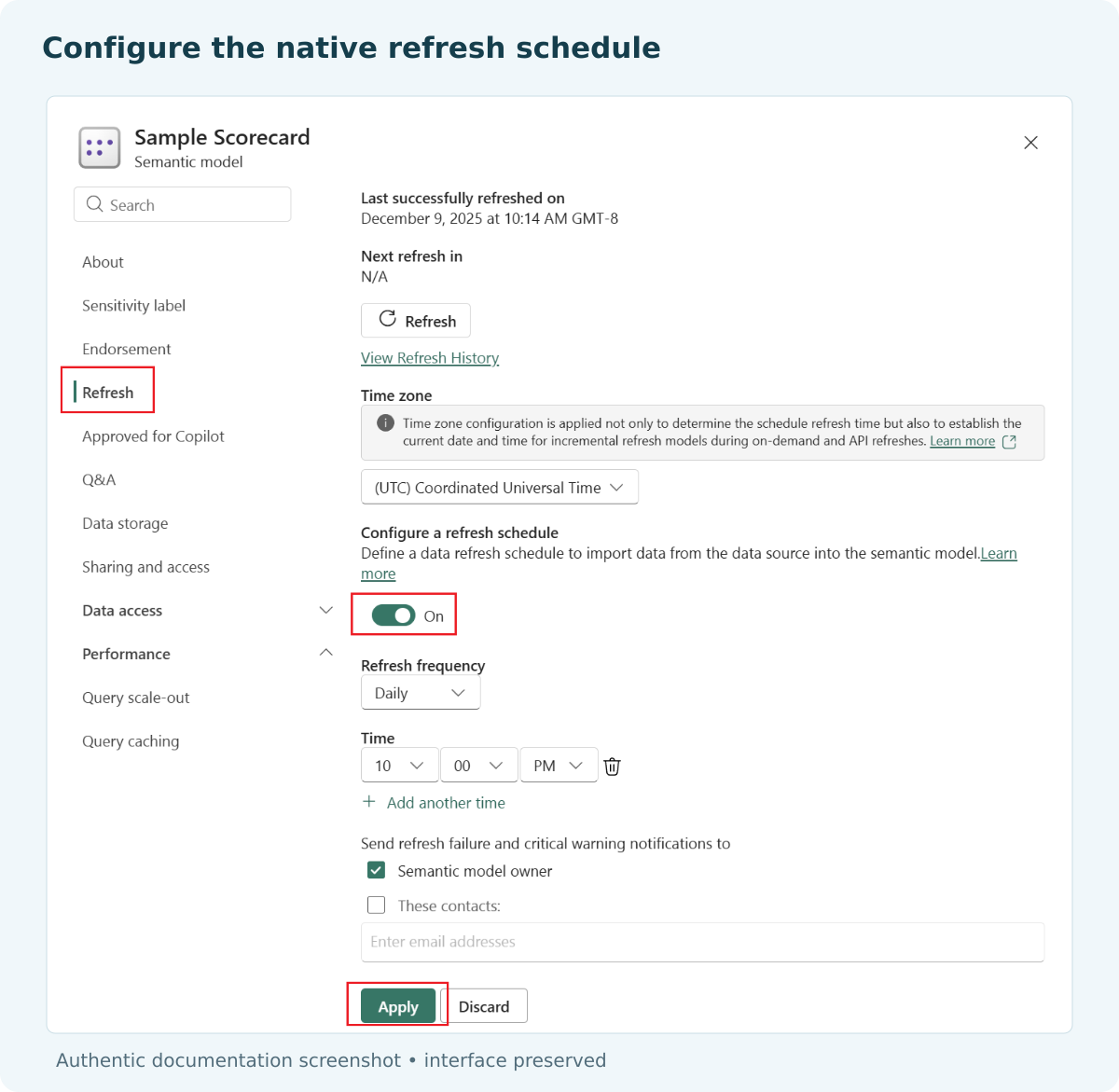
Power BI semantic-model refresh settings showing the time zone, frequency and time slots.

Give the failure a clear owner

A gateway administrator and a report author may fix different problems. Make sure the notification reaches the person who can act on it.

  
DEVELOPER AND API WORKFLOWS

Coordinate refresh with application-driven reporting

If the source load finishes at a variable time, an application or flow can coordinate the next steps instead of depending entirely on fixed clock times. Start from the event that means the source is ready, then request refresh and observe its outcome before releasing the report.

PBRS provides refresh settings on applicable report schedules and a Refresh Power BI Dataset task for automation schedules. Prepare the supported workflow in PBRS first, including its notification and failure behavior. Your application can then trigger a configured reporting job using the PBRS execution API.

For a custom Microsoft refresh integration, submission is asynchronous. Keep the request identity and follow the matching refresh result, rather than waiting a fixed two minutes and assuming success. Check the relevant allowance, permissions and response behavior for the model.

A useful sequence is: the source load finishes, the intended model refresh completes, the report reflects the new data, and the reporting job generates and delivers the file. Record which stage failed so the right person can act. An email delivery receipt cannot explain an earlier source-data failure.

Use native scheduling alone when updating the model is the entire task. Add coordination when there is a real downstream dependency, such as the operations PDF that must contain the completed overnight load.
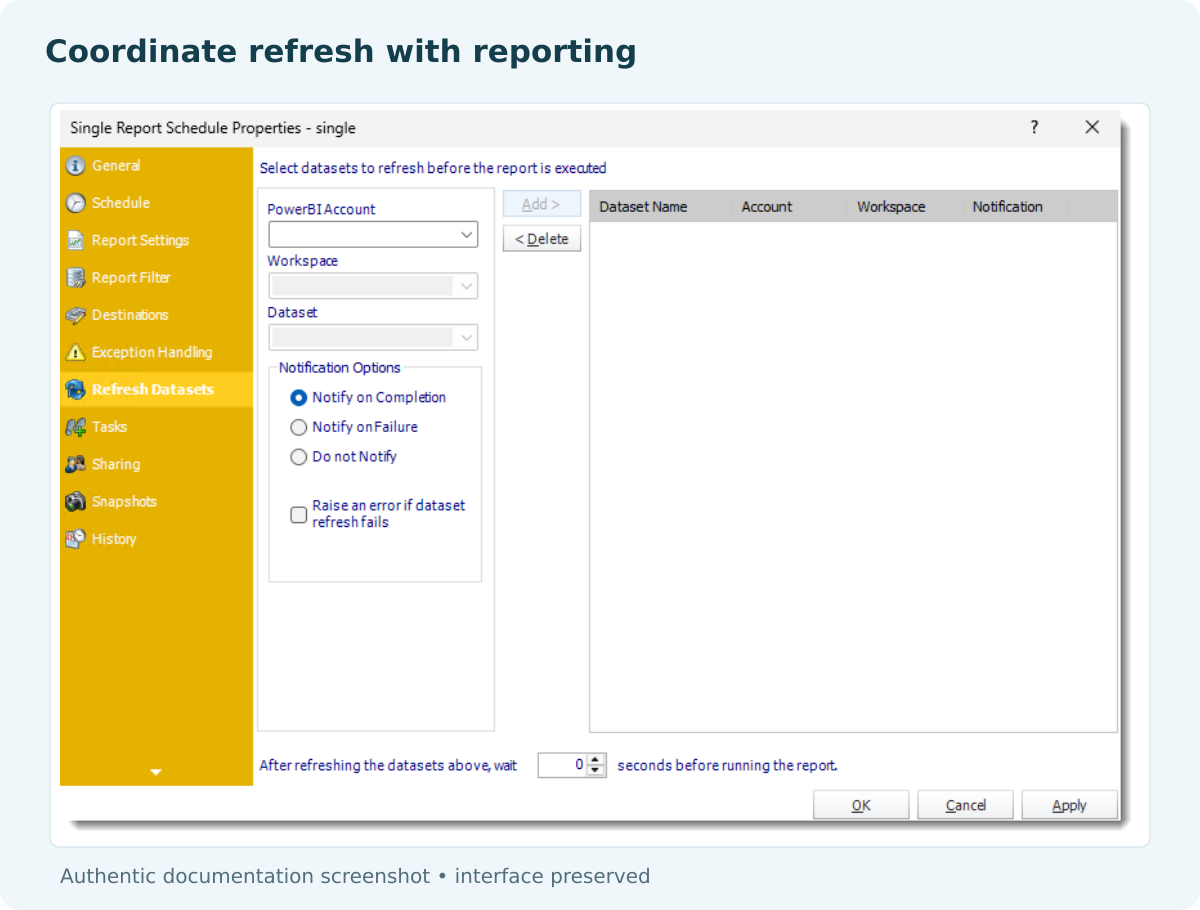

PBRS Refresh Datasets panel in the report-schedule workflow.

Explain which step is waiting

“Waiting for the source load” is more useful than a generic reporting failure when the underlying data has not arrived yet.

  
CHOOSE YOUR NEXT STEP

Give the team current figures at the start of the day

The operations team needs current figures when it opens the morning report. Working back from that need gives you a more useful schedule than simply choosing an available refresh slot.

Keep native refresh for straightforward model updates. When the routine includes refresh, report preparation and delivery, consider PBRS as part of that workflow and test the complete sequence. Explore Power BI Report Automation to see how those steps fit together.

Download the PBRS Internal Evaluation Guide

Contributors:

Christian Ofori-Boateng

Christian Ofori-Boateng

CEO, ChristianSteven Software