

How Do You Send Different Tableau Views to Different Users?
To send different Tableau views to different users, define the report state for each audience and pair it with the right recipients. For a few stable PNG or PDF emails, save the appropriate Custom Views and subscribe eligible Tableau users to each one. For a recurring batch of personalized files, Advanced Tableau Report Scheduler (ATRS) can take report values and delivery details from a data driver.
For example, North and South managers need separate weekly sales reports. Sending one unfiltered file to two addresses does not meet that requirement. Keep the region, reporting period, output and destination connected through generation and delivery.
- THE DIRECT ANSWER Match each audience to the intended report
- REQUIREMENTS AND LIMITATIONS Choose between saved views and data-driven production
- END-USER WORKFLOWS Build a North and South delivery example in ATRS
- DEVELOPER AND API WORKFLOWS Keep each application export and destination together
- CHOOSE YOUR NEXT STEP Choose the next step for your audience
Match each audience to the intended report
Begin with the audience’s actual question: does each manager need an interactive dashboard, an inbox snapshot or a file to work with? North and South may share the same published report while requiring different regional results. Agree the two expected results before choosing the delivery method.
For a small, stable audience, apply North’s selections, save a recognizable Custom View and create its subscription through Watch > Subscriptions. Repeat for South and its intended recipients. Tableau’s native subscription instructions require saved Custom Views for filtered content; temporary browser filters do not define the recurring email. Native output is PNG, PDF or both, and recipients need View and Download Image/PDF permissions.

Each recipient’s report values and delivery details belong together, even when both versions use the same published report.
The Custom Views controls support saved interaction states rather than separate copies of the workbook. Subscribing other people depends on the appropriate role or ownership. Verify the intended audience can use the source and the saved view before treating a missing control as a distribution failure.
For interactive access, Tableau’s user filters and row-level security guidance describes restricting visible rows by user context. Work with the author to establish that access design. A convenient saved filter and permission to receive a region’s exported file are separate decisions.
Define each reader’s result
Audience: Agree who should receive each regional version.
State: Record the filters or parameters that select its content.
Format: Choose an interactive view, snapshot or working file.
Sample: Compare two deliberately different regional results.
Choose between saved views and data-driven production
A handful of well-maintained saved views can be enough. The recurring work grows when the list changes often, each recipient needs a different file format, or operations must repeatedly select, export, rename and route each version. Compare the complete production job rather than only how many emails can be scheduled.
| Requirement | Native Tableau route | Where ATRS helps |
|---|---|---|
| Few stable regional snapshots | Create the appropriate Custom View and subscription for each intended audience. | Keep native subscriptions when PNG/PDF output and permitted Tableau users meet the need. |
| Interactive user-specific data | Use the appropriate Tableau permissions and row-level security design. | A static exported file serves a different need from interactive Tableau access. |
| Many changing report/recipient pairs | Maintain the corresponding views and subscription audience, or own an export integration. | Use driver records for report parameters and delivery details at run time. |
| Different files and messages | Native subscriptions provide snapshots with a subject and message. | Configure supported PDF, Excel or CSV outputs, filenames and email presentation. |
| Reliable regional separation | Inspect representative results under the intended access context. | Check each driver row’s output and destination together; keep source permissions in force. |
ATRS Tableau report bursting repeats report production for approved values and routes the outputs. The data driver is a maintained table or query describing that work. It is different from the sales data behind the visualization: one selects the reporting instructions, while the other supplies the figures.
Keep the Tableau account’s allowed data scope explicit. An email destination does not log into Tableau as that recipient, and a row containing South does not grant access to South. For this example, the reporting account and the North/South mappings must both be approved before the full batch runs.
Separate production from access
Identity: Know which Tableau account produces the export.
Entitlement: Approve the region each recipient may receive.
Instructions: Maintain the driver independently of sales facts.
Changes: Assign an owner for the distribution mapping.
Build a North and South delivery example in ATRS
Use two controlled examples before expanding the audience. Each needs a unique record key, its regional report value, the reporting period and the intended destination. For the first sample, both regions use the week ending 18 October 2026. The following records describe the intended outputs; your driver schema can use the fields appropriate to your system.
| Record key | Report selection | Intended recipient and file |
|---|---|---|
| 1001 | Region = North; week ending 18 October 2026 | north.manager@example.com; north-sales-2026-10-18.pdf |
| 1002 | Region = South; week ending 18 October 2026 | south.manager@example.com; south-sales-2026-10-18.pdf |
In an ATRS Data-Driven Schedule, build the driver from the maintained database query and select a unique Key Column. The data-driven schedule guide recommends a System DSN for database access from unattended scheduling. Ensure the scheduler’s service identity can read the required driver data. Parse and inspect the returned rows before binding them to a report.
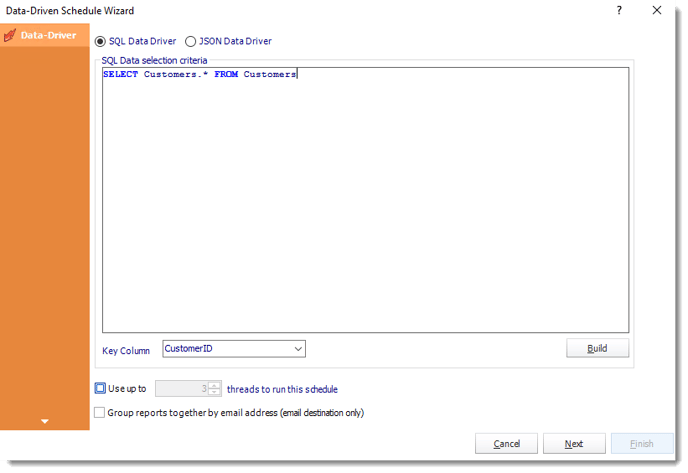
The Data-Driver screen defines the records used by the schedule. Its sample query is an example; use your approved regional instructions.
Select the linked Tableau account and source Item Path. Use data-driven inserts for the report’s actual supported parameter values and for the Email destination’s recipient. For example, bind the North/South column to an existing RegionChoice parameter only if the workbook uses that parameter to select its region. Bind the period to the intended date input and use the correct types. The record key identifies the row for investigation; it is not automatically a region filter.
Use the ATRS email report workflow to set a clear filename, subject, message and sending account. Keep the first run limited to these approved rows and controlled test destinations. Preview the configured report, then use Execute for that limited test run. Open both received PDFs, reconcile their regional totals and dates, and confirm that North’s file was paired with North’s route and South’s with South’s. The addresses above are illustrative, not operational destinations.
After acceptance, configure Monday 08:30 in the intended time zone, define the advancing-period rule and confirm how failures or unexpected blank reports are handled. A repeat time and a date in a filename do not choose report data. Assign an owner for changes to the recipient mapping, so a departing manager’s address does not remain in a continuing job.

Verify both regional deliveries
Key: Identify each driver record without treating it as a filter.
Values: Match region and period to the report’s supported inputs.
File: Open and reconcile each produced regional report.
Pairing: Check the intended file and recipient together.
Keep each application export and destination together
An owned application can perform the same regional production, provided it authorizes the mapping and keeps each export associated with its intended destination. Resolve the source view and approved North/South values on the server; do not accept an arbitrary recipient-and-region pair as authorization.
For a published view with the underlying field Region, Tableau’s view query filter contract supports separate filtered PDF requests. These illustrate two regional exports; configure and validate the agreed reporting period separately. They do not send an email or define a batch-send endpoint:
GET /api/<api-version>/sites/<site-id>/views/<view-id>/pdf?vf_Region=North
X-Tableau-Auth: <tableau-session-token>
GET /api/<api-version>/sites/<site-id>/views/<view-id>/pdf?vf_Region=South
X-Tableau-Auth: <tableau-session-token>Include the authentication header on each request and use the Query View PDF method with an authorized session and supported API version. Match field names and values exactly and URL-encode special characters. These equality filters are different from an entitlement check; verify the export account’s permissions and any user-based data restrictions independently.
Store each result with its own row key, region, period and destination. Avoid one shared temporary filename for every iteration, which can disconnect the last generated file from the intended reader. Validate the content before releasing that file, and record its delivery result separately from successful export generation.
If a run is interrupted after North is sent, reconcile which outputs and destinations succeeded before repeating the whole batch. The integration owns those recovery decisions as well as recurrence and sending. ATRS is an alternative place to maintain the reporting job; it does not remove the application’s responsibility to authorize the request and interpret its execution result.
Keep each export accountable
Request: Authorize the source, context and recipient mapping.
Isolation: Retain separate output names and row references.
Result: Validate report content before releasing a file.
Recovery: Reconcile partial delivery before repeating a batch.
Choose the next step for your audience
Use native saved views and subscriptions when a small, stable group needs regional PNG or PDF snapshots with the required Tableau access. Verify both North and South and keep their view and audience choices clear.
Evaluate the ATRS Tableau report scheduler when regional production has become a recurring loop of selecting values, preparing files and maintaining destinations. Bring two deliberately different report/recipient pairs so the evaluation can check both content and routing.
Explore recipient-specific Tableau report bursting
Considering ATRS for regional or customer reports? Share the guide with the report owner and distribution team to review access, deployment and delivery requirements.
Contributors:
Christian Ofori-Boateng
CEO, ChristianSteven Software

