

How Do You Deliver Tableau Reports to an SFTP Server Automatically?
Your customer needs the daily report on its SFTP server, but the file is still on your desktop. Its receiving process is waiting for a transfer you perform by hand.
Advanced Tableau Report Scheduler (ATRS) can prepare the Tableau Cloud export and deliver it through the configured file-transfer destination.
Finish the customer’s daily file handoff
Imagine your service team answering a customer’s call about a missing daily activity file. The Tableau report is ready, but the customer does not collect email attachments. Its import looks in a particular directory on its transfer server.
Until someone exports the report and completes the upload, the customer cannot finish its reconciliation. The recurring task includes both the file and the transfer.
ATRS can maintain the Tableau Cloud report inputs, output and FTP destination together, using the supported secure transfer type agreed with the customer. That turns a repeated desktop task into a reporting job the team can maintain.

Conceptual illustration: Report files routed to the people and locations that use them.
Start with the import owner
The person maintaining the receiving process can explain the exact directory, filename and contents it expects.
Match the export with the receiving process
For a one-off file, an authorized export and your organization’s approved transfer client may be enough. A maintained script is another option when your development team wants to own the connection, scheduling and recovery.
ATRS is useful when the same customer file is needed every day, or when other customers need their own periods, filenames and directories. Keep those requirements with the reporting instructions so an address change does not become another set of disconnected reminders.
Ask the customer how it recognizes a complete delivery and whether it expects a fixed filename. A successful connection test alone does not establish that the import found the intended file.
Transfer protocol and receiving-system requirements
The ATRS FTP destination guide documents the server, credentials, FTP Type, port, remote directory, connection verification and applicable certificate or proxy settings. Choose the actual SFTP or other approved transfer type supported by your installed configuration; SFTP and FTPS are different protocols.
Have the transfer administrator supply and validate the connection settings. Do not replace server-identity verification with an assumption that any reachable host is the customer’s server.
ATRS connects to Tableau Cloud only. The transfer transports an exported file; the export still needs the right sheet, customer and reporting period.
Separate connection from content
Reaching the server and delivering the correct activity file answer different questions.
Prepare and test the SFTP delivery
Create the activity report schedule with a test directory agreed by the customer. Select the Tableau Cloud report and its customer/date inputs, then choose the output the receiving process accepts.
Add the FTP destination and configure the approved transfer type, server, port, account and directory. Verify the connection before sending the sample file. This separates access problems from questions about the export itself.
Have the customer retrieve and import that delivered sample. Find a known activity record and compare the agreed total. Use the filename and date rule it will see in production, so the trial tests the actual handoff.
Then try an unavailable destination and agree who receives the failure notification. When the connection, file and recovery are understood, enable the recurring job after the day’s required data is ready.
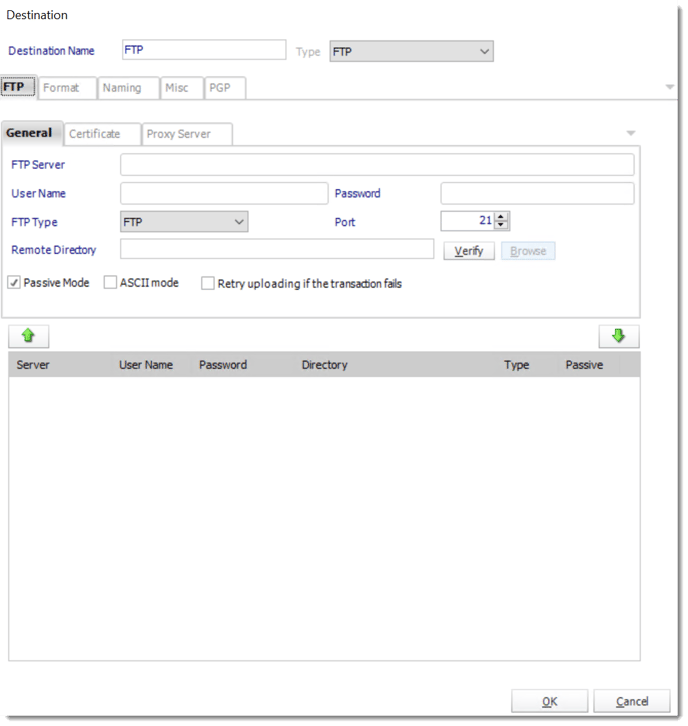
The ATRS FTP destination includes connection and remote-directory settings. Select the secure transfer type agreed with the receiving administrator.
Naming, protection and recovery
CSV output settings provide separator and delimiter choices when the customer consumes data. Other outputs can serve a reading copy. Use the receiving specification rather than rename a file extension and assume its structure changed.
ZIP passwords and configured PGP protect files differently from the transfer connection. Apply them only with an agreed receiving process. A successful upload does not prove a downstream import completed; retain its acknowledgement when that is part of the business requirement.

Try the received sample
Have the customer import the file from the transfer directory, rather than only inspect a local export.
Let your application request the customer file
Your service application can request an extra customer file through the saved ATRS job. The reporting team keeps its export and transfer settings in one place.
Retain the application request with the reporting date, so another colleague can follow the transfer without starting it again.
API example: request the saved customer transfer
Replace 101 with the tested report schedule ID. Use your ATRS HTTPS address and the transfer destination already saved in that job.
POST /api/Schedule/ExecuteScheduleAsync
Authorization: Bearer <ATRS-access-token>
Content-Type: application/json
{
"ScheduleType": "report",
"UniqueId": 101,
"RunBy": "Customer activity transfer"
}
GET /api/Schedule/GetExecutionStatus?ExecutionId=<returned-id>
Authorization: Bearer <ATRS-access-token>This request does not contain SFTP credentials, a new path or file bytes. Check both the report result and destination evidence, then distinguish upload from downstream acceptance.
Follow the ATRS execution guide. Keep the token on an authorized backend. Monitor within a defined deadline and decode ResultJson; Completed can contain Result=false. Check the expected files and destinations before reporting delivery. Reconcile an uncertain execution before submitting another copy.
Keep the customer reference
The reporting date and execution reference help service staff find the particular delivery behind a call.
Give the customer a dependable morning file
The customer can begin its reconciliation from the file in its agreed directory, and your service team can discuss the activity rather than repeat the upload.
Bring the accepted sample and transfer requirements to your first ATRS trial. Prove one customer’s complete handoff before extending the routine.
Contributors:
Christian Ofori-Boateng
CEO, ChristianSteven Software

