

LEARN CRYSTAL REPORTS

Why Are My Scheduled Crystal Reports Not Arriving by Email?

When a scheduled Crystal Report email is missing, check the stages in order: execution, attachment generation, mail submission and receipt.

CRD can manage the reporting and email workflow together, but a successful export or mail-server response does not prove that the recipient received the message.

  
Your reporting task

Find where the expected email stopped

Imagine a branch manager asking for the weekly stock report just before opening. You can see a successful report preview, but there is nothing in her inbox. Sending another copy immediately may hide the cause or produce a duplicate a few minutes later.

Find the scheduled run for that branch and week. Check whether it started and whether it generated the intended file. Only then follow the email stage.

Keeping these stages separate makes the investigation faster: there is little value changing mailbox rules when the report never reached its export step.

Identify the exact run

Use the reporting period, schedule and execution time. The most recent successful run may be a different branch or a manual test.

  
Your options

Use the evidence available in your current workflow

In Crystal Server, inspect the scheduled instance and its status. For a script, compare the rendering log with the mail submission result. Keep any returned message or job references with the reporting date.

If the file was produced, verify the recipient, sender and attachment. A successful SMTP connection test checks a different thing from authorization to send that particular message with its attachment.

CRD’s saved Email destination keeps recipients, message content and the selected mail connection alongside the report. That helps make the handoff inspectable, while mail filtering and recipient policies still belong to the email systems involved.

The CRD Email destination guide describes the message configuration and delivery-receipt option.

Check the maintained address source

An old typed address, distribution group or query result may differ from the audience you intended this week.

  
Put it into practice

Trace the branch email to its destination

Open the generated stock file first. If it is missing or incorrect, resolve the report stage before investigating mail. If it is correct, inspect the configured destination and the recorded mail error or submission result.

Check sender authorization and attachment size with the mail administrator. Then ask for the message trace, quarantine or rejection evidence that identifies this message. The receiving organization may apply different rules from your own test mailbox.

For a CRD test, use a controlled recipient with the same relevant delivery route and file format. Confirm the actual message and attachment there before changing the normal branch audience.
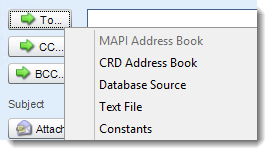

Crystal Reports: Email Destination in CRD.

Treat a spam folder as evidence

Finding the message in quarantine explains a different failure from a report that never ran. Record that distinction so the same fix is not applied to unrelated jobs.

  
Keep it dependable

Recover without multiplying the problem

Tell the branch manager what is known and whether you are sending a replacement. A silent rerun can leave her unsure which copy to use if the original appears later.

Set a clear owner for recurring failures and preserve enough evidence to distinguish them. Reporting history, mail acceptance and receipt are useful milestones, but they are not interchangeable.

Technical reference: receipts and retries

Delivery receipts depend on the mail systems involved and do not prove that a person read the report. Mail acceptance can precede a later rejection or filtering decision.

Before retrying an uncertain submission, inspect the existing result and message trace. If regenerating the report would change its figures, decide whether the recipient needs the original output or a newly dated replacement.

Keep the attachment period visible

A replacement email should make clear which week’s stock figures it contains. The resend time does not redefine the report’s data period.

  
Your next step

Restore the branch’s reporting routine

The immediate goal is for the manager to receive the correct stock report. The lasting improvement is knowing which stage failed and who will respond if it happens again.

Use Crystal Reports email automation when you need to bring the recurring report and its delivery instructions together.

Contributors:

Christian Ofori-Boateng

Christian Ofori-Boateng

CEO, ChristianSteven Software