

TABLEAU QUESTIONS

How Do You Send Tableau Reports to Customers Outside Your Organization?

A customer needs its monthly service figures, but your analyst is still filtering the report, exporting the file and writing another email. The account review is waiting for that copy.

Advanced Tableau Report Scheduler (ATRS) can prepare and deliver the customer’s Tableau Cloud report from maintained reporting instructions.

  
THE PROBLEM AND ANSWER

Give the customer the information its review needs

Imagine the account team preparing a service review for a customer who does not work inside your Tableau site. The customer wants its monthly results in a document it can read and retain.

An authorized PDF or workbook can meet that need. It is a different service from inviting the customer to explore interactive dashboards and underlying data.

ATRS can repeat the Tableau Cloud export and delivery, keeping the customer’s report selection, period and destination together. The analyst can support the account conversation rather than recreate the same handoff every month.

Conceptual illustration: Separate report versions prepared for their intended customers or locations.

Conceptual illustration: Separate report versions prepared for their intended customers or locations.

Begin with the review

Ask whether the customer wants a document to retain, cells to reconcile or interactive analysis.

  
YOUR OPTIONS

Choose a static report or interactive access

If the customer needs interactive analysis, plan the appropriate Tableau access and permissions. Native subscriptions can serve eligible Tableau readers who need their regular image or PDF snapshot.

For the static monthly pack, start with the document the customer actually uses. A PDF can support the review, while finance may need an Excel workbook for reconciliation or a CSV for its receiving system.

The exported file can be opened in its intended application without signing in to Tableau. That does not grant interactive Tableau access or remove obligations for the Tableau account producing the export. Keep the source access and approved external distribution policy with the reporting owner.

Recipient eligibility and the boundaries of a file

Tableau’s subscription guide describes subscribing users with the required view access. Use the supported native route when its audience and deliverable fit.

ATRS connects to Tableau Cloud using the configured reporting account. Confirm its permissions, export rights and licensing requirements. Sending a static PDF, workbook or CSV is not permission to share unrelated customer data or a way to provide unlicensed interactive access.

Files already delivered can be retained or forwarded by recipients. Changing an address or disabling the next schedule does not recall earlier copies. Agree the sharing and retention requirements accordingly.

Keep the source obligations clear

The account generating the file still needs its approved Tableau access and export rights.

  
SET IT UP

Prepare one customer’s recurring delivery

Choose one customer and an accepted reporting month. In ATRS, select the Tableau Cloud report and the exact customer/period inputs the published report supports. Use your own controlled destination for the first copy.

Open the export with the account manager and find a familiar service result. Look for another customer’s data as well as the intended figures; the audience is external, so the report selection deserves the same care as the address.

Configure the file, message and destination the customer agreed. Include PDF protection or a prepared workbook where those belong in the service, and let a customer representative try opening the received sample.

For a growing audience, put the reporting assignments in a maintained driver. Test a second customer separately before enabling the wider run, and give the account team ownership of changes to contacts and customer scope.
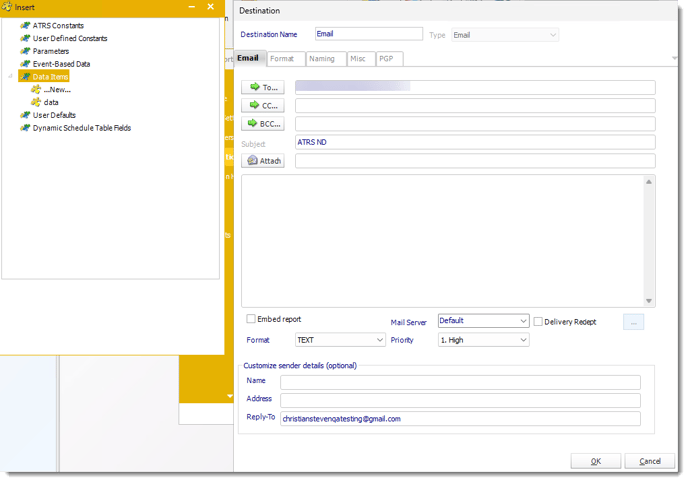
Configure the message and recipient for the reporting assignment, then verify the customer’s actual attachment.

Configure the message and recipient for the reporting assignment, then verify the customer’s actual attachment.

Customer-specific delivery and related files

Data-driven schedules can use database records to supply supported report inputs, formats and destinations. An address alone does not filter the report.

Data-driven packages can assemble related reports for the customer. PDF passwords, watermarks, ZIP and configured PGP have different purposes; use the protection the customer can actually open. Review already queued or deferred work separately after an audience change.

Compare two customer scopes

A correct address is only half the handoff. Check the actual customer figures in both sample files.

  
FOR DEVELOPERS

Let your customer application request the approved report

Your customer application can offer an extra monthly copy without giving the browser a shared reporting credential. Its backend authorizes the customer and selects the appropriate ATRS job.

The reporting team keeps the customer selection and delivery configuration in ATRS while the application follows that particular request.

API example: request an authorized customer report

Replace 101 with the tested job for this customer. Authorize the signed-in customer before resolving its ATRS installation, schedule family and ID.

POST /api/Schedule/ExecuteScheduleAsync
Authorization: Bearer <ATRS-access-token>
Content-Type: application/json

{
  "ScheduleType": "report",
  "UniqueId": 101,
  "RunBy": "Customer monthly report"
}

GET /api/Schedule/GetExecutionStatus?ExecutionId=<returned-id>
Authorization: Bearer <ATRS-access-token>

A supplied schedule ID or RunBy value is not an authorization rule. This request uses saved settings and returns tracking information rather than a public file download URL.

Follow the ATRS execution guide. Keep the token on an authorized backend. Monitor within a defined deadline and decode ResultJson; Completed can contain Result=false. Check the expected files and destinations before reporting delivery. Reconcile an uncertain execution before submitting another copy.

Authorize each request

The application should resolve a customer’s request to an approved job and destination on its backend.

  
YOUR NEXT STEP

Start the account review with the right figures

The customer can arrive at its account review with the intended service results already available. Your analyst can help explain the performance instead of preparing another export while everyone waits.

Start with one customer’s accepted file and reporting assignment. Use it to explore how ATRS can maintain the recurring external handoff.

Explore ATRS customer report distribution

Contributors:

Christian Ofori-Boateng

Christian Ofori-Boateng

CEO, ChristianSteven Software