

How Do You Trigger Tableau Report Delivery When a File Arrives or Data Changes?
The customer’s activity report runs at eight, but the approved batch is not always ready by then. Someone watches for the file and sends the report again when the work finishes.
Advanced Tableau Report Scheduler (ATRS) can start the Tableau Cloud reporting workflow from a configured file or database condition.
- THE PROBLEM AND ANSWER Let the approved batch start the customer report
- YOUR OPTIONS Choose a condition that means the work is ready
- SET IT UP Connect the event with the prepared delivery
- FOR DEVELOPERS Let your application request the report after approval
- YOUR NEXT STEP Give the customer the approved batch
Let the approved batch start the customer report
Imagine your service coordinator waiting for the final activity file before preparing a customer’s report. Some days the batch is approved before eight. On a busy day, the timed export runs first and the coordinator has to replace it.
The meaningful event is the approved batch becoming available. ATRS Event-Based Schedules can watch configured conditions and run an existing schedule or custom task when those conditions are met.
That lets the service team connect its real handoff with the Tableau Cloud report. The aim is a useful customer file following the approved work, rather than another attempt to guess a convenient time.

Conceptual illustration: A reporting handoff connected with the data and work it depends on.
Name the business event
The application owner can explain which record or completed file means the batch is approved.
Choose a condition that means the work is ready
A regular timer is enough when the activity data reliably finishes beforehand. Tableau’s native refresh-triggered subscription may also fit a suitable snapshot that simply needs to follow its supported extract refresh.
The customer’s approval is a different business event. A database record can identify the approved batch and its reporting period; a completion file can provide the signal when the producing process finishes writing it.
Agree that meaning with the application owner. A file existing does not necessarily mean it is complete, and an approval record does not by itself refresh the Tableau extract. Include the required data preparation before the report is produced.
File and database conditions
The ATRS Event-Based Schedule guide documents file existence/modification and database record conditions, ANY/ALL combinations and execution ordering. Choose ALL when every selected condition must hold.
For a database event, follow the documented detected/processed-record approach and use a stable business reference. Arrange for a condition to be handled or reset as intended so repeated checks do not repeatedly deliver the same customer report.
The scheduling service must be able to reach the watched location or database. Use supported conditions as integration points; do not describe them as a universal business-application webhook. ATRS supports Tableau Cloud only.
Keep preparation in the flow
The approval signal and the extract containing the approved figures may be separate steps.
Connect the event with the prepared delivery
Prepare the customer’s activity report first, with the correct batch-period inputs and a test destination. Verify that it produces the file the service coordinator expects before connecting it to the event.
Create the Event-Based Schedule and add the agreed file or database condition. Select the existing reporting job and put any required custom tasks before it in the execution flow. Keep a separate timer from getting ahead of that preparation.
Create one controlled approval and follow its report to the destination. Open the delivered file with the coordinator and find an activity record from that batch. Then leave the condition in place for another check to confirm that the handled event does not create an unwanted second delivery.
Try the missing or failed preparation as well. Once the team knows who hears about a delay and how the event is recovered, put the workflow into the normal approval routine.
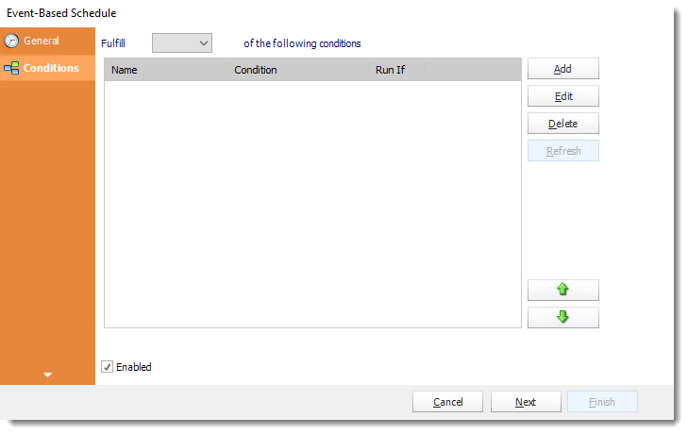
Configure the event conditions around the business handoff, then choose the reporting work they should start.
Operating windows and ordered work
Operational Hours can restrict when an event is allowed to trigger work. Agree what the team expects outside that window rather than assume every overnight occurrence is automatically replayed in the morning.
The event workflow can order its schedules and tasks. Required source/extract readiness and the report’s customer/period selection remain part of the design. An event starting a job is not evidence that every downstream step succeeded.

Try the next check
A handled approval should not quietly become another customer delivery when the condition is checked again.
Let your application request the report after approval
Your service application may already know when the batch is approved and the required reporting data is ready. It can request the saved reporting job at that point instead of asking ATRS to watch a separate signal.
Keep that ownership clear: the application confirms readiness, and the chosen ATRS job supplies the tested report preparation and delivery.
API example: request the report after confirmed approval
Use 101 only as a placeholder for the tested single-report schedule. Submit it after the application confirms the required approval and data readiness.
POST /api/Schedule/ExecuteScheduleAsync
Authorization: Bearer <ATRS-access-token>
Content-Type: application/json
{
"ScheduleType": "report",
"UniqueId": 101,
"RunBy": "Approved activity batch"
}
GET /api/Schedule/GetExecutionStatus?ExecutionId=<returned-id>
Authorization: Bearer <ATRS-access-token>An ordinary execution does not automatically evaluate the conditions or run the preceding tasks of a separate Event-Based Schedule. Keep required preparation in the invoked job or complete it beforehand. This payload does not invent event context fields.
Follow the ATRS execution guide. Keep the token on an authorized backend. Monitor within a defined deadline and decode ResultJson; Completed can contain Result=false. Check the expected files and destinations before reporting delivery. Reconcile an uncertain execution before submitting another copy.
Keep the batch reference
Record the approved batch and execution together so a colleague can find the report it requested.
Give the customer the approved batch
The service coordinator can follow the approved batch into its customer report without watching another clock. When approval is late, the reporting routine follows that work instead of sending an early version.
Begin with one real completion signal and the file the customer needs. Use that pair to explore an ATRS event-based handoff.
Contributors:
Christian Ofori-Boateng
CEO, ChristianSteven Software

