

How to List Power BI Subscriptions with Admin API
To list Power BI subscriptions through the Admin API, use the report, dashboard or user subscription endpoint for the review you need to carry out. These preview APIs require an authorized Fabric administrator or a service principal configured for read-only admin access.
The useful result is a list that helps you answer who still needs each report email and who will maintain it. If that review reveals a need for recurring PDFs, personalized files or additional destinations, PBRS can manage those reporting jobs centrally. Keep its schedules alongside the native subscription review as a separate inventory.
- THE PROBLEM AND ANSWER Start with the report emails people still need
- YOUR OPTIONS Choose the API view and authorized identity
- PRACTICAL SETUP Turn the inventory into an ownership review
- DEVELOPER AND API WORKFLOWS Collect the records without hiding gaps
- YOUR NEXT STEP Use the findings to improve reporting
Start with the report emails people still need
Imagine a report owner has changed roles and colleagues are unsure which of her recurring emails should continue. Some recipients still rely on the Monday summary; others have moved teams. An inventory gives the administrator a starting point for that conversation.
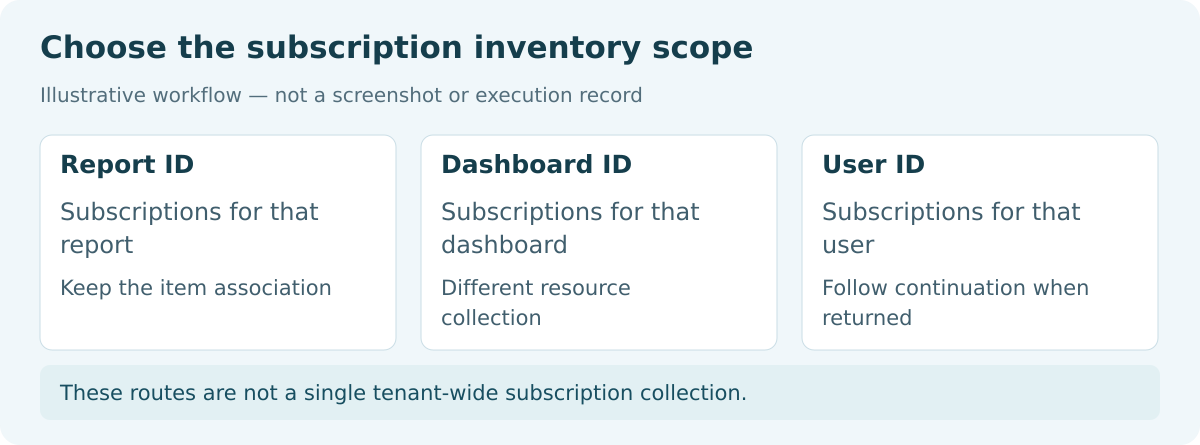
Choose the review’s scope first. For a particular report, collect that report’s subscriptions. For a dashboard, use the dashboard endpoint. For a person’s review, use the user endpoint and follow all of its continuation pages.
The documented endpoints are separate views, rather than a single tenant-wide subscription collection. If you need a broader review, first discover the reports or dashboards to include, then query their subscriptions.
Keep the purpose practical: identify useful deliveries, missing owners and settings that need attention. An enabled subscription tells you how it is configured; it does not establish that the last email reached its recipient.
Ask who relies on the email
A subscription with an old owner may still support important work. Check with its readers before deciding what should change.
Choose the API view and authorized identity
| Question you are answering | API view |
|---|---|
| Who subscribes to this report? | Report subscriptions, returned in a value array. |
| What subscriptions belong to this dashboard? | Dashboard subscriptions, also returned in value. |
| Which subscriptions are returned for this person? | User subscriptions, returned in subscriptionEntities with continuation information. |
For delegated access, the caller must be a Fabric administrator with the documented Tenant.Read.All or Tenant.ReadWrite.All scope. A scope in a token does not by itself establish the administrator role.
A service principal follows a different setup. The application must belong to the approved security group covered by “Service principals can access read-only admin APIs,” and must not have Power BI permissions requiring admin consent configured in Microsoft Entra ID. Ask the administrator to confirm that setup for the intended app.
Keep credentials outside inventory files and routine diagnostic exports. A report viewer reviewing their own subscriptions can use the service’s Subscribe interface; they do not need an admin API collector for that task.
Each of the three preview subscription APIs documents a maximum of 200 requests per hour. Design for its current contract and rate limit rather than assuming an unrestricted tenant scan.
For the detailed requirements and controls, see Microsoft’s admin API service principal guide and schedule lifecycle operations.
Keep the review proportionate
A named-report review needs different collection work from a tenant-wide inventory. State the scope so readers know what the results cover.
Turn the inventory into an ownership review
Agree which reports, dashboards or users the review covers and record the collection time. Keep a simple record of whether each target succeeded, returned no subscriptions or could not be read.
Suppose you review three reports. Two requests succeed and the third fails authorization. You have results for two reports and an unresolved third report, not a complete inventory. Likewise, a successful empty response means no subscriptions were returned for that target at that time; it is different from a failed request.
For report discovery, Get Reports As Admin supports $top and $skip and returns report and workspace IDs. Its documented limits are 50 requests per hour and five per minute per tenant. Preserve those IDs when joining the subscription records to report details.
Then speak with the owners. Do the recipients still need the email? Is the timing useful? Does the attachment contain what they need? Who will maintain it when the current owner leaves?
Keep a native subscription when it serves that need well. If the team instead needs customer-specific files or a report delivered to a shared folder, that is a concrete requirement to evaluate with PBRS. Its value is managing the resulting reporting job; the native API inventory remains the evidence for the original subscription review.
Make gaps visible
Keep “no records returned” separate from “request failed.” They lead to different follow-up actions.
Collect the records without hiding gaps
The following HTTP outline shows the three collection routes. Replace the placeholders with validated identifiers and keep the access token in your backend.
GET https://api.powerbi.com/v1.0/myorg/admin/reports/{reportId}/subscriptions
GET https://api.powerbi.com/v1.0/myorg/admin/dashboards/{dashboardId}/subscriptions
GET https://api.powerbi.com/v1.0/myorg/admin/users/{userId}/subscriptions
Authorization: Bearer {accessToken}The user endpoint accepts a Microsoft Graph user ID or user principal name; encode it safely. Read value for report/dashboard responses and subscriptionEntities for user responses. Follow the user endpoint’s returned continuation information until there are no further pages, preserving it if collection stops.
Do not add report-discovery paging parameters to an artifact subscription endpoint just because Get Reports As Admin supports them. Also avoid relying on the deprecated subscriptions property of an admin report object, which can be empty; query the subscription endpoint itself.
Keep the subscription ID, report or dashboard identity, title, enabled state, frequency and applicable content or attachment options. Include subscriber information where available. Microsoft warns that the users property will be removed in an upcoming release; it can already be empty or null in the user response. Missing subscriber information is not proof that a subscription has no recipients.
If combining views, deduplicate using source-qualified identifiers rather than titles. Respect rate limits, preserve unresolved requests and retain only the subscriber information needed for the authorized review. This is a collector outline, not a complete production implementation.
Plan for preview changes
Handle absent fields explicitly and review the documented response contract when maintaining the collector.
Use the findings to improve reporting
A useful review leaves every relevant delivery with a clear owner and a decision: keep it, investigate it or change it to meet an identified need. Keep unresolved requests visible so the next person knows what is still missing.
If the review leads to centrally managed file delivery, explore the PBRS report automation API and Power BI Report Automation. PBRS jobs have their own schedule lifecycle; these Microsoft read APIs do not create or migrate them automatically.
Contributors:
Christian Ofori-Boateng
CEO, ChristianSteven Software
