

LEARN CRYSTAL REPORTS

How to Schedule Crystal Reports Without Running Them by Hand

You can schedule Crystal Reports through Crystal Server, a suitable script or a dedicated scheduler. The right choice depends on what needs to reach your team each morning.

CRD brings report execution, file preparation and delivery together, so the routine can continue without someone opening every report.

  
Your reporting task

Give the morning report a routine of its own

Imagine looking after a daily dispatch report. Before the warehouse meeting, you open the RPT file, enter yesterday’s dates, export a PDF and send it to the supervisor. The report itself works well. It is the repeated handoff that depends on you being available.

Scheduling means preserving those instructions: the report, its data selection, the finished file and the people who need it. Moving the reminder into a calendar does not perform that work. A reporting engine must open and execute the report, and a delivery process must place the result where the supervisor expects it.

Start by writing down today’s successful run. Include the database connection and any subreports, because the unattended job will need those too. This gives you a practical starting point instead of a long list of features to compare.

Keep one familiar report

Use the dispatch report your supervisor already understands. Changing its design and its delivery at the same time makes problems harder to isolate.

  
Your options

Choose the approach that fits your existing setup

If you already have Crystal Server or the BusinessObjects BI platform, look at its scheduling facilities first. SAP supports recurring report execution with parameters, database logon, output formats and destinations. Your edition, permissions and configured services determine the available choices.

A script is another route when a developer can maintain the report execution code and its runtime. Windows Task Scheduler can start that script; it does not render an RPT file by itself. Someone still owns export errors, credentials, changes to recipients and the days when the job runs late.

CRD is useful when those instructions need a dedicated home. A saved schedule can combine the dispatch report, its parameter values, PDF output, destination and reporting calendar. You keep the existing report and automate the work around it.

The CRD single-report guide shows those parts together.

Compare the whole handoff

Ask each option to produce the actual file and deliver it. A timer that starts a process covers only part of the reporting job.

  
Put it into practice

Prepare the dispatch job in CRD

Create a Single Report schedule and select an RPT path that the CRD server can reach. Give the job a name that makes sense to the person covering your absence, then set the recurrence and intended start date.

Enter the report parameters and database access needed for the dispatch figures. If yesterday’s date should move forward each day, use a relative date value rather than leaving the date from your first test. Choose the PDF output and the supervisor’s delivery destination.

Use your own test mailbox or a controlled folder first. Open the delivered PDF and look for a dispatch you recognize, the correct reporting date and the complete page set. Then allow a genuinely scheduled run to happen under the unattended execution account. A successful interactive preview alone does not establish that the morning routine works.
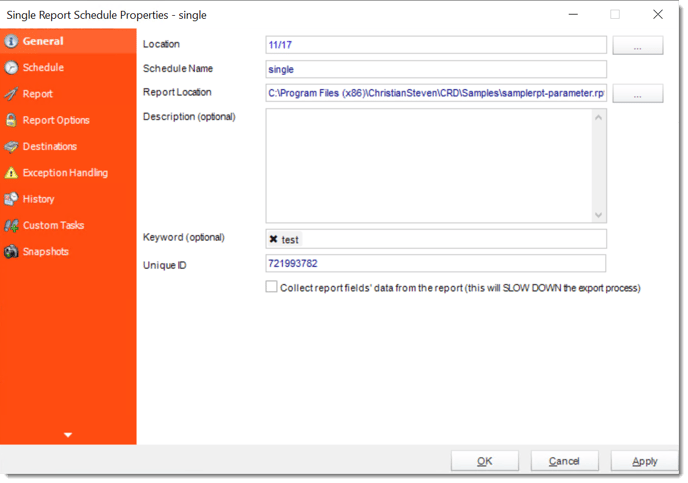

crd single general

Plan for an empty morning

Decide whether no dispatches should produce an empty report, a short notification or no delivery. Give a failed query a different response.

  
Keep it dependable

Make the job manageable when you are away

The warehouse still needs an answer when the database is unavailable. Set the job’s error notification and agree who will investigate. If the data arrives at an unpredictable time, consider a readiness condition instead of repeatedly moving the clock.

An application can also request a prepared CRD schedule through its API. That is useful when the application already knows the dispatch data is complete; it is not necessary for a straightforward daily job.

Technical reference: the unattended run

The execution account needs access to the RPT file, its databases and the destination. Include subreport credentials and matching parameter types. Confirm runtime and driver compatibility on the machine that actually executes the report.

Keep the reporting date with the run history. Before repeating an uncertain job, check whether its file or email already reached the destination; a delayed response can otherwise lead to duplicate delivery.

Give your colleague a useful starting point

Record the job name, expected arrival time and one place to check the result. That is more useful during an absence than instructions to open every report manually.

  
Your next step

Let the warehouse meeting start with the report

The aim is for the supervisor to find the dispatch PDF without waiting for your export. Once the scheduled run produces the expected figures and destination result, move it to the approved audience and keep an eye on its first reporting cycles.

If your existing Crystal Server setup already covers the job, use it. If the recurring export and delivery need a dedicated workflow, start with this one report and explore the CRD scheduling options.

Contributors:

Christian Ofori-Boateng

Christian Ofori-Boateng

CEO, ChristianSteven Software