

TABLEAU QUESTIONS

How Do You Audit Who Changed or Ran an Automated Tableau Report Schedule?

Finance asks who changed the monthly report’s recipient and when the replacement was run. The team has an email, but no clear account of the reporting changes behind it.

Advanced Tableau Report Scheduler (ATRS) can record schedule activity in an Audit Trail alongside the history used to investigate its Tableau Cloud reporting runs.

  
THE PROBLEM AND ANSWER

Answer the question behind the changed delivery

Imagine the reporting owner investigating a customer’s unexpected monthly attachment. The file arrived, but someone changed the schedule earlier in the week. Finance wants to know which user made the change and which reporting run produced this copy.

Those are related questions with different evidence. ATRS’s Audit Trail records activities such as users editing, refreshing or executing schedules. History View helps investigate a particular reporting run and its destinations.

Keeping both available makes the conversation easier to continue. The owner can follow the configuration activity, then inspect the execution and file, instead of trying to reconstruct everything from inbox messages.

Conceptual illustration: Report files routed to the people and locations that use them.

Conceptual illustration: Report files routed to the people and locations that use them.

Name the question first

Who edited the schedule and whether its email arrived are different questions. Keep the evidence for each.

  
YOUR OPTIONS

Separate schedule activity from report results

For an occasional delivery question, the saved schedule and History View may be enough. You can inspect what ran and which destination needs attention.

When several people maintain customer reporting, an activity record serves another purpose: it helps identify who performed the recorded schedule actions. ATRS stores its Audit Trail in an external ODBC-compliant database you configure for that purpose.

Agree access and retention with the person responsible for that database. An activity entry is useful evidence, but it should not be presented as a complete, immutable compliance record or proof that someone received and read a report.

Audit Trail, execution history and delivery evidence

The ATRS Audit Trail guide documents enabling the feature and designating the external database. It describes the user, activity, affected schedule and schedule type, including execution, refresh and editing activity.

History View serves the reporting-run investigation. Actual file or mail evidence serves the delivery question. A successful send is not evidence of reading, and the activity log is not a copy of the exported report.

Use individual authorized accounts and the organization’s storage controls. ATRS connects to Tableau Cloud; this configuration does not create a native Tableau administrative audit or imply a compliance certification.

Give the database an owner

The activity record needs the access, backup and retention arrangements your reporting review depends on.

  
SET IT UP

Set up and try the activity record

Begin with a test schedule and the question finance wants to answer. Ask the database owner to provide the approved external Audit Trail database and connection access.

In ATRS Options, open Audit Trail, enable it and configure that database connection. Confirm the connection before applying the setting. The reporting team now has a place for the activity record it expects to use.

Make a controlled change with a known authorized user, then run the test report. Review the recorded action with the schedule owner and compare it with the reporting history and actual test delivery.

Have another colleague use the records to explain the test without relying on your memory. Once the evidence supports that handover, agree how the database is retained and who reviews activity when a reporting change is questioned.
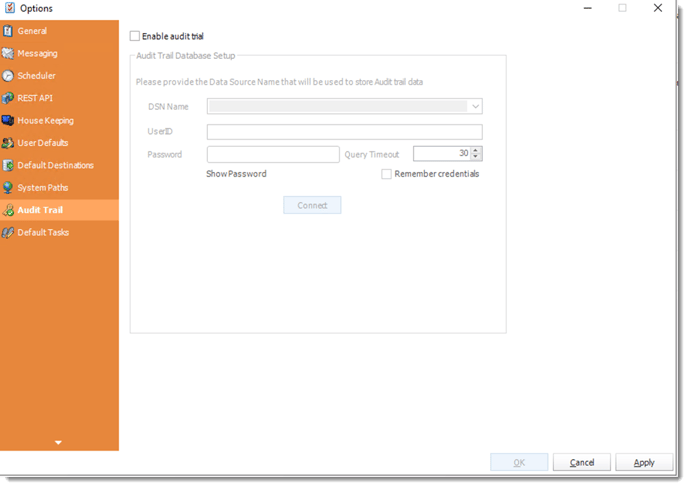
The Audit Trail settings configure the external database used for the activity record.

The Audit Trail settings configure the external database used for the activity record.

Retention and application-originated actions

The Audit Trail database is external to ATRS. Its backup, access and retention need an explicit owner. The guide does not promise a complete before-and-after configuration diff for every action.

For application requests, keep the authenticated application user, authorization decision, ATRS installation, schedule family/ID and execution reference in the application’s own record. RunBy is a supplied label, not proof of the customer’s identity.

API queue retention and status are separate from durable audit storage. Preserve the evidence needed for the organization’s reporting review rather than depend on a queue remaining available indefinitely.

Let a colleague investigate

A useful test is whether someone else can explain the controlled change from the retained records.

  
FOR DEVELOPERS

Connect application requests with execution evidence

An application can keep the customer’s authorized request with its ATRS execution reference. That connects the action people recognize with the particular reporting run.

Use the application’s own authenticated user record for identity, and retain the outcome needed for the reporting review.

API example: inspect the retained application execution

Use the ExecutionId retained when the application submitted its actual reporting request. Read that execution on your ATRS HTTPS service.

GET /api/Schedule/GetExecutionStatus?ExecutionId=<retained-execution-id>
Authorization: Bearer <ATRS-access-token>

This operation reads API execution status. It does not enable, query or replace the external ATRS Audit Trail, and it does not establish who read the report.

Follow the ATRS execution guide. Keep the token on an authorized backend. Monitor within a defined deadline and decode ResultJson; Completed can contain Result=false. Check the expected files and destinations before reporting delivery. Reconcile an uncertain execution before submitting another copy.

Do not treat labels as identity

Keep the authenticated application user separately from the supplied RunBy label.

  
YOUR NEXT STEP

Give the reporting owner a useful explanation

The reporting owner can answer finance with an activity record, a particular run and the document it produced. The next question has a traceable starting point rather than another search through emails.

Use one controlled schedule change to evaluate the records your team needs. It gives the ATRS audit configuration a concrete business purpose.

Explore ATRS reporting oversight and delivery

Contributors:

Christian Ofori-Boateng

Christian Ofori-Boateng

CEO, ChristianSteven Software