

LEARN CRYSTAL REPORTS

How to Automatically Name and Archive Crystal Reports Without Overwriting Previous Files

Automatically preserve successive Crystal Reports exports by giving each output an appropriate unique name, such as a report name with its reporting period or timestamp.

CRD supports custom filenames and appended dates and times. That helps prevent the latest export from overwriting the copy colleagues still need.

  
Your reporting task

Keep yesterday’s report when today’s file arrives

Imagine a finance folder containing a daily cash report named Cash.pdf. Each morning’s export replaces the previous file. When a colleague asks what yesterday’s report showed, the folder contains only today’s figures.

The immediate need is to preserve successive files and make them recognizable. Decide whether colleagues search by the business period, the export time or both. Those dates are not always the same.

A name such as a report label plus its period can help someone find the right output without opening every PDF. A run timestamp can distinguish a corrected or repeated export for the same period.

Choose what a repeated run should do

Decide whether it replaces a provisional file or preserves another version. A timestamp is useful only when it supports that intended behavior.

  
Your options

Choose naming and retention for different purposes

A script can rename an exported report or generate its filename as part of the export. Native server publishing facilities may also provide naming options appropriate to the deployment.

CRD’s destination Naming controls support a custom output name, Inserts and an appended date/time. The documentation explicitly identifies preserving unique successive files as a reason to append the timestamp.

That is different from a retention policy or backup. A dated filename helps identify a copy; it does not make the folder immutable or protect it from deletion.

The CRD output-naming guide explains the naming options.

Keep the extension meaningful

A PDF remains a PDF because of its contents, not its name. Changing an extension is useful for a defined system interface, not for converting the file format.

  
Put it into practice

Give the cash reports readable names

Configure the cash report and folder destination, then choose a custom name in the Naming settings. Use the report parameter value where it identifies the reporting day, and add the run date/time if repeated exports must remain distinct.

CRD Inserts can place current parameter values in a report name. Check the resulting characters and length against the destination’s filename rules, especially when a customer or branch value forms part of the name.

Run twice to a controlled folder. Confirm that the two outputs behave as intended, that neither necessary copy disappears and that a colleague can identify the reporting day from the file. Open both to verify the name matches the actual content.
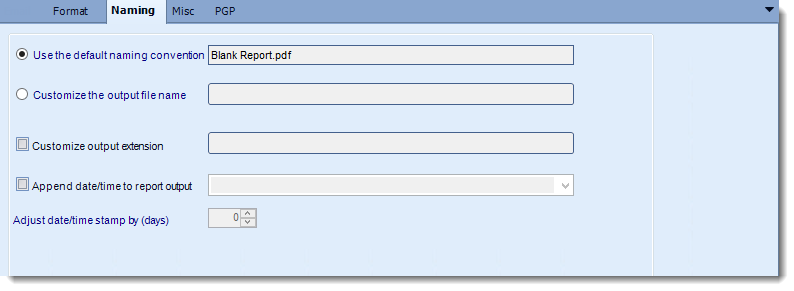

CRD Naming options for custom filenames, extensions and appended dates.

Test the same-day rerun

A date without a time may still collide when a job runs twice in one day. Check the actual generated names and overwrite behavior.

  
Keep it dependable

Preserve the original when a colleague asks for it

If finance asks for yesterday’s delivered figures, regenerating the report may not reproduce yesterday’s document after source data changes. Distinguish a retained original from a newly generated replacement.

CRD also documents snapshots for retaining generated reports for a chosen number of days. Use that feature and your organization’s file retention process deliberately, with suitable access controls.

Technical reference: archive boundaries

Keep report period, execution time and destination path together in internal records. Validate uniqueness for the actual run frequency and destination behavior.

Apply retention, backup and access policies separately. Custom names and snapshots do not provide immutable storage or guarantee permanent preservation.

Review personal information in filenames

A filename can be visible to people who cannot open the document. Use customer identifiers or labels appropriate to the destination’s audience.

  
Your next step

Make the reporting history easy to find

Finance should be able to locate the intended cash report without discovering that today’s export replaced it. Start with one folder and a naming rule colleagues understand.

Explore CRD delivery operations to connect naming, destinations and retained outputs.

Contributors:

Christian Ofori-Boateng

Christian Ofori-Boateng

CEO, ChristianSteven Software