

What Is Report Bursting in Crystal Reports, and How Does It Work?
Report bursting produces separate outputs for different groups in a Crystal Report and routes them to the intended recipients. How the engine queries and renders the report depends on the chosen method.
CRD provides Bursting schedules and data-driven delivery for turning a grouped report into a recurring distribution routine.
One report, different readersGive each department its own figures
One report, different readers
Give each department its own figures
Imagine a finance analyst opening a report with a section for every department. Each manager should receive only their own figures, so she exports and checks the sections individually before sending them.
Bursting automates that separation and routing. The group might be a department, branch or customer, with a destination associated with each output. The useful result is a set of correct individual documents.
It is tempting to describe every bursting implementation as one database query followed by file splitting. That is too broad. Report design, subreports and the chosen rendering method affect execution; assess performance with your actual report.
Begin with the separation
Write down which report group belongs to which recipient. That mapping is more important than how many files the demonstration produces.
Your options
Crystal Reports bursting explained through departmental reports
SAP Crystal Server provides personalized automated publishing with Concurrent Sessions licensing. If you already use that workflow, compare its publication result with the departmental requirement before introducing another tool.
CRD’s Bursting schedule works with groups in a report. Simple Bursting assigns destinations to selected groups; Advanced Bursting can use report fields or database lookups and assign multiple destinations and formats. The Bursting guide explains these choices.
A Data-Driven schedule takes a different approach: returned records supply report parameters and delivery instructions at run time. Use it when each department needs its own parameterized execution, rather than assuming every personalized output requires the same bursting design.
Keep workbook tabs distinct
Excel Group Bursting creates worksheets in one workbook. Sending that entire workbook to everyone does not isolate departmental data.
Set it up
Prove the departmental boundaries before distribution
Choose two departments with clearly different figures. Confirm the RPT’s grouping expresses the separation you need, then create a Bursting schedule and select the reporting period.
Choose Simple or Advanced Bursting according to how the destination assignments are maintained. Associate the selected groups with controlled test destinations and choose the appropriate file formats. Keep the grouping value and delivery address together during review.
Open both received files. Inspect the department name, a known transaction, the total and the transition between groups. A group heading alone does not establish that detail or subreport content belongs exclusively to that department.
Then test a newly added department and a missing destination. Those are the changes the analyst would otherwise discover while preparing the monthly emails.
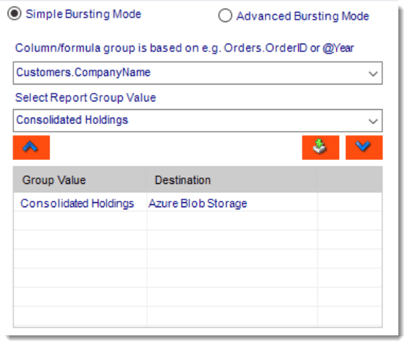
CRD documentation example. Use the report and destination settings for your own job.
Review more than the first group
A middle and final group can expose boundary errors hidden by a correct first output.
Keep it manageable
Maintain the assignments as departments change
Bursting removes repeated exports, but somebody still owns the reporting assignments. A manager’s replacement needs the correct department, destination and any file-protection arrangements.
If an application maintains the routing data, its approvals remain part of the design. A destination lookup is an instruction, rather than an authorization decision.
Technical reference: execution and recovery
Measure the report’s actual database and rendering work before making throughput assumptions. Do not treat a vendor’s use of “bursting” as proof of one query or one execution.
Keep each group, reporting period and destination result traceable. If some outputs succeed and others fail, inspect those results before repeating the whole distribution. A retry can otherwise resend already delivered departmental reports.
Try a withdrawn assignment
Remove a test recipient from the approved source and confirm the next run no longer routes output there.
Your next step
Let finance maintain the reporting decision
The analyst should be maintaining which manager receives which figures, rather than recreating the same exports every month. Begin with the two departmental outputs you can verify confidently.
