

How Do You Password-Protect Tableau PDF Reports Before Sending Them?
The customer’s financial PDF is ready, but someone still has to add its password and confidentiality mark before sending it. That final preparation repeats with every reporting period.
Advanced Tableau Report Scheduler (ATRS) can include PDF protection and finishing in the recurring Tableau Cloud delivery.
- THE PROBLEM AND ANSWER Prepare the customer’s document for its intended reader
- YOUR OPTIONS Choose the protection the reader actually needs
- SET IT UP Build the protected financial-report delivery
- FOR DEVELOPERS Let the account application request the prepared PDF
- YOUR NEXT STEP Spend the review discussing the figures
Prepare the customer’s document for its intended reader
Picture your account manager preparing a customer’s monthly financial review. The figures are approved, but the exported PDF still needs its opening password and confidentiality watermark. The meeting pack cannot go out until that work is complete.
ATRS can keep those PDF options with the Tableau Cloud report and destination. The preparation becomes part of producing the customer’s file rather than a separate desktop job repeated each month.
Begin with the document and the customer’s requirements. Who is allowed to open it, how will they receive the password, and which label or logo belongs on its pages? Those decisions explain the purpose of the settings.
Conceptual illustration: A PDF prepared with the protection and finishing its reader needs.
Begin with the reader
Ask which PDF application the customer uses and how the opening password will reach them.
Choose the protection the reader actually needs
An occasional PDF can be downloaded from Tableau and finished with an approved PDF tool. That may be enough when protected customer reports are rare.
For the monthly pack, ATRS can apply the selected passwords, permissions and watermark or stamp before delivery. Related reports can be combined in a package when the customer wants one review document.
Keep file protection and recipient selection connected. A password does not correct a report containing another customer’s figures, and a confidentiality label does not prevent the wrong address being selected. The useful outcome is the intended document reaching the intended reader with protection they can use.
Opening passwords, PDF permissions and other protection
The ATRS PDF guide documents passwords, file permissions, watermark/stamp controls and file properties. Opening protection and permissions for copying, printing or editing have different purposes. PDF permission enforcement depends on the reader; do not describe it as an absolute barrier to copying.
The same guide documents password-protected ZIP and configured PGP. These produce different recipient workflows from a PDF opening password. Use the approach required by your organization and the customer’s approved tools.
The documented PDF encryption option is 128-bit. Do not claim a different algorithm or a compliance certification from the presence of a password. ATRS supports standard PDF, not a PDF Data Only export format.
Give each control a purpose
Opening protection, permission restrictions and a watermark help with different parts of the document handoff.
Build the protected financial-report delivery
Select the customer’s Tableau Cloud report and agreed month in an ATRS schedule. Add a test destination and choose PDF, then enable the additional PDF options required for this delivery.
Set the approved opening and permission passwords, and add the watermark or stamp the account manager discussed with the customer. Keep password handling within your organization’s process rather than placing the secret beside the attachment in the same message.
Open the received PDF with the intended reader’s application. Find a familiar account total, check the period and try the opening process. Read the pages with the watermark in place to make sure it does not obscure the figures.
If several reports form one pack, inspect the finished merged document as well. Once the customer can use that actual delivery, enable the monthly routine and retain its reporting owner.
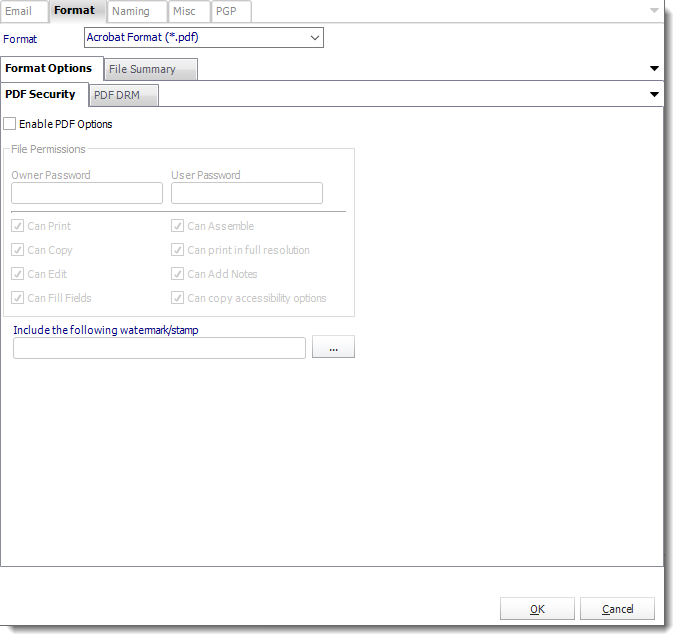
Enable the required PDF options in ATRS and test the final protected document with its intended reader.
Packaging and recipient-specific documents
Package schedules can deliver several attachments or merged PDFs. Review the final file’s protection and page order instead of assuming member settings establish the finished result.
Data-driven schedules can supply supported report and delivery values from maintained records. Test each customer’s data selection and destination independently of its password.

Read the finished pages
A visible confidentiality mark should leave the totals and labels easy to read.
Let the account application request the prepared PDF
The account application may need a replacement before an extra review. It can request the saved protected-PDF job while the reporting owner maintains the finishing options.
The application follows that requested execution and tells the account manager when the result has been checked.
API example: run the saved protected-PDF job
Use the tested single-report schedule’s UniqueId in place of 101. Configure and test its customer selection, protection and destination in ATRS first.
POST /api/Schedule/ExecuteScheduleAsync
Authorization: Bearer <ATRS-access-token>
Content-Type: application/json
{
"ScheduleType": "report",
"UniqueId": 101,
"RunBy": "Customer financial review"
}
GET /api/Schedule/GetExecutionStatus?ExecutionId=<returned-id>
Authorization: Bearer <ATRS-access-token>The execution payload does not supply a PDF password or watermark override and does not return PDF bytes. Keep those choices in the saved reporting configuration.
Follow the ATRS execution guide. Keep the token on an authorized backend. Monitor within a defined deadline and decode ResultJson; Completed can contain Result=false. Check the expected files and destinations before reporting delivery. Reconcile an uncertain execution before submitting another copy.
Keep secrets out of the request
The application can request the maintained job without putting the customer’s PDF password into an execution payload.
Spend the review discussing the figures
The account manager can begin the customer review with the protected document already prepared. The repeated password-and-watermark task no longer takes the place of discussing the financial results.
Start with one accepted customer PDF and its protection requirements. Use it to explore an ATRS delivery the reader can open and the reporting team can maintain.
Contributors:
Christian Ofori-Boateng
CEO, ChristianSteven Software

