

CRYSTAL REPORTS QUESTIONS

How Can I Automatically Export Crystal Reports to Excel Without Losing Formatting?

You can automate Crystal Reports exports to Excel, but preserving every printed-layout detail is not guaranteed. Choose between layout-oriented output and data-only output according to how the workbook will be used.

CRD adds recurring delivery and workbook controls around the selected export method.

  
The weekly workbook

Give finance a file they can work with

Imagine a finance analyst opening the weekly sales workbook and spending the first half hour removing blank columns and dealing with merged cells. The Crystal report looked right on paper; the spreadsheet serves a different purpose.

Before automating that file, ask whether she needs a faithful-looking report or rows she can sort and analyze. Those are different acceptance criteria, and the Excel export mode affects both.

For this example, finance needs to filter sales by branch and reconcile totals. A clean data structure matters more than reproducing every heading position from the printed report.

Keep one awkward sample

Use the real workbook that needs cleanup. A tidy demonstration report may not reveal the layout problem you need to solve.

  
Your options

Choose Crystal Reports Excel export formatting for the task

Crystal Reports offers Excel export routes, including data-oriented output. Start with a manual export in the intended mode and inspect its structure. Automating the same mode will not automatically repair a poorly suited source layout.

CRD documents legacy XLS formats and MS Excel Workbook — Data Only XLSX. It also provides worksheet naming, Excel Group Bursting, workbook passwords and freeze panes. Available behavior depends on the selected format and runtime.

Excel Group Bursting places report groups into separate worksheets; combining different reports into one workbook is a Package workflow. The CRD Excel export guide explains these distinctions.

Match appearance to purpose

A PDF can preserve the readable report while a data-only workbook supplies analysis rows. The recipient may need both.

  
Set it up

Prepare the branch workbook finance expects

Choose the sales RPT and its period in CRD, then configure the destination’s Excel output mode. Compare the resulting workbook with finance’s required columns and totals before enabling the recurrence.

Set the worksheet name and freeze panes where they make navigation easier. If each branch should occupy a tab, configure Excel Group Bursting against the actual group column or formula. The documented prerequisite is that group values appear in the report’s Group Header.

Open the delivered workbook and sort a representative range. Check leading zeros, dates, numeric values, repeated headings and the final rows, as well as the total. Formatting that looks acceptable on the first screen can still make the file difficult to analyze.

If the chosen export cannot produce the required structure, adjust the report design or choose a more suitable data workflow. A scheduler cannot repair every report layout.
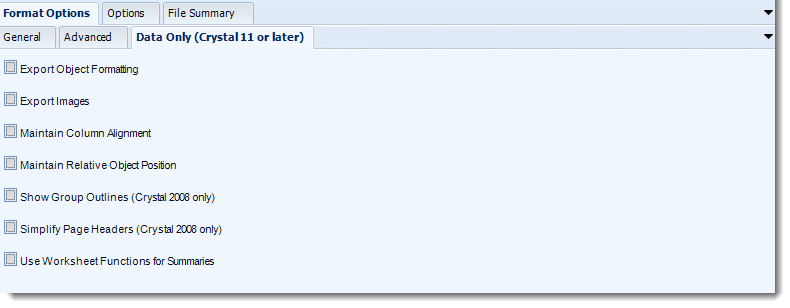

CRD Excel output controls including worksheet and grouping options.
CRD documentation example. Use the report and destination settings for your own job.

Ask finance to perform the task

Have the analyst find a branch and reconcile its total. That tests usefulness more directly than asking whether the workbook looks attractive.

  
Keep it usable

Preserve the workbook agreement as reports change

Once finance accepts the workbook, the schedule can reproduce the export and delivery routine. A new field or renamed branch is a reason to review the output again.

An application requesting the saved job can leave workbook preparation in CRD rather than duplicating it in application code.

Technical reference: format and grouping boundaries

Check the CRD build, Crystal runtime and Office prerequisites for the selected Excel route. The documentation includes older format-specific requirements; confirm the current supported host configuration rather than treating an old Office version as a deployment recommendation.

Separate worksheets are not recipient isolation. If the workbook contains every branch, sending it to every branch exposes every tab. Use separate recipient-specific outputs when that is the requirement.

Keep a boundary case

Include a branch with many rows and a new group value in regression checks after a report change.

  
Your next step

Let finance begin with the figures

The weekly file should let the analyst investigate sales without first rebuilding the spreadsheet. Start with the accepted workbook and automate that agreed output.

Explore CRD Excel automation for the workbook controls your file needs. The Crystal Reports automation page covers the wider delivery routine.

Contributors:

Christian Ofori-Boateng

Christian Ofori-Boateng

CEO, ChristianSteven Software