

TABLEAU QUESTIONS

How Do You Send Tableau Subscription Emails with Saved Filters?

To send Tableau subscription emails with saved filters, apply the required selections, save a Custom View, then subscribe to that saved view. Temporary filters in an open dashboard do not define the subscription. This native workflow suits a recurring PNG or PDF snapshot for Tableau users with the required permissions.

For example, a North operations manager needs only North sales in a Monday email. Start by saving that exact view. Consider Advanced Tableau Report Scheduler (ATRS) when the requirement grows into configured report parameters, spreadsheet attachments, branded messages or delivery instructions maintained together.

  
THE DIRECT ANSWER

Save the filtered view before subscribing

Open the published dashboard and select the filters the manager expects. For the first sample, use Region = North and the agreed week ending 18 October 2026. Check a recognizable total before saving, so there is a concrete result to compare with the received file.

After changing the view, choose Save Custom View from the toolbar and give it a recognizable name, such as North — Weekly Sales. Saving preserves a view configuration without editing the published workbook. Making it your default is optional; a default preference is a separate choice from saving the view you intend to subscribe to. Tableau’s Custom Views guide explains the controls.

A teal funnel, bookmarked report card, envelope and clock illustrate saving a filtered view for recurring email.

Save the report state the reader needs, then configure its recurring email.

Open that saved view and choose Watch > Subscriptions. Select the current view, eligible recipients, PNG, PDF or both, and the available schedule; then subscribe. Tableau’s subscription instructions explicitly require a saved Custom View for filtered subscriptions. For this North-only example, begin with the current view and inspect any workbook-wide output separately.

Recipients need View and Download Image/PDF permissions. Subscribing other people also requires the appropriate content ownership or administrative role. Confirm those conditions before treating a missing subscription control as a filter problem.

Open the received snapshot and compare the North total and reporting period with the saved view. This verifies the requirement at the point the manager uses it. A subject reading “North sales” is useful identification, but the subject itself does not filter report content.

Confirm the saved result

Selection: Start with the intended region and reporting period.

Name: Give the Custom View a recognizable purpose.

Scope: Use the current view for the first regional sample.

Receipt: Compare the received output with the saved view.

  
REQUIREMENTS AND LIMITATIONS

Separate saved state, access and delivery

A saved selection answers which report state to use. Access controls answer which data a user may see, while the subscription supplies the email format and recurrence. Keeping those choices separate makes a wrong-region result easier to investigate.

RequirementNative Tableau routeWhere ATRS helps
One recurring filtered snapshotSave a Custom View and subscribe to that view.Keep the native route when it already meets the requirement.
Excel or CSV instead of a snapshotNative subscription output is PNG, PDF or both.Configure the required file output and its email destination.
Report values maintained in a jobA Custom View holds a useful saved interaction state.Supply the intended report parameters in the schedule and preview the output.
Many recipient-specific versionsManage appropriate saved views and subscriptions for the intended users.A data-driven workflow can obtain report values and recipient details from maintained records.
A changed source workbookRetest the saved view when its underlying content changes.Retest configured source paths, parameter names and outputs after changes.

For the North manager, decide whether “weekly” means a fixed historical week or an advancing reporting period. A saved absolute date remains a different specification from a relative period. Configure the intended date rule in the source view or reporting job and check the next period as well as the initial sample. The Monday run time alone does not select last week’s data.

A region filter is also different from permission to distribute that region’s data. Use the report account and recipient mapping approved for the job. The ATRS report bursting guidance keeps the connected account’s Tableau access, report values and intended audience together; changing an email address does not establish a new data context.

If a previously correct Custom View changes after publication, check the source workbook before rebuilding the delivery process. Tableau’s maintenance guidance identifies workbook and field changes that can affect saved views. A missing field or changed calculation needs attention even if the email still arrives.

Keep the choices separate

State: Identify which saved selections define the report.

Period: Distinguish a historical date from an advancing rule.

Access: Use the authorized data context for the audience.

Changes: Retest after relevant workbook updates.

  
END-USER WORKFLOWS

Configure the North report as a maintained job

Suppose operations now wants the same North output as an Excel attachment from its reporting mailbox. Treat this as an ATRS export-and-delivery job with its own configured values, rather than expecting the active dashboard tab to supply them. Keep the approved North sample nearby for comparison.

Create a Single Schedule in ATRS, select the linked Tableau account and Item Path, and use a unique name such as North Weekly Sales. Choose Monday at 08:30 in the intended time zone, then enter the report’s actual parameter names, values and types in Report Parameters. Add each entry and preview the report, following the Single Schedule setup guide. A parameter must already have the intended effect in the published report; assigning a plausible name does not create that behavior.
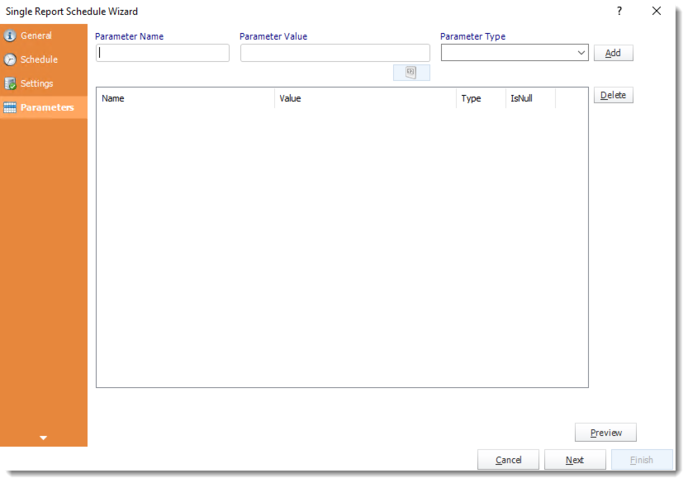
ATRS Single Report Schedule Wizard Parameters tab with name, value, type, Add and Preview controls.

Set the report’s parameter names, values and types in ATRS, then preview its output.

For example, if the report uses a string parameter named RegionChoice in its regional filter, enter RegionChoice with North. If it exposes a WeekEnding date parameter, supply the agreed date with the correct type for the first sample. These names are illustrative: use the exact fields and allowed values from your workbook. If your dashboard only has an interactive Region filter, agree the supported configuration with its author before translating that requirement into a job.

Add the approved Email destination, select the required file format and write a clear subject and message. The Tableau email report automation workflow brings those production and delivery choices together. Use Tools > Test with controlled destinations, then open the received file. Reconcile North-only content, dates and totals, and check the next period’s values before enabling recurrence. Configure exception handling for a failed or blank report and assign an operations owner to investigate unexpected results.

When the audience later expands, move the approved report-value and recipient pairs into a suitable data-driven design. Establish that mapping deliberately; changing the To address of one fixed North job would still leave its content configured for North.

Check the configured job

Names: Use the workbook’s actual parameter names and types.

Values: Preview the approved North reporting context.

Output: Open the file in the application the manager uses.

Delivery: Keep recipient and report values paired.

  
DEVELOPER AND API WORKFLOWS

Make API export filters explicit

An application that exports a published view should send the intended filtering context explicitly. A browser session’s temporary selections are not an API request specification. For an owned export integration, keep the source identifier and approved filter values with the request, then validate the resulting file before delivery.

Tableau’s view query filter documentation uses vf_ keys for supported export methods. For a view whose underlying field is exactly Region and whose value is North, an illustrative PDF request is:

GET /api/<api-version>/sites/<site-id>/views/<view-id>/pdf?vf_Region=North
X-Tableau-Auth: <tableau-session-token>

Use the Query View PDF method with a supported API version and authorized Tableau session. Match the source field and value exactly and URL-encode spaces or special characters. These view filters support equality, not arbitrary ranges or wildcard expressions. They are distinct from filter=name:eq:..., which filters a REST resource listing.

In this example, verify the generated PDF contains North data and that its title describes the filtered result. A static label such as “All regions” can remain misleading even when exported values are restricted. If the workflow also needs a workbook parameter, use the contract for that chosen operation; do not assume every parameter is an interchangeable vf_ field.

The integration still owns recurrence, file preparation, sending and recovery. If ATRS holds those settings instead, authorize the application to request the appropriate configured job and track its execution. In either design, keep North’s approved context attached to the resulting file and destination.

Preserve context in code

Identity: Authorize the export account and application request.

Filters: Send supported view fields and exact values.

Validation: Check content and labels in the produced file.

Ownership: Assign recurrence, delivery and recovery explicitly.

  
CHOOSE YOUR NEXT STEP

Choose the simplest route that preserves the result

For a North-only PNG or PDF sent to permitted Tableau users, save the Custom View and subscribe to it. Keep the setup proportionate to that requirement. Check the received result and retain an owner who can retest it when the workbook changes.

Evaluate the ATRS Tableau report scheduler when the recurring task also needs configured parameters, working files, company email presentation or recipient-specific delivery. Bring a source view and a known-good sample so the evaluation can compare real content, period and receipt.

Explore filtered Tableau report emails with ATRS

Considering ATRS for your recurring regional reports? Share the guide with the report owner and delivery team to review deployment, access and reporting requirements.

Download the ATRS Internal Evaluation Guide

Contributors:

Christian Ofori-Boateng

Christian Ofori-Boateng

CEO, ChristianSteven Software