

LEARN CRYSTAL REPORTS

How to Send Crystal Reports Only When a Business Condition Needs Attention

Send a Crystal Report only when a business condition needs attention by defining the qualifying records and connecting that condition to report execution.

CRD event-based schedules can use database conditions to start the reporting job. Include a way to handle each event so the same exception does not trigger another email on every check.

  
Your reporting task

Make the report mean there is something to act on

Imagine a credit manager receiving a report whenever a newly overdue account exceeds an agreed balance. A daily file containing every account is too broad; she needs the exceptions that require a call.

Define the condition with the business owner. Specify the overdue date, threshold, account status and the period the report should cover. Then decide whether the recipient should hear about each new account or receive a grouped update.

This is different from suppressing an empty report. The requirement begins with a business rule that determines when the reporting work should happen.

Agree when to alert again

A balance may remain over the threshold for several days. Decide whether that merits one alert, a reminder or another message only after a meaningful change.

  
Your options

Choose an alert workflow that fits the environment

Crystal Reports and SAP server environments provide alerting facilities with behavior that depends on the product and deployment. A query-and-script workflow can also check a business condition and prepare the report when it matches.

CRD event-based schedules support database-record conditions and configurable queries. The documented example uses a qualifying amount together with a processed marker so the same record does not keep triggering.

The query must express the business condition; CRD is not automatically subscribing to every alert formula inside an RPT. Keep the report selection aligned with the account that caused the event.

The CRD event-based scheduling guide explains matching records, new-record detection and repeated-trigger handling.

Separate readiness from urgency

A completed import tells you the figures are ready. An overdue-balance threshold tells you someone needs to act on them. Define both when the process needs both.

  
Put it into practice

Prepare the overdue-account alert

Create and test the account report with a controlled recipient. Configure a database condition whose query returns the approved overdue accounts, including a stable identifier for each qualifying record.

Choose the detection behavior appropriate to the rule. For matching-record checks, plan how a processed record stops matching after the intended reporting action. CRD Custom Tasks can participate in that process, with the ordering and database permissions configured deliberately.

Test an account below the threshold, a newly qualifying account and an account already handled. Confirm the delivered report identifies the intended account and that the unchanged handled record does not repeatedly send the same alert.
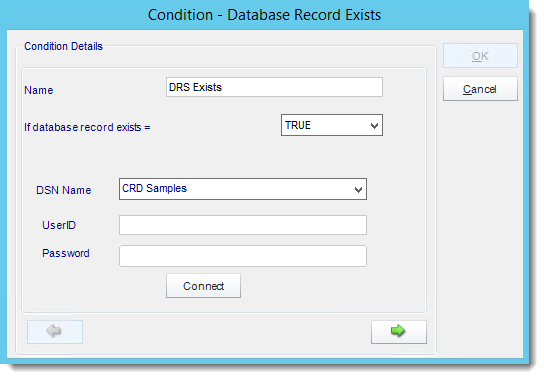

CRD event-based schedule condition wizard.

Use a controlled destination first

A test threshold can match many accounts. Inspect the qualifying query results before enabling messages to the credit team.

  
Keep it dependable

Handle failures between detection and delivery

An exception can be detected successfully while its report or email fails. Decide how the credit manager will hear about that and how the reporting owner will recover the original event.

Marking a record as handled too early can hide a missing report; marking it after delivery can still leave a repeated-trigger risk if the final update fails. The workflow needs a deliberate reconciliation path.

Technical reference: processed markers and repeat checks

Use unique keys and a condition narrowly matched to the intended business event. CRD documents New Records Only and Any Matching Records; choose against the required alert behavior rather than assuming they are interchangeable.

If a task writes a processed marker, use approved database permissions and verify ordering. This is not a guarantee of exactly-once delivery. Keep the event, execution and destination result traceable so an uncertain run can be investigated before another alert is sent.

Test the recovery case

Include a controlled report or delivery failure in the evaluation. Verify how the still-relevant overdue account becomes visible again without flooding the manager.

  
Your next step

Give the credit manager a report with a purpose

The alert should arrive because an agreed condition needs attention, with enough account detail for the manager to act. Start with one well-defined rule and prove both its normal and recovery paths.

Explore event-triggered Crystal Reports automation with the business owner’s threshold and reminder requirements.

Contributors:

Christian Ofori-Boateng

Christian Ofori-Boateng

CEO, ChristianSteven Software