

LEARN CRYSTAL REPORTS

How to Password-Protect Crystal Reports PDFs Before Delivery

Password-protect Crystal Reports PDFs by applying the required PDF security settings before delivery, then testing the file as the recipient will open it.

CRD provides PDF password and permission controls, watermarks and separate ZIP protection options. Choose each control for the specific risk it addresses.

  
Your reporting task

Protect the file someone will receive

Imagine sending a monthly account statement outside the company. The customer needs to open it, while finance wants to reduce the risk of the attachment being read by the wrong person.

Start by agreeing whether the file must require a password to open. That is different from a permission setting intended to restrict actions such as printing or copying. A watermark identifies or labels the document, but is not an opening password.

Decide how the intended recipient will obtain the password. Putting it next to the attachment in the same email may defeat the separation your process requires.

Identify the security requirement

Ask for the required protection and accepted encryption standard before choosing a setting. “Secure PDF” is too vague to validate.

  
Your options

Choose file protection and transport separately

A native or script-based workflow can apply PDF protection using an appropriate export or PDF-processing component. Check the exact features and encryption supported by that route.

CRD documents PDF options for passwords, file permissions and a watermark or stamp. The PDF guide specifies 128-bit encryption. If your organization requires AES-256 or another particular standard, confirm compatibility before choosing this route.

ZIP encryption is a separate wrapper around the output. Secure transport and destination permissions address the delivery route. Your security and compliance requirements still apply to the complete storage and delivery process.

The CRD PDF guide describes the documented protection options.

Keep the limitation visible

A password-protected attachment is not a revocable document. Do not promise that access can be withdrawn after the recipient downloads it.

  
Put it into practice

Prepare the protected statement in CRD

Select the statement report and the customer’s reporting values, then choose PDF in the destination. Enable the additional PDF options and configure the passwords and permitted actions required by your policy.

Add a watermark or stamp if it serves the statement workflow. Keep it readable and confirm that it does not obscure figures, reference numbers or payment instructions.

Deliver a test to a controlled recipient. Confirm that the PDF requires the intended opening password, opens with the correct value and remains readable. Test any permission settings in the PDF software the recipient is expected to use.
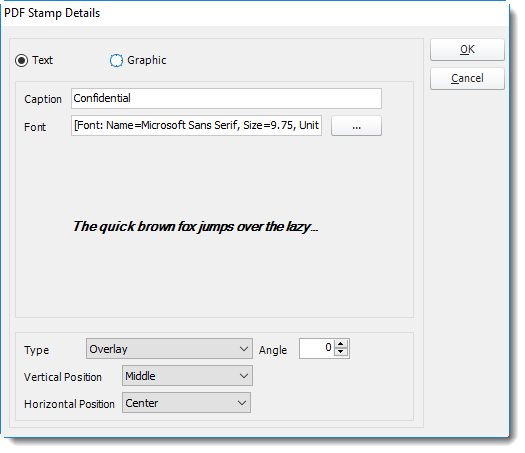

Crystal Reports: PDF output format options in CRD.

Test the delivered attachment

The original PDF on your workstation may differ from a merged or wrapped file. Inspect the exact final attachment.

  
Keep it dependable

Keep protection working for changing recipients

For recurring customer delivery, establish who maintains the recipient and password instructions. Treat the values as sensitive configuration rather than ordinary text for an email or log.

If the workflow merges reports, verify the protection on the merged file. Do not assume that protecting a component automatically produces the desired final document security.

Technical reference: passwords and permissions

Opening passwords, permission restrictions, watermarks, ZIP protection and transport security solve different problems. PDF viewers may handle permission restrictions differently; verify the intended recipient software and organizational policy.

Protect password sources and avoid exposing values in filenames, audit records or screenshots.

Plan the forgotten-password request

Agree how to verify the recipient and issue an approved replacement. Do not let a support exchange accidentally disclose another customer’s password.

  
Your next step

Make protection part of the reporting handoff

The customer should be able to open the right statement using the agreed process, while finance can demonstrate the protection actually applied to that file.

Explore Crystal Reports PDF automation with your organization’s specific file-security requirements.

Contributors:

Christian Ofori-Boateng

Christian Ofori-Boateng

CEO, ChristianSteven Software