TABLEAU QUESTIONS

How Do You Schedule Tableau Reports by Email?

You can schedule Tableau report emails with a native Tableau Cloud or Tableau Server subscription. For recurring PNG or PDF snapshots sent to permitted Tableau users, start there. When the job also needs spreadsheet attachments, different outputs for different recipients or several reports delivered together, Advanced Tableau Report Scheduler (ATRS) provides a configurable export-and-email workflow.

The useful starting point is the email your reader needs. Consider an operations analyst preparing a Monday trading update: initially, managers need a sales snapshot; later, finance asks for a workbook and each regional manager needs only their own region. This illustrative example follows that reporting job from its first subscription to a more complete delivery process.

  
THE DIRECT ANSWER

Start with a native Tableau subscription

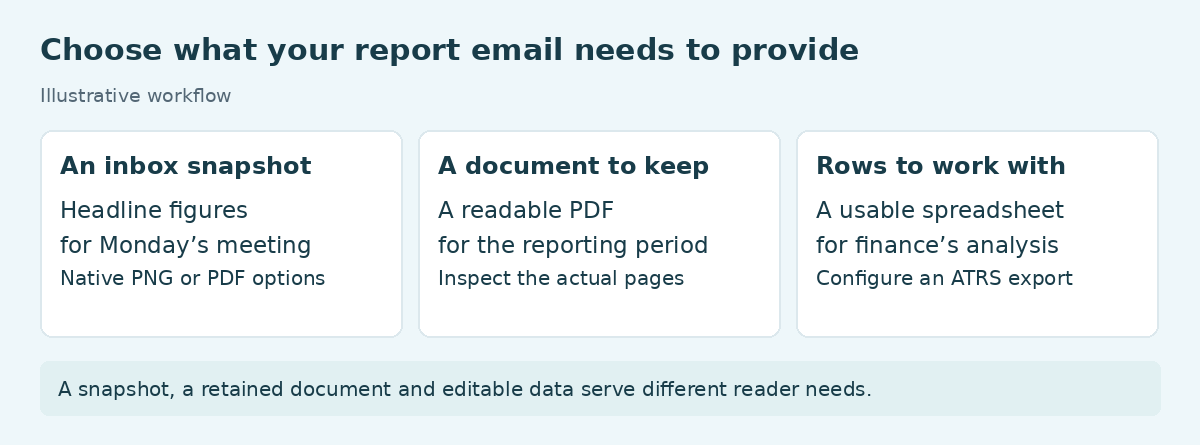
Three reporting outputs: an inbox snapshot, a PDF document and spreadsheet rows for finance.

Choose the deliverable first: a snapshot, a document to retain or data the reader can work with.

For the analyst’s first requirement, a weekly snapshot may be all that is needed. Managers can review the figures in their inbox and follow the report link when they want to investigate. There is no reason to build a separate delivery system for that job.

In Tableau, open the published view and choose Watch > Subscriptions. Select the recipients, the current view or entire workbook, PNG/PDF output, a subject and message, then the available schedule. Check the time zone before saving. If the email needs a filtered version, save a custom view first; temporary browser filters do not define the subscription.

Recipients need View and Download Image/PDF permissions. Subscribing other users also depends on your role and content ownership. If the option is missing, involve the site administrator rather than treating it as a scheduling fault.

On Tableau Server, administrators must configure subscription email and enable the relevant server/site options, including attachments where required. They can also test a subscription schedule through Actions > Run Now. That separates an administrator’s configuration task from the analyst’s choice of report and recipients.

Agree on what the reader will receive

Snapshot: Show the headline figures for Monday’s meeting in the email.

PDF: Give managers a reading copy to retain; inspect its actual pages.

Interactive link: Let readers explore in Tableau with their own authorized access.

Spreadsheet: Agree the columns finance needs to sort and reconcile; an image is not editable data.

  
REQUIREMENTS AND LIMITATIONS

Decide what the report email must contain

The reporting job changes when finance asks for an Excel attachment and regional managers ask for different content. Those requests concern the deliverable and its audience, rather than how often an email runs. This is where comparing complete workflows is more useful than comparing schedulers by their list of frequencies.

Requirement Native Tableau route Where ATRS helps
Weekly image or PDF Native subscriptions provide scheduled snapshots to eligible Tableau users. A dedicated scheduler is worth considering when the same job needs additional production or delivery controls.
Spreadsheet attachment The PNG/PDF subscription route is not an Excel attachment workflow. ATRS can generate Excel output and deliver it by email; choose the export that contains the required data.
Filtered reports Saved custom views define filtered subscribed content. Data-driven schedules can use records to supply report parameters and recipient details.
Several reports together A subscription covers its selected view or workbook. A package schedule can assemble several report outputs into one email.
Company email design Native subscriptions offer a subject and message. ATRS email destinations offer HTML/text messages, inserts and a selected mail server.
Refresh-dependent delivery Refresh-triggered subscriptions have source conditions and exclude Bridge-backed sources. Design the required refresh/readiness dependency explicitly; a timed ATRS export alone does not establish freshness.

An owned script is another valid route. A developer can export authorized Tableau content and send it through an approved mail service. The organization then owns the recurring execution, recipient mapping, output preparation and recovery logic. ATRS becomes attractive when you want that reporting configuration maintained in a reporting application rather than spread across scripts.

Keep four boundaries clear

Source access: The export account still needs appropriate Tableau permissions and licensing.

Recipient data: Approve each region-to-address mapping; a filter is not authorization.

Freshness: Confirm the required data is ready, rather than relying on the scheduled time.

Mail limits: Check sending and receiving limits with a representative large message.

  
END-USER WORKFLOWS

Build the recurring email in ATRS

Start with one useful message. For our analyst, that is a weekly sales PDF sent from the operations mailbox, with the reporting period in the subject and a short explanation of what managers should review. Once that works, add the finance workbook and regional variations as separate requirements.

In ATRS, use a Single Schedule for the first report. Select the linked Tableau account and report path, give the job a recognizable name, set its recurrence and supply the report’s required parameter values. Preview the chosen content before adding its destination.

Under Destinations, add Email. Enter the approved addresses, choose the output and write the message. The email destination supports HTML or plain text, with inserts for values in the subject or body. Select a configured mail account rather than assuming that changing a displayed sender address authorizes that account to send.

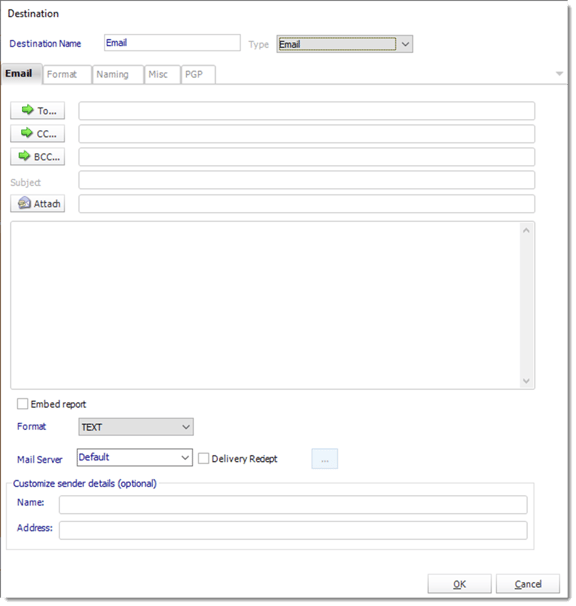
ATRS Email destination with To, CC, BCC, subject, message, embed report, format and mail server controls.

The Email destination in ATRS. Set the recipients, message, output format and mail server for your reporting job.

For the first sample, the message might read: “Here is the trading update for 5–11 October. Please review the sales and returns figures before Monday’s meeting. Reply to Operations if a location needs investigation.” The report’s date selection must produce that same period; a date in the subject does not change the underlying report.

Configure the company sending account before making the schedule recurring. ATRS can send through SMTP or an Office 365 account with modern authentication. Use the organization’s approved account and send a sample through that route.

When finance needs another report in the same email, move to a package schedule and select the required outputs. When every region needs its own version, a data-driven schedule can obtain recipient and parameter values from a control table. For example, a control record can pair the North region parameter with its manager’s approved address. Review that pairing alongside a second region before extending the job to the full list.

The improvement is practical: the analyst no longer has to repeat the export, compose the same message and manually attach the files each week. The configured job holds those choices together, leaving the analyst to investigate exceptions and changes to the reporting requirement.

Review the finished email

Period: Match dates and totals to the source, including a week or month boundary.

Files: Open the received PDF and workbook in the applications readers use.

Audience: Compare two regional outputs at controlled test destinations.

Exceptions: Assign an owner and distinguish failed generation from a valid empty report.

  
DEVELOPER AND API WORKFLOWS

Request the same reporting job from an application

The same weekly update may eventually be requested from an internal portal after a manager approves the figures. The portal can authorize that action while ATRS runs an existing configured schedule. This keeps the report and destination settings in ATRS instead of rebuilding email production in the portal.

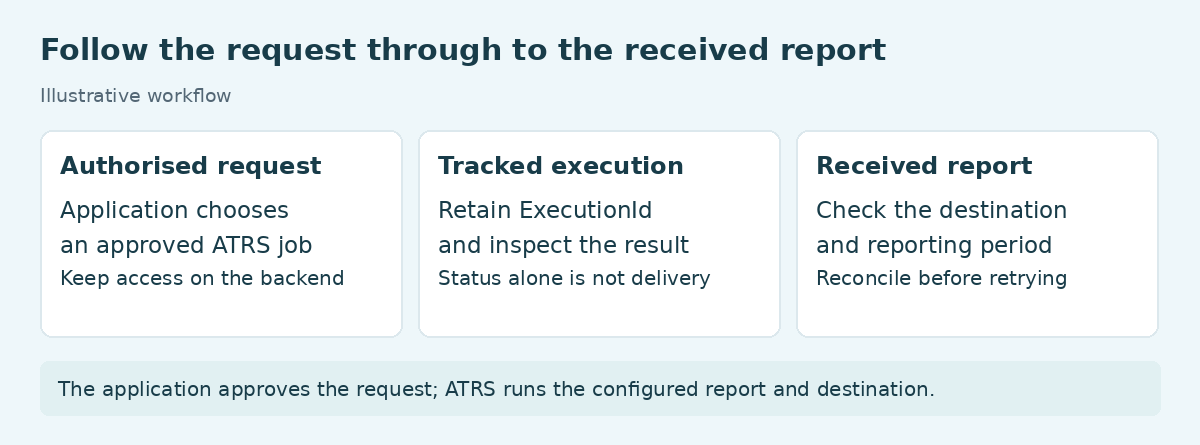
An authorized application request leads to a tracked ATRS execution and a checked destination report.

Keep the approved request, execution result and received report connected.

Begin with a single-report schedule that already produces the correct email. The documented ATRS execution route accepts its stored identifier and returns an ExecutionId for the submitted run. Use the following example to run that configured job. Replace 101 with the intended schedule’s actual UniqueId and use the configured HTTPS host and a server-held bearer token.

POST /api/Schedule/ExecuteScheduleAsync
Authorization: Bearer <access-token>
Content-Type: application/json

{"ScheduleType":"report","UniqueId":101,"RunBy":"API"}

GET /api/Schedule/GetExecutionStatus?ExecutionId=<returned-id>
Authorization: Bearer <access-token>

Store the returned execution identifier with the application request, then monitor that run. Read ResultJson as well as Status: Completed can contain a failed result. After a successful result, verify the expected file and destination.

If the application only needs to administer native subscriptions, Tableau also provides subscription API methods. Those operations retain the native subscription model; they are a different choice from asking ATRS to execute a configured export-and-delivery job.

For authentication and the full integration workflow, visit the ATRS Developer Hub.

Keep each request accountable

Authorization: Map the signed-in user to an approved job; keep credentials on the server.

Isolation: Use an approved configuration for each context; do not overwrite shared recipient settings.

Traceability: Retain the request, schedule, execution identifier and intended destination together.

Recovery: Reconcile history and destination before resubmitting a request with a lost response.

  
CHOOSE YOUR NEXT STEP

Choose the next step for your report
If your managers need the same recurring Tableau image or PDF and already have the required access, start with a native subscription. Confirm the content and schedule, send a representative sample and keep the setup proportionate to the job.

Investigate ATRS when the Monday update has become a recurring production task: prepare the right exports, write a recognizable email, assemble related reports or generate different content for different recipients. That is where bringing the choices into one maintained reporting workflow can remove the manual export-and-send routine.

Bring one real example to the evaluation: the Tableau report, a sample of the email and attachment, the intended recipients and the reporting period. Use that job to decide whether the workflow meets your needs, rather than starting with a catalogue of features.

See how ATRS can automate your Tableau report emails

Considering ATRS for recurring Tableau report emails? Share the guide with your colleagues to review deployment, licensing, security and your reporting requirements.

Download the ATRS Internal Evaluation Guide

Contributors:

Christian Ofori-Boateng

Christian Ofori-Boateng

CEO, ChristianSteven Software