

LEARN CRYSTAL REPORTS

How to Run Crystal Reports from Your Own Application

Your application can run a Crystal Report by rendering it through a suitable SDK or asking a reporting service to execute a prepared job.

With CRD, the reporting team keeps the report, export and delivery instructions in a saved schedule. Your application requests the run and follows its result.

  
Your reporting task

Let the order application request the finished document

Imagine an order application that knows when an invoice is ready. A colleague currently opens Crystal Reports, enters the order number and sends the invoice. The application already has the business event; it needs a controlled reporting handoff.

Decide what the application is requesting. Starting a saved invoice job is different from rendering an RPT inside the application or returning a PDF directly to the browser. Those designs place different responsibilities on your development team.

For this example, the reporting team prepares the authorized invoice job and its destination in CRD. The application starts that prepared job when the order is ready and keeps the execution reference with the order.

Keep authorization in the application

Knowing a schedule identifier is not a business permission to run any customer’s report. Check the user and reporting assignment before making the request.

  
Your options

Choose who owns rendering and delivery

An SDK integration gives the developer responsibility for loading the report, connections, parameters, export and the application’s deployment requirements. That can suit a tightly controlled rendering feature.

A Crystal Server or BusinessObjects API works through the applicable SAP server environment and its permissions. Check which API supports your report type and required operation; an SDK and a server scheduling API are different integration routes.

CRD’s REST API provides another division of work: the saved reporting job owns the configured output and destinations, while the application requests and monitors execution. CRD remains a Windows-hosted reporting service; an HTTP client does not turn the report runtime into a native Linux component.

The CRD API setup guide explains the service and API-client prerequisites.

Define the final result

If the application must display a PDF immediately, design that retrieval path explicitly. Do not assume schedule execution returns a downloadable file URL.

  
Put it into practice

Prepare the invoice job before calling the API

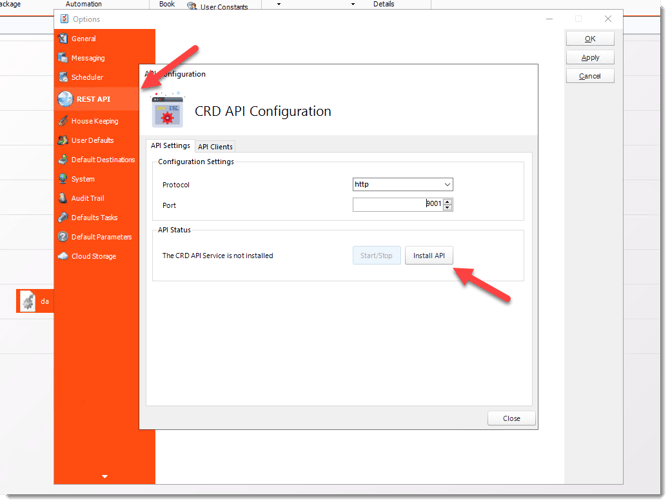
Run the invoice schedule successfully in CRD first, with the intended report values and a controlled destination. Confirm that the API Service and Scheduler are running and that your integration host can reach the configured service address.

Create and protect the API client credentials using the documented authentication flow. Keep tokens and secrets on the application’s trusted server, rather than embedding them in customer-facing browser code.

Find the saved schedule’s unique identifier and schedule type through the supported discovery workflow. Submit one execution request using the current API Reference’s exact method and payload. For an asynchronous run, save the returned ExecutionId with the order so subsequent checks follow that specific invoice job.

The execution guide walks through this prepared-schedule workflow.
CRD configuration for run crystal reports from your application

Separate parameters from execution

Do not assume an execution request accepts arbitrary parameter overrides. Use the documented configuration operation and consider concurrent callers before changing a shared saved job.

  
Keep it dependable

Follow the run without sending two invoices

An accepted request means the handoff has begun. Follow the returned execution until a final result or your application’s waiting deadline, then inspect the destination evidence appropriate to the invoice workflow.

If the status response is delayed, investigate the existing run before submitting another. Otherwise two application workers can each decide the first request failed and send duplicate invoices.

Developer reference: connectivity and execution ownership

The documented unauthenticated Ping operation checks whether the API Service is reachable. Replace the address with the protocol, host and port configured for your installation. It does not authenticate a client or execute a report.

GET {configuredCrdBaseUrl}/api/service/ping

Use the current CRD API Reference for the execution and status contracts. Retain the ExecutionId, inspect its final result and verify delivery separately. The request above is a connectivity example, not an invoice execution request.

Keep one owner for a run

Coordinate application workers around the order and reporting period. A connection timeout should lead to reconciliation before another execution.

  
Your next step

Give the application a dependable reporting handoff

The order workflow can request the invoice without reproducing the whole reporting routine in application code. The reporting team retains an understandable job, and the application retains a traceable request.

Explore CRD application reporting using one prepared schedule and a destination you can verify.

Contributors:

Christian Ofori-Boateng

Christian Ofori-Boateng

CEO, ChristianSteven Software
