

Should You Use a Tableau Alert or a Subscription?
Use a Tableau alert when people need notification that a numeric threshold has been reached. Use a subscription when they need a recurring PNG or PDF snapshot. If a report should arrive only when exceptions exist, a subscription’s empty-view option can help when the subscribed view genuinely becomes empty; it is not an arbitrary threshold rule.
For example, a North manager first wants to know when late orders exceed ten. Later, the team asks for an Excel worklist only when that condition holds. Advanced Tableau Report Scheduler (ATRS) becomes relevant to that configured export-and-delivery job, with the condition, report values, recipients and failure response defined explicitly.
- THE DIRECT ANSWER Choose notification or report delivery first
- REQUIREMENTS AND LIMITATIONS Compare the condition and the required output
- END-USER WORKFLOWS Build a conditional worklist for the North team
- DEVELOPER AND API WORKFLOWS Make the condition and repeat policy explicit
- CHOOSE YOUR NEXT STEP Choose the route that fits the next action
Choose notification or report delivery first
Start with what the manager should do next. “Tell me when North’s late-order count exceeds ten” is a threshold-notification requirement. “Send the sales report every morning” is a recurring-report requirement. “Send a usable late-order workbook only when action is needed” adds a condition to file production and delivery.
For the first request, Tableau’s data-driven alerts use a continuous numeric axis on a supported chart. Select the axis and Create from the Alerts panel, then configure the condition, threshold, recipients and notification schedule. Gantt charts, maps, numeric bins, discrete numeric axes and story points are outside the documented support. Choose a condition strictly greater than ten for this example.
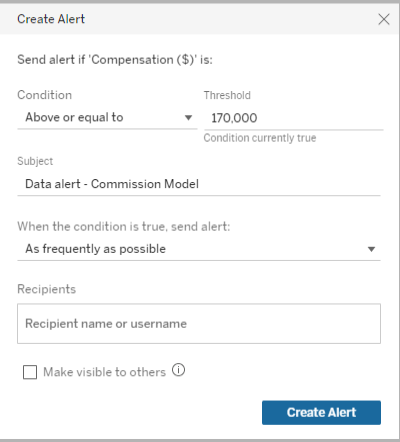
The Alert dialog controls the threshold and notification frequency. Tableau’s compensation example is illustrative; use the late-order measure and the intended condition for North.
For a routine snapshot, use the subscription workflow and choose the current view or workbook, PNG/PDF output and schedule. Recipients need View and Download Image/PDF permissions. Save a Custom View first when filtered content is required. For an exception-only snapshot, author the intended exception view and inspect whether it truly contains no data when the condition is false.
Keep alert frequency and data readiness visible in the decision. A notification schedule is not a promise of an instantaneous message or an upstream data refresh. On Tableau Server, the subscription and alert access guidance also covers email setup, content access and the View/Connect capabilities needed for published data sources.
Agree the required action
Notification: Identify the value that should bring a problem to attention.
Report: Choose the snapshot or working file the reader needs.
Condition: State the exact comparison and threshold.
Timing: Set a suitable check or delivery frequency.
Compare the condition and the required output
The choice becomes clearer when the condition and deliverable are stated together. An alert email may include a view image, but that does not make it a configurable Excel worklist. A recurring report can be useful without any exceptional condition.
| Requirement | Native Tableau route | Where ATRS helps |
|---|---|---|
| Notify when a numeric threshold is met | Use a data-driven alert on a supported continuous numeric axis. | Keep the native alert when notification is the whole requirement. |
| Send a routine image or PDF | Use a subscription with the intended content and schedule. | Consider additional production controls only when the job needs them. |
| Send an exception snapshot only when it has data | Use Don’t send if view is empty on the intended view. | Define a suitable condition or output rule for a wider reporting job. |
| Send an Excel worklist to the correct manager | A threshold notification is different from producing and routing that workbook. | Maintain the approved report values, file output and destination in a configured job. |
| Wait for an upstream completion signal | Choose a supported native refresh-dependent route when it fits the source. | Define readiness and any refresh/export sequence explicitly. |
For the North rule, “greater than ten” differs from “ten or more.” Check nine, ten and eleven in the approved test data. The manager should agree whether a still-open exception needs a daily reminder or only a new notification; that choice affects the repeat policy.
The empty-view option only tests the subscribed view’s emptiness. A visible zero or a nonempty summary is not the same as no data. To use that native route for a threshold condition, the author must make the view’s contents correspond to the intended rule and verify both outcomes. Keep generation failures separate from a valid result with no exceptions.
Keep the boundaries clear
Threshold: Distinguish greater than ten from ten or more.
Empty state: Check the actual view instead of treating zero as empty.
Readiness: Use data from the intended completed period.
Failure: Distinguish no exceptions from an unsuccessful run.
Build a conditional worklist for the North team
Suppose the North team now needs an Excel worklist at 09:00 after the overnight order data is ready, but only when its late-order count is greater than ten. Agree the business date and the count’s definition first. The condition source and the exported Tableau report must describe the same region and completed data period.
A maintained query can supply the approved reporting records to an ATRS Data-Driven Schedule. Follow the data-driven schedule guide to build and inspect the driver, select a unique key, choose the linked Tableau account and source Item Path, and bind supported report parameters and recipient fields. Put the numeric selection rule in the maintained query; the recipient address alone does not select North’s data.

Choose the notification for awareness or a configured report file for the action the team must take.
For a controlled sample, select North and the business date 18 October 2026 in the report, choose Excel output and route it to a test destination. Use the ATRS Tableau email report workflow for the subject, file naming and sending account. Preview the content, then run only the approved sample records. Open the received workbook and reconcile its late orders with the completed source data.
Test the false and boundary cases as well: nine and ten should not select a worklist under this rule, while eleven should. A failed driver query or failed export needs an error response, not classification as “nothing to send.” Define who investigates that outcome before enabling the recurring job.
If the upstream completion time varies, use the Tableau refresh, export and delivery automation guidance to define a readiness signal and the required sequence. A 09:00 clock time alone does not establish that the report is ready. Configure the reporting period and repeat policy separately so yesterday’s condition cannot silently produce today’s mislabeled file.

Test the worklist requirement
Selection: Use the approved North region and business date.
Boundary: Check nine, ten and eleven against the same rule.
Output: Open the received Excel file and reconcile its contents.
Exceptions: Assign a response for query or generation failure.
Make the condition and repeat policy explicit
A developer or data owner can make the selection rule explicit in the driver query. For example, this illustrative reporting queue contains one approved record per regional reporting job and completed business date. Adapt its table and field names to your reporting database:
SELECT DispatchId, Region, BusinessDate, RecipientEmail
FROM ReportingQueue
WHERE ReadyForReporting = 1
AND Region = 'North'
AND BusinessDate = '2026-10-18'
AND LateOrderCount > 10;The fixed region and date select the controlled sample. Before enabling recurrence, use the approved region and advancing-period rule and check the next business date. Keep that selection aligned with the Tableau report’s actual inputs.
Check the returned DispatchId, region, date and recipient together, then map the report’s actual supported inputs. The query establishes which reporting records are selected. It does not refresh Tableau, confer source permissions or send the final file by itself. The scheduler and export-and-delivery configuration supply those later stages.
Decide what should happen if a record still matches on the next run. A daily worklist may be intentional; a one-time dispatch needs maintained processing state and a recovery policy. If a send result is uncertain, reconcile the run and destination before marking it delivered or submitting the same work again.
For application-owned orchestration, keep the authorized request, condition evidence and reporting result connected. If the application requests an existing ATRS job, track its execution and verify the configured output and destination. The API response is not proof that the manager has received a valid worklist.
Native alerts and subscriptions remain valid alternatives. Choose the threshold notification when it provides the required action, or keep the authored exception subscription when its snapshot and empty-state behavior are sufficient. Custom orchestration is useful only when the complete reporting requirement warrants maintaining it.
Own the complete dispatch
Evidence: Retain the record and condition that selected the job.
Mapping: Keep report inputs and recipient details together.
Repeats: Decide whether a continuing exception should be sent again.
Receipt: Check the delivery result before treating the work as complete.
Choose the route that fits the next action
Start with a Tableau alert for North’s numeric notification, or a subscription for a recurring or suitably authored exception snapshot. Confirm what the manager needs to do with the result before adding a separate file-production workflow.
Evaluate the ATRS Tableau report scheduler when the team needs the conditional worklist prepared and routed with maintained values, recipients and failure handling. Bring the greater-than-ten rule, both false and true examples, and the actual file the team wants to use.
Explore conditional reporting and data-readiness workflows with ATRS
Considering ATRS for an exception-reporting job? Share the guide with the report owner and operations team to review access, deployment and the required delivery outcome.
Contributors:
Christian Ofori-Boateng
CEO, ChristianSteven Software

