

How Do You Combine Multiple Tableau Reports into One PDF?
Finance has the monthly summary, sales detail and returns analysis, but they are still separate files. Someone has to assemble the review PDF before the meeting can start.
Advanced Tableau Report Scheduler (ATRS) can prepare the Tableau Cloud reports together and merge their PDFs in the agreed reading order.
- THE PROBLEM AND ANSWER Make the review pack easier to work through
- YOUR OPTIONS Choose one reading copy or separate working files
- SET IT UP Prepare and check the merged review PDF
- FOR DEVELOPERS Let your finance application request the saved pack
- YOUR NEXT STEP Open the meeting with the complete document
Make the review pack easier to work through
Imagine the finance manager preparing for month-end. The summary belongs first, followed by Sales and Returns. Every month an analyst exports the same reports and combines the files before anyone can work through the pack.
The useful result is more than several PDFs arriving at once. It is one document whose period, sections and reading order match the discussion.
ATRS Package Reports Schedules can maintain those Tableau Cloud reports, choose PDF output and merge them into the delivery. The analyst can spend the review answering questions about returns instead of assembling another set of files.

Conceptual illustration: Related reports brought together into a complete review pack.
Follow the meeting order
The summary and its supporting detail should appear in the order finance uses them.
Choose one reading copy or separate working files
A one-off review can use authorized Tableau PDF downloads and an approved merging tool. That remains a sensible option when the pack changes completely from one meeting to the next.
When the same sections recur, an ATRS package keeps their source reports and assembly together. Put the summary before the detail so the reader can begin with the overall result and follow a question into its supporting pages.
Finance may still need Excel for reconciliation. Keep that working file alongside the reading copy when it serves a different task, rather than expect a merged PDF to replace usable spreadsheet cells.
What merging does and does not change
The ATRS Package Schedule guide documents Merge all PDF Files and states that report order determines their order in the merged PDF. Give the final file its own appropriate name.
Merging combines the exported documents. It does not recover rows clipped by a scrolling dashboard, insert unsupported web objects or make differently dated reports represent one period. Check the source layout and inputs first using Tableau’s download guidance.
ATRS connects to Tableau Cloud and supports standard PDF. Do not describe this as a PDF Data Only export.
Keep the workbook’s purpose
A reading PDF and an Excel reconciliation file can both belong in the reporting routine.
Prepare and check the merged review PDF
Begin with the three documents finance already accepts for a known close. Create an ATRS Package Reports Schedule, add the Tableau Cloud reports and choose PDF for their outputs.
Set each report’s period and arrange the members in the order finance reads them. Enable the PDF merge and give the completed pack a filename that identifies the close.
Send the first pack to a controlled destination and open that actual file with finance. Find the summary total, the supporting sales section and the final returns page. Check a longer month as well, when a section grows across more pages.
Then decide what the team should receive if a required report is blank or fails to export. Once the complete and failed-member cases have the agreed response, enable the recurring preparation and delivery.
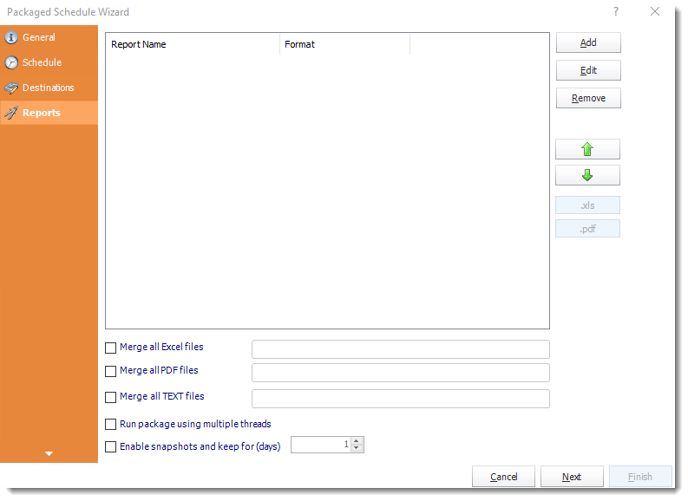
Add and arrange the reports in the package before configuring its PDF merge and final delivery.
Finishing, destinations and an incomplete pack
PDF finishing options include passwords, permissions and watermarks. Test the final merged file’s opening and reading experience rather than infer it from member previews.
Configure both member-level and overall package exception handling. For a large close pack, compare the final file with the approved mail route’s size limit and use a suitable file destination when needed. Multiple reports can also remain separate attachments when that better serves the review.

Read the final section
The last page of the longest report is a useful place to check the finished pack.
Let your finance application request the saved pack
The finance application may need another copy for a follow-up meeting. It can request the saved ATRS package, reusing its reports, ordering and destination.
Finance’s reporting owner keeps that assembly in ATRS while the application follows the requested run.
API example: run the saved merged-PDF package
Use the package-level UniqueId in place of 201. Configure and test the members, reporting periods, PDF merge and destinations before the request.
POST /api/Schedule/ExecuteScheduleAsync
Authorization: Bearer <ATRS-access-token>
Content-Type: application/json
{
"ScheduleType": "package",
"UniqueId": 201,
"RunBy": "Month-end review pack"
}
GET /api/Schedule/GetExecutionStatus?ExecutionId=<returned-id>
Authorization: Bearer <ATRS-access-token>The API request starts the maintained package. It does not accept uploaded PDFs to merge, change the report order in this payload or return the finished PDF bytes.
Follow the ATRS execution guide. Keep the token on an authorized backend. Monitor within a defined deadline and decode ResultJson; Completed can contain Result=false. Check the expected files and destinations before reporting delivery. Reconcile an uncertain execution before submitting another copy.
Identify the close
Keep the month and execution reference with a request for another pack so the team can find that delivery.
Open the meeting with the complete document
The finance manager can begin at the summary and continue into Sales and Returns in the same PDF. The monthly review has its document ready, and the analyst can help explain the figures.
Start with the pack someone assembles today. Its report order and accepted pages give you a useful specification for the ATRS package.
Contributors:
Christian Ofori-Boateng
CEO, ChristianSteven Software

