

LEARN CRYSTAL REPORTS

How to Email Crystal Reports as PDF or Excel Attachments Automatically

To email Crystal Reports automatically, schedule the report, choose its PDF or Excel output and configure an authorized mail connection.

CRD keeps the attachment, recipient list and message with the reporting job, helping your team send the right file without repeating the export each week.

  
Your reporting task

Start with the attachment someone is waiting for

Imagine a finance colleague preparing a weekly receivables update. The director wants a PDF to read before the meeting, while the analyst needs an Excel file to work through the balances. Sending the wrong format creates another round of requests even when the figures are correct.

Before automating, agree what each person needs to do with the file. A PDF preserves a reading layout. An Excel export needs checking for usable rows, identifiers and totals; choosing an Excel extension does not automatically produce the workbook the analyst expects.

Keep the reporting period in view too. A perfectly addressed email can still contain last week’s figures if the saved parameter values never advance.

Make the subject useful

Include a clear report name and reporting period so the recipient can recognize the update without opening several messages.

  
Your options

Use your current email route when it is sufficient

Crystal Server and the BusinessObjects platform provide scheduled email destinations when the required services and permissions are configured. If those meet the weekly requirement, there may be no reason to replace them.

A developer can export and email a report with a script, but must maintain both the rendering code and the mail integration. That includes authentication changes, attachment limits and failures between file generation and submission to the mail server.

CRD brings those choices into the saved reporting job. Its Email destination supports To, CC and BCC, HTML or plain-text messages, attachments and Inserts for values such as report parameters. Recipients can come from maintained address sources rather than being copied into every weekly message.

The Email destination guide explains the available message and address options.

Separate shared copies from personalized reports

Sending one attachment to several people gives them the same content. Customer-specific data needs a report-selection and recipient-mapping workflow.

  
Put it into practice

Build the receivables email

Select the receivables report in CRD and enter the required reporting period. Add an Email destination, choose PDF for the director and configure the Excel output needed by the analyst. Use separate destination instructions where their files or audiences differ.

Write the message as you would write a useful handoff: what the report covers and what the reader should do next. Use Inserts where the date or other values change. CRD also supports additional attachments, and a package can assemble several reports for one email when the update needs more than one document.

Select the configured mail server and use a sender it is authorized to send as. For Microsoft 365, use the authentication route supported by your installed CRD version and tenant configuration. The reporting job cannot override a tenant’s sender or relay policy.
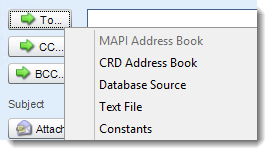

Crystal Reports: Email Destination in CRD.

Test with the actual formats

Open both the PDF and the Excel file from the received test message. The attachment, rather than the preview in the designer, is the recipient’s working document.

  
Keep it dependable

Check the complete email journey

Run the weekly job to controlled recipients before enabling the normal audience. Check the period, filenames, subject, message and attachments, then test a run without an interactive desktop session.

If a message does not arrive, distinguish a report-generation failure from a mail-delivery problem. A successful SMTP connection is not evidence that the attachment reached the inbox.

Technical reference: mail authentication and delivery limits

Confirm the configured mail connection, sender authorization and recipient addresses with the mail administrator. Do not assume that entering a different From address grants permission to send as that identity.

Check attachment limits and filtering at the sending and receiving systems. CRD can prepare and submit the message, but a successful submission does not prove that it was read. Configure error notifications and investigate uncertain delivery before sending another copy.

Keep one owner for the distribution list

Give finance a maintained source for changes to recipients. A departed colleague should not remain on a report simply because their address was copied into an old job.

  
Your next step

Make the weekly update recognizable and dependable

The director should recognize the PDF, and the analyst should be able to work with the workbook without asking for another export. Once both files and the unattended delivery are correct, enable the recurring schedule.

Use the Crystal Reports email automation guide to explore the message, attachment and delivery choices for your own reporting routine.

Contributors:

Christian Ofori-Boateng

Christian Ofori-Boateng

CEO, ChristianSteven Software