

LEARN CRYSTAL REPORTS

Crystal Reports SDK, Crystal Server API or CRD API: Which Approach Fits?

Choose a Crystal Reports SDK when your application should own report rendering, a Crystal Server API when it should use your SAP server environment, or the CRD API when it should request managed reporting jobs.

Compare responsibility for execution, output, delivery and recovery—not only whether each option can accept a request.

  
Your reporting task

Start with what the application must deliver

Imagine a development team adding a monthly statement feature. One proposal loads the RPT directly in the application; another calls a reporting server; a third starts an existing scheduled job. All three can sound like “using an API,” but they create different systems to maintain.

Define the required result first. Does a user need an immediate document in the browser, or should a completed statement be prepared and sent to an approved destination? Does the same work also run every month without a user request?

These questions expose the responsibilities that matter after the first successful demonstration.

Compare the complete requirement

Include parameters, database connections, output protection, distribution, monitoring and the person who will support failures.

  
Your options

Understand the three ownership models

A Crystal Reports SDK gives application code responsibility for report loading, data access, parameters and export within its supported runtime. Scheduling and delivery may then become application features you build or integrate separately.

A Crystal Server or BusinessObjects server API works with the applicable server services, repository and permissions. Verify the precise API and report family, because SAP’s SDKs and REST services do not form one interchangeable contract.

The CRD API works with the CRD reporting environment. A saved schedule can hold report execution and destination instructions while the application starts and monitors the job. The application still owns business authorization and how its users see the outcome.

Do not compare names alone

A server scheduling operation and an embedded report viewer solve different parts of the statement feature. Choose against the required result.

  
Put it into practice

Evaluate the same statement with each approach

Use one representative RPT and reporting period. For an SDK proof of concept, demonstrate loading, authentication, parameters and the required export on the intended deployment host.

For a SAP server route, demonstrate the permitted report operation and how the application follows its result. Include the output destination or retrieval path instead of stopping at a successful server response.

For CRD, prepare the statement schedule and prove it runs correctly before using the API. Confirm the API Service, authenticate, request the saved schedule and retain the asynchronous execution reference. Then check the final file where the statement workflow expects it.

The CRD service setup guide and the execution workflow establish that starting point.
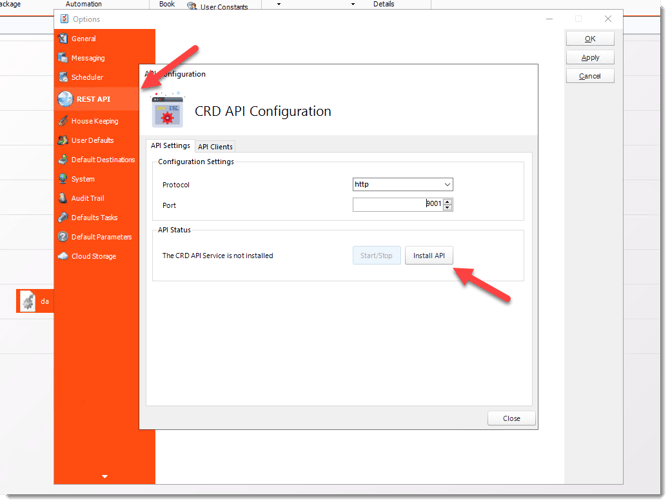
CRD configuration for crystal reports sdk vs crystal server api vs crd api

Use a realistic report

Include the subreport, connection type or output requirement that makes your workload distinctive. A trivial sample may hide the deployment work.

  
Keep it dependable

Compare the work after the first successful request

Discuss how each design handles a changed recipient, an unavailable database and a response that times out after execution begins. The useful comparison includes support ownership and the evidence available for recovery.

Keep cost and development effort specific to your environment. A claim that one approach always takes days and another minutes would obscure the actual dependencies.

Developer reference: contracts and deployment boundaries

Verify current SDK runtime compatibility and redistribution requirements, SAP server API scope and permissions, or CRD API authentication and operation contracts as appropriate. Do not transfer request bodies or schedule types between products.

CRD is Windows-hosted even when a client calls it from another platform. Executing a schedule does not establish an embedded viewer or automatic file-download endpoint. Retain the specific run reference and verify output rather than treating request acceptance as completion.

Include a controlled failure

Ask each prototype to explain a failed statement and recover an uncertain request. That reveals responsibilities a successful export will not.

  
Your next step

Choose the approach your team can operate

The right route leaves the development and reporting teams with clear ownership of the monthly statement. It should fit both the user-facing feature and the recurring work behind it.

Use the Crystal Reports API comparison with your tested report and deployment requirements.

Contributors:

Christian Ofori-Boateng

Christian Ofori-Boateng

CEO, ChristianSteven Software
