

TABLEAU QUESTIONS

Can You Generate a Tableau Report Now and Deliver It Later?

The overnight report is ready long before the team needs its email. You want the completed close preserved, with delivery delayed until the working day begins.

Advanced Tableau Report Scheduler (ATRS) can defer a scheduled Tableau Cloud report’s delivery after generation.

  
THE PROBLEM AND ANSWER

Keep the overnight close and choose a later handoff

Imagine the warehouse close finishing at two in the morning. The operations manager wants that completed stock position in the morning email, while the reporting team prefers to prepare the file during the quieter overnight period.

Generating at two and emailing at seven are separate parts of that requirement. ATRS deferred delivery lets the scheduler prepare the report and hold its delivery for the configured delay.

The distinction matters when the data can change again before seven. A deferred file is the output prepared at its generation time, not a report automatically refreshed at the moment it is released. The feature applies through the Scheduler; manual executions do not use deferred delivery.

Conceptual illustration: A reporting job maintained around its generation and delivery timing.

Conceptual illustration: A reporting job maintained around its generation and delivery timing.

Name the figures being held

The earlier close and the latest available figures can be different reports. Agree which one the morning email should contain.

  
YOUR OPTIONS

Decide whether to delay generation or delivery

If the manager wants the newest figures at seven, scheduling generation around seven may be the simpler answer. Deferred delivery fits the different need to prepare an earlier accepted close and deliver its file later.

Agree that reporting period with the warehouse. The document should identify the completed close it represents, while the delivery timing fits when the manager starts work.

A configured delay also is not an approval gate. If someone must review and release each report, design that separate business process explicitly rather than assume a deferred item waits for a person’s decision.

What deferred delivery controls

The ATRS Deferred Delivery guide documents the destination’s Misc setting, the delay interval and the Deferred Delivery view in System Monitor. It explicitly limits the feature to Scheduler execution and excludes manual runs.

Confirm the release behavior for the configured interval, overnight date boundary and your local schedule time. Do not equate a configured delay with a guaranteed exact arrival time in a receiving mailbox.

ATRS supports Tableau Cloud. Source readiness, correct period selection and later delivery are separate concerns; test them together for the close the manager needs.

A delay is not an approval

If a person must release the report, keep that review step explicit in the workflow.

  
SET IT UP

Try the deferred delivery as a scheduled run

Prepare the stock-close report and a test destination in ATRS. Select the Tableau Cloud account and report inputs for a known close, then configure the normal output and filename.

In the destination’s Misc options, enable deferred delivery and set the delay that fits the agreed handoff. Set a near-term scheduled test so the Scheduler, rather than a manual Execute action, performs the run.

Follow the generated item in System Monitor’s Deferred Delivery view. Observe the actual later receipt, then open the file with the warehouse manager and find a movement from the intended close.

Repeat the test around the overnight timing the routine will use, and agree what the owner does when generation or delivery fails. Once the close and release work together, enable the production schedule and its approved destination.
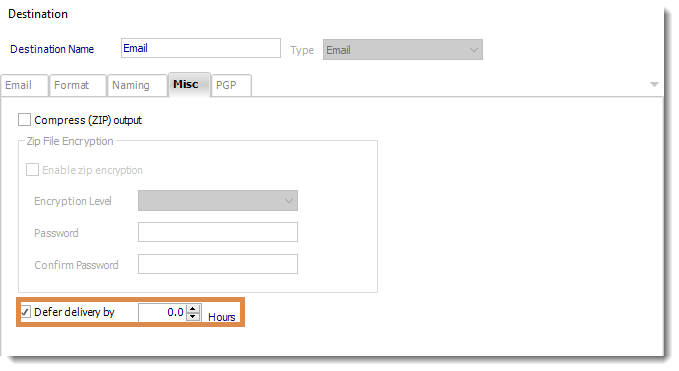
Deferred delivery is configured in the destination’s Misc options and must be tested through the Scheduler.

Deferred delivery is configured in the destination’s Misc options and must be tested through the Scheduler.

A held export and its operational owner

The Deferred Delivery view lists held exports and their details. Use the observed item and actual destination receipt when checking the delay.

Review already-generated or deferred work separately after changing a recipient or schedule. Do not assume disabling future recurrence recalls or removes a file already prepared for delivery.

Keep the required failure notification and recovery with the reporting job. A quiet inbox before release and a failed delivery are different situations for the support owner.

Use the Scheduler for the test

A successful manual export cannot validate a feature documented for scheduled execution only.

  
FOR DEVELOPERS

Keep application controls aligned with the scheduler

Your operations application may display the reporting configuration or help an owner review the saved job. Keep its actions consistent with the Scheduler’s deferred-delivery behavior.

Do not present an on-demand API execution as a way to prove or guarantee deferred release.

API reference: inspect the saved report configuration

Use the real single-report schedule ID in place of 101, your ATRS HTTPS address and a backend access token. This reads saved configuration; it does not generate or release a held file.

GET /api/SingleSchedule/Get?Id=101
Authorization: Bearer <ATRS-access-token>

The ATRS schedule guide documents this read and the complete create/update workflow. A saved response can omit settings; retain the complete intended definition and preserve the destinations when updating.

Review deferred behavior in the installed scheduler configuration and perform a genuine scheduled test. The deferred-delivery guide excludes manual runs; this example does not promise an API release endpoint or a deferred on-demand execution.

Keep existing held work visible

A change to future scheduling is separate from the exports already awaiting delivery.

  
YOUR NEXT STEP

Give the team the prepared close at the intended time

The manager can begin the shift with the accepted overnight close, while the reporting job prepares that file in its agreed generation window.

Bring the close time and the required delivery window to the first trial. Use a genuine scheduled run to establish whether ATRS deferred delivery fits that handoff.

Explore ATRS scheduled reporting

Contributors:

Christian Ofori-Boateng

Christian Ofori-Boateng

CEO, ChristianSteven Software