

How Do You Run Several Tableau Reporting Tasks in the Right Order?
The customer’s export ran before its preparation finished. Now the report is wrong and someone has to repeat the download, transfer and follow-up work.
Advanced Tableau Report Scheduler (ATRS) can arrange the required reporting tasks and schedules into a maintained Tableau Cloud workflow.
- THE PROBLEM AND ANSWER Connect the work behind the customer’s reporting file
- YOUR OPTIONS Choose the workflow around the handoffs
- SET IT UP Build and test the required execution order
- FOR DEVELOPERS Let your application request the prepared reporting work
- YOUR NEXT STEP Complete the customer handoff without rebuilding the sequence
Connect the work behind the customer’s reporting file
Imagine the service team preparing a customer’s month-end activity file. A preparatory program finishes the source work, the Tableau report is exported and a follow-up task records the handoff. Today the export started before the preparation had finished.
Three timers do not establish that sequence. The useful connection is completion: the required preparation finishes, the report uses the intended figures, and the follow-on action reflects what actually happened.
ATRS custom tasks and automation workflows can maintain that reporting work in order. The team can support one understood process instead of reconstructing the dependencies whenever the customer calls.

Conceptual illustration: A reporting handoff connected with the data and work it depends on.
Name the completion that matters
A program returning and the required business update finishing may be different events.
Choose the workflow around the handoffs
A single scheduled export needs little extra coordination when its source is already ready. Keep that simple routine when it completes the customer’s task.
The activity-file process needs more. ATRS can run configured custom tasks before or after reports, and an Automation Schedule can arrange business-process tasks. An Event-Based workflow can also determine the execution order of its selected schedules and tasks.
Choose the arrangement that owns the whole handoff. If the preparatory program merely submits background work and exits, its exit is not proof that the source update is complete. Agree the meaningful completion signal with the application owner.
Tasks, schedules and completion rules
General Custom Tasks documents Run Program/Open Document, waiting for program exit, Wait/Pause and Execute Schedule. Execute Schedule offers waiting and failure-related controls for the configured task.
Automation Schedules and Event-Based execution flow provide their documented workflow arrangements. Select the actual configuration needed rather than assume every task automatically blocks subsequent work on failure.
A pause is elapsed time, not evidence of source readiness. For supported Tableau extract refresh work, the Refresh Tableau Datasource task has its own completion-wait setting. ATRS connects to Tableau Cloud only.
Give the workflow an owner
Someone should be able to explain why each task comes before or after the report.
Build and test the required execution order
Start with the customer’s reporting file and map the work someone currently performs around it. Name the preparation that must complete and the follow-on action that should happen only after its intended predecessor.
In ATRS, attach the appropriate before/after custom tasks to the reporting job, or arrange the wider Automation/Event-Based workflow. Configure the relevant waiting and failure response where the documented controls apply.
Run a controlled successful batch and follow its actual file to the test destination. Compare a known customer activity with the prepared source, then inspect the follow-on result.
Next make the required preparation fail or take too long. Confirm whether the export and later action proceed, who hears about the problem and what a recovery repeats. Once those outcomes match the customer’s handoff, enable the recurring process.
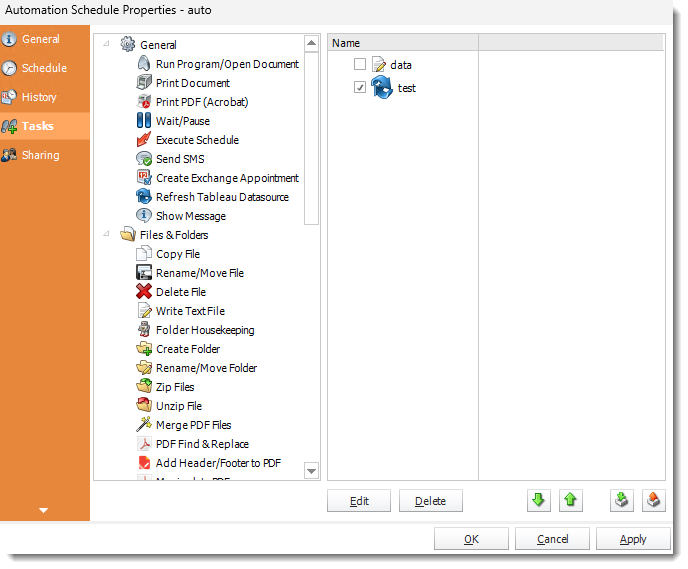
Custom tasks provide the work around a report. Configure their timing, waits and failure response for the intended sequence.
Failure handling and a truthful follow-on record
A report can finish while one destination fails. If a later database or file action is meant to mean “delivered,” establish how that actual destination result is checked. Running an after-task is not by itself proof of delivery.
Review partial successes before repeating the workflow. A recovery can otherwise rerun a preparatory action or send a report that already arrived. Keep the business batch reference with the reporting evidence.
Use Files & Folders or database tasks for their documented operations. Do not present report automation as an automatic rollback across programs, databases, exports and delivered mail.

Try the broken preparation
A controlled failure shows what happens to the later work while the owner is available to discuss it.
Let your application request the prepared reporting work
Your service application can request a saved reporting job whose required preparation is already configured with it. The reporting owner maintains the before/after tasks and the destination.
Keep a separate parent workflow’s responsibilities explicit rather than assume that executing one child invokes everything around it.
API example: run the report with its saved task configuration
Replace 101 with the tested single-report job whose attached task configuration implements the intended work. Use your ATRS HTTPS service.
POST /api/Schedule/ExecuteScheduleAsync
Authorization: Bearer <ATRS-access-token>
Content-Type: application/json
{
"ScheduleType": "report",
"UniqueId": 101,
"RunBy": "Customer reporting workflow"
}
GET /api/Schedule/GetExecutionStatus?ExecutionId=<returned-id>
Authorization: Bearer <ATRS-access-token>This starts that saved report job. It does not automatically start a separate Automation or Event-Based parent workflow. Use only the documented schedule family and configuration for the full workflow you intend to invoke.
Follow the ATRS execution guide. Keep the token on an authorized backend. Monitor within a defined deadline and decode ResultJson; Completed can contain Result=false. Check the expected files and destinations before reporting delivery. Reconcile an uncertain execution before submitting another copy.
Follow the same batch
Keep the business reference and execution record connected when the application requests the workflow.
Complete the customer handoff without rebuilding the sequence
The service team can follow the customer’s month-end file through the preparation it depends on and the actions that come after it. A difficult batch has an agreed response instead of another hurried reconstruction of timers.
Bring one reporting handoff with its preceding and following work. Use that sequence to explore the ATRS workflow your team can maintain.
Contributors:
Christian Ofori-Boateng
CEO, ChristianSteven Software

