

BUSINESS INTELLIGENCE QUESTIONS

Can You Run Business Intelligence on Your Own Infrastructure?

Your branch managers need a dashboard they can open in a browser. IT needs to know where the reporting software will run and who will keep it running.

Make recovery part of deciding whether you’re ready to self-host. Restore the service in a test environment, then ask a branch manager to sign in and check the figures they need for the weekly review.

  
WHERE IT RUNS

Choose where the BI application runs

Yes. You can run business intelligence on your own infrastructure if the software supports customer-managed deployment. Your team runs the application on a server it controls. You also need an agreed way to connect the data, give readers access and keep the service running.

On-premises usually means the server sits at your site or in your data center. A self-hosted installation can also run in your own cloud account if the vendor supports that setup. Check the exact edition and where you’re allowed to install it.

Define what you control

Include the BI application, source data and stored report results in your decision.

  
WHERE THE DATA LIVES

Map the application, data and readers

Take one example. Branch managers need a browser dashboard for the weekly order review. The BI application runs on a company-managed server. It reads from the order database, which runs separately. The managers open the dashboard through an approved network route.
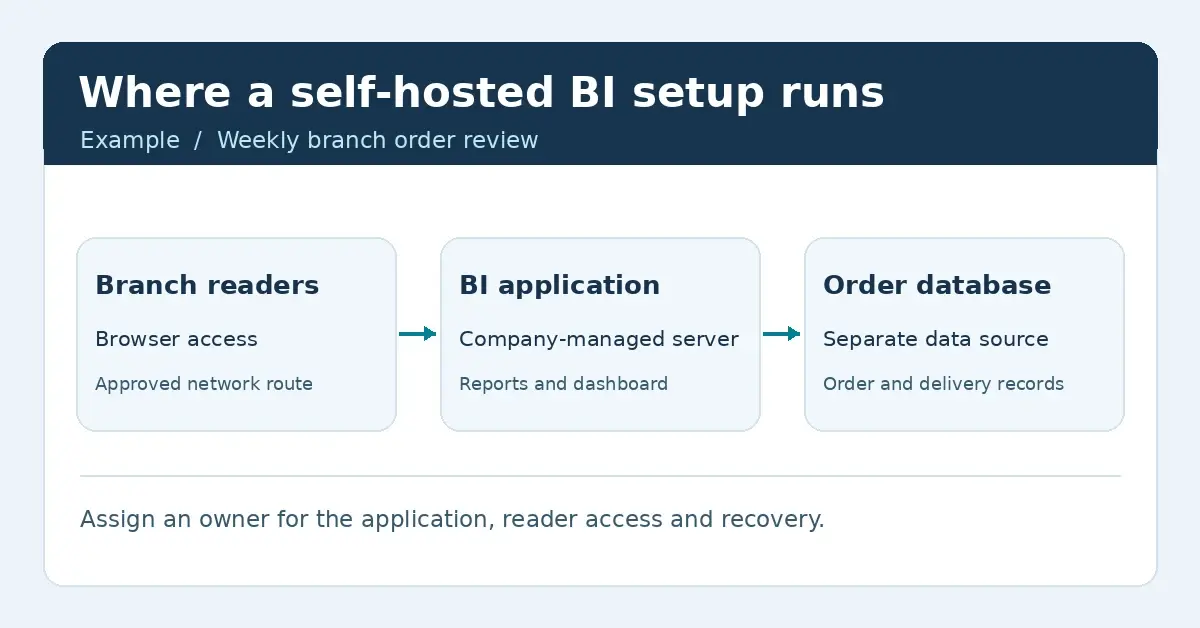
Branch readers connect in a browser to a BI application on a company-managed server, which reads a separate order database.
The browser, BI application and order database have different roles. Open the full deployment diagram.
  • Application: Record where the BI service and its own settings live.
  • Data: Check where the source records, cached data, exports and backups are stored.
  • Readers: Check how people reach the service and sign in.

Check external connections

Confirm which connections your setup needs for sign-in, licensing, email or external data.

  
WHO RUNS IT

Decide who operates each part

For self-hosted BI, assign someone to install and update the application, manage connections and accounts, and restore the service if it fails. A vendor may support those tasks under its agreement.

With vendor-hosted BI, the vendor operates the application. Your team still needs to know who manages reader access and connections to your data. Check those responsibilities in the service agreement.

Name an owner

Assign responsibility for refreshes, access and recovery.

  
WHAT TO TEST

Try one reporting job before rollout

Use the branch review to test the whole route before you add more reports:

  1. Connect the order database using the intended reporting account and confirm the expected figures.
  2. Sign in as a branch manager from the network they’ll use. Check that they can reach the right view and see only the records their role allows.
  3. Ask the service owner to restore a backup in a test environment and confirm the dashboard, connection and sign-in work again.

If the branch review needs recent data, set a maximum acceptable delay and test it with your actual connection. Check the source timestamp against what the branch manager sees before the review starts.

Use your planned setup

Run the pilot on a supported server and use the sign-in route readers will use in production.

  
THE DEPLOYMENT DECISION

Write down what you’ll manage

Record where the application, data and backups will live, how readers will connect and who will support each part. If the branch review works and you can recover it, you have a setup you can test with another reporting team.

If you need to create reports, dashboards and KPIs and share them in a browser on infrastructure you control, IntelliFront BI is self-hosted business intelligence software from ChristianSteven Software. If you’re planning where the software, data and backups will run, explore business intelligence on infrastructure you control. Use the evaluation guide to test that setup with the people who will use it.

Download the IntelliFront BI Internal Evaluation Guide

Contributors:

Christian Ofori-Boateng

Christian Ofori-Boateng

CEO, ChristianSteven Software