

Your team needs a weekly branch report, a dashboard readers can filter, and a KPI they can verify. Several self-hosted BI tools may look suitable on paper.
If branch managers run the review themselves, give priority to tools they can use without an analyst in the room. They should be able to verify a number and explain the result while the team is still discussing it.
Shortlist self-hosted BI tools that can run where you need them, then test the same report, dashboard and KPI in each one. Have a report author build the views and an ordinary reader use them. Compare the cost and effort of running the tools that pass.
For a weekly branch review, use one set of order records. Ask the author to build a late-order report, a dashboard filtered by branch and a KPI for on-time delivery. The branch manager needs to spot a missed target and find the orders behind it.
Before the trial, list the required data sources, what each reader can see, and which reports or workbooks you need to keep.
Record the data, authors and readers.
Start with two or three tools that fit the work and the deployment requirement. Keep an existing platform on the shortlist if it can deliver the same report, dashboard and reader access.
Ask the vendor which edition you can run on your infrastructure and which features its quote includes. A cloud demo may show a different edition.
| Tool | A reason to evaluate it |
|---|---|
| Power BI Report Server | Publishing Power BI and paginated reports on a server you manage. |
| Tableau Server | Publishing and sharing Tableau workbooks on infrastructure you manage. |
| Qlik Sense Enterprise on Windows | Interactive exploration and self-service visual analysis. |
| IBM Cognos Analytics on Premises | Managed enterprise reporting and dashboards. |
| Metabase (self-hosted) | Database questions and dashboards for business teams. |
| DashboardFox (self-hosted) | Building and sharing reports from business data sources. |
| Zoho Analytics On-Premise | Creating reports and dashboards on a customer-managed server. |
| Kyubit BI | Reporting and dashboards with SQL Server or SQL Server Analysis Services data. |
| Bold BI On-Premises Edition | Dashboard authoring and embedded analytics. |
| Yellowfin BI (self-hosted) | Dashboards and analytics where you need to run the server yourself. |
Test the edition you plan to run.
Give each vendor or evaluator the same sample data and expected results. Test the author and reader roles separately:
Count an order as on time if it was delivered by its promised date. If 18 of 20 completed orders were on time, the KPI should show 90%. The report should list the two late orders for that same branch and week.
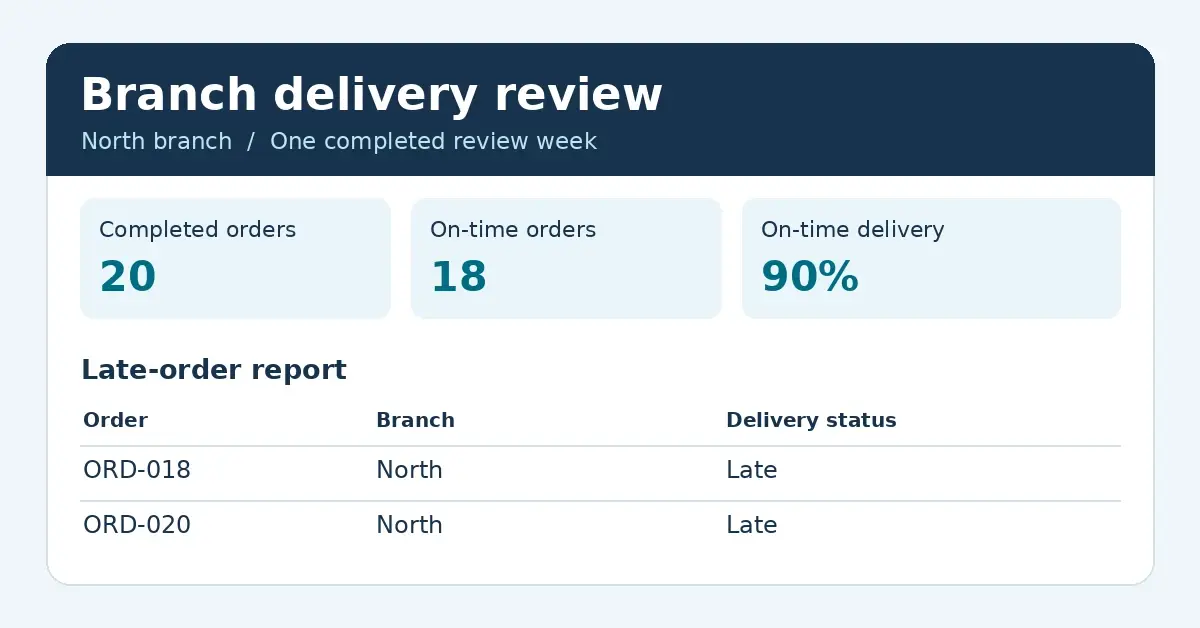

Match the KPI and late-order report to the source.
Self-hosted BI puts the application on infrastructure you operate. Before choosing a tool, agree who handles installation, updates, backups, recovery and access. Confirm who will help if a data connection or scheduled job fails.
Ask for a quote that covers your author and reader counts, production and test environments, required connectors, and support. Compare the full cost over the same period, including infrastructure and staff time.
If a decision depends on how recent the data is, agree the maximum acceptable delay and test it. Check how long a known change takes to appear in the view and whether readers can see when the source was last updated.
Apply an update, restore a backup and remove reader access.
Drop any tool that misses a requirement you can’t work around. For the rest, compare how easily an author can maintain the views and how confidently a branch manager can verify the figures. Use your own results to decide which trade-offs matter.
If your team needs to build reports, dashboards and KPIs and share them in one browser-based workspace, include IntelliFront BI in the same evaluation. It’s self-hosted business intelligence software from ChristianSteven Software. If everyone needs one place to find the views they use, see how a business intelligence portal brings reports and dashboards together. The guide can help you set up the trial and record what each role can do.
CEO, ChristianSteven Software