

BUSINESS INTELLIGENCE QUESTIONS

What Should You Look for in Self-Hosted KPI Software?

At the weekly service review, the scorecard shows 88% against a 90% target. Before the team calls it a miss, someone needs to check whether any results are still outstanding.

Give a colleague the scorecard and ask them what they’d tell the team. If they need the author to explain the result, you’ve found something to test in the next tool.

  
THE MEASURE

Start with one KPI your team already uses

Choose self-hosted KPI software that lets you define a measure once and gives readers the target, period and evidence they need to interpret it. Start with one measure the team already acts on. For a service desk, that might be the share of eligible requests that receive a first reply within 60 minutes.

Agree which requests qualify. For a weekly review, use requests opened during the week whose 60-minute window has elapsed. State whether the clock uses business hours or elapsed time. If a reply’s outcome is unavailable, keep that visible in the count.

Write down the rule

Record who counts, when the clock starts and which time basis you use.

  
TARGET AND PERIOD

Test the target, period and status together

Set a 90% target for Nov 9–15. Of 50 eligible requests, 44 were answered on time, four were late and two have unavailable outcomes. That’s 88% confirmed on time. Mark the result provisional. If one of the two outstanding outcomes proves on time, the team reaches 90%.
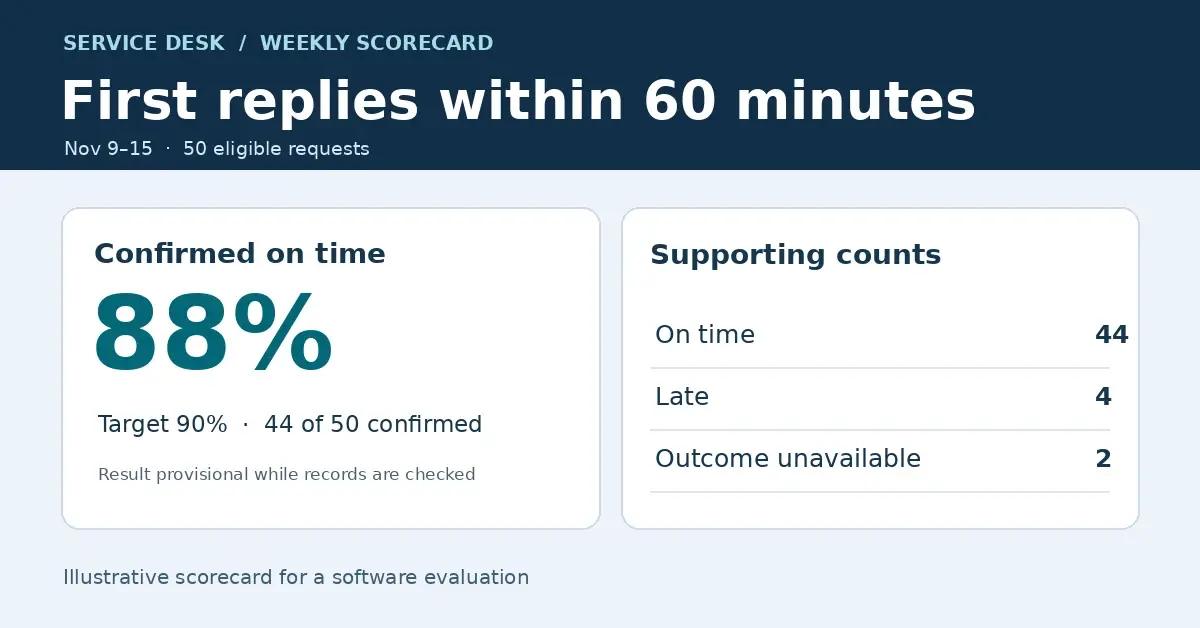
Illustrative weekly scorecard showing 88% confirmed on time against a 90% target, with 44 on time, four late, and two unavailable outcomes.
The two unavailable outcomes keep the weekly result provisional. Open the full-size scorecard.

Switch to the previous week and confirm that the dates, denominator and target follow the selected period. If the target changes next month, check that older results still show the target in force at the time.

Show incomplete results

Keep unavailable outcomes visible so readers can tell what remains open.

  
SUPPORTING RECORDS

Make the result traceable

Ask a reader to follow the 88% to the supporting view and find the two requests that need checking. Show the request ID, opening time and recorded first reply time where the reader has permission to see them.

Compare those records with the source. If the details are in a separate report, check that it opens for the same week and team. Give one author a revised target to enter and confirm that the supporting counts stay the same.

Follow the figure

A reader should be able to identify the records behind the score.

  
ACCESS AND FRESHNESS

Check what readers can see and when

Show when the scorecard’s source data was last updated. Run one refresh late and check what the reader sees. An overdue load, two unavailable outcomes and a confirmed miss each call for a different follow-up.

Sign in with an ordinary reader account on the device used for the review. Check that the reader can see the scorecard and appropriate detail, and that a shared link respects those permissions. Confirm who will manage the refresh and access on your infrastructure.

Test with a reader

Use the account and screen the reviewer will actually use.

  
THE EVALUATION

Compare tools with the same scorecard

Give each tool the same data, target and reader tasks. For a free or commercial option, include the work your team will do to maintain the source, update the scorecard and support readers. Record what took extra steps and where someone needed help.

IntelliFront BI supports KPIs, dashboards and reports on infrastructure you control. If the same measures also need to be visible during the working day, see how to use operational screens and KPI wallboards. Use the guide below to plan a trial with your own scorecard.

Download the IntelliFront BI Internal Evaluation Guide

Contributors:

Christian Ofori-Boateng

Christian Ofori-Boateng

CEO, ChristianSteven Software