

LEARN BUSINESS INTELLIGENCE

Building KPIs People Can Trust

A KPI is easier to trust when you can explain the records behind it. For on-time dispatch, decide which orders count and what qualifies as on time. Then work out the result by hand for a few orders before you rely on the dashboard.

  
DEFINE THE MEASURE

Write Down What the KPI Counts

A dispatch team wants to know how many orders leave on time. Its KPI divides on-time orders by all eligible orders with a promised deadline that day.

  • Use the promised dispatch date to decide which day an order belongs to.
  • Count a dispatch at or before its deadline as on time.
  • Include eligible orders still awaiting dispatch at day-end in the total. They have missed their promise.

The team reviews orders due on November 12, 2026, using UTC. It checks their status at 00:00 UTC on November 13.

Write the rule beside the result

Keep the measure, reporting period and assessment time together so readers can repeat the check.

  
CHECK THE LEVEL OF DETAIL

What happens when one order has two lines?

All three example orders were due at noon UTC. ORD-101 has two order lines, but it shipped on time as one order.

Fictional extract: four order-line rows, three orders
OrderLineDispatch informationOrder result
ORD-101A12 November, 11:40 UTCOn time
ORD-101B12 November, 11:40 UTCOn time
ORD-102A12 November, 12:20 UTCLate
ORD-103AAwaiting dispatch at day-endNot on time

Counting the rows puts ORD-101 in the on-time total twice, giving you 50%. The dispatch team wants to know about orders. Count each order once and the result is one out of three, or 33.3%.
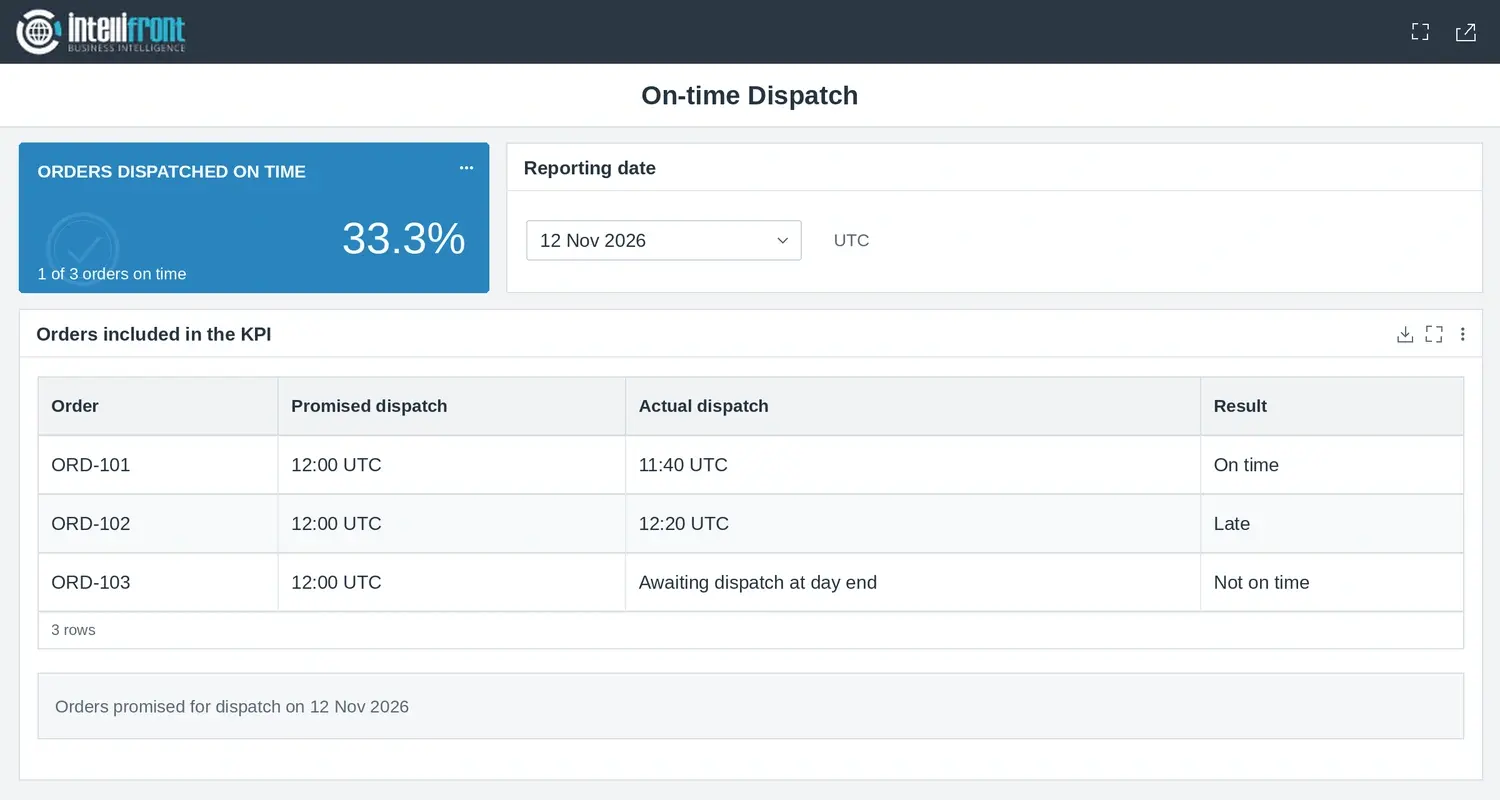

On-time dispatch KPI of 33.3%, with one on-time order, one late order, and one awaiting dispatch.
ORD-101 shipped on time. Its two order lines count as one order in the KPI. Open the full image.

Pick one useful test case

In your test copy, remove one of ORD-101’s two lines and recalculate. The order still counts once, so the result stays at 33.3%.

  
TEST THE BOUNDARIES

Check Dates, Missing Values and Empty Results

The example gives you a baseline. Now try the cases most likely to change the result.

  • A dispatch at the deadline counts as on time under this rule.
  • A blank dispatch timestamp needs checking. The source may confirm the order is still open, or the source extract may be incomplete.
  • A missing promised date needs a separate review because you cannot place the order in the right reporting day.
  • With zero eligible orders, show “No eligible orders.”

Make incomplete data visible

Tell readers when a result is provisional and which records are still under review.

  
CONFIGURE THE DISPLAY

Make the Display Match the Calculation

Show the percentage, the number on time and the eligible total. Use your current reporting tool if it gives readers those figures clearly.

If the team relies on the figure in several views, publish the same checked measure wherever it’s used. IntelliFront BI is ChristianSteven Software’s self-hosted reporting platform. You can show a percentage you’ve already checked or calculate it from one row per eligible order. Give each order a 1 if it shipped on time and a 0 if you’ve confirmed it missed the deadline. Once you’ve checked the result for every eligible order, average those values and display the result as a percentage. Look into missing dispatch times before assigning a 0. If any outcomes remain unknown, label the figure provisional or hold it until you can check them. Use the Cards visual guide to check the formatting and target display.

Check the percentage format

Check that a tested ratio of 0.333 displays as 33.3% in the chosen format.

  
RECONCILE AND MAINTAIN

Trace the Result Back to the Source

Compare the dashboard with the source using the same period, assessment time and inclusion rules. If the totals differ, compare the order IDs first.

Keep the three example orders and their expected result so the next person can repeat the check. If the team needs the same measure in a shared operational view, explore operational dashboards and KPI wallboards.

Contributors:

Christian Ofori-Boateng

Christian Ofori-Boateng

CEO, ChristianSteven Software