

Reporting on Discharge Pharmacy Workload
Give ward staff a way to see where a discharge prescription stands. Give the service team a way to see how long completed requests took. A label like “65 minutes from pharmacy receipt to recorded supply” tells both groups which part of the journey the report measures.
- START WITH THE ENQUIRY Give the Ward a Useful Progress Update
- FOLLOW THE REQUEST Find the Events Behind the Waiting Time
- KEEP OPEN WORK VISIBLE Read Queue Age Alongside Completed Activity
- SHARE THE REPORTING Connect the Request With the Service View
- EXPLAIN THE RESULT Use the Completed Journey in the Review
Give the Ward a Useful Progress Update
At 11:00, someone on the ward calls pharmacy about discharge prescription D-41. The pharmacist has recorded a review. The ward colleague wants to know whether the medicines have been supplied. Later, the pharmacy service lead will use the same request to look at turnaround.
We’ll follow D-41 from that phone call to the service review. It counts as one request, even if it contains several medicine items. Keeping those two counts separate helps everyone understand what the report shows.
Start with the records your ward and pharmacy teams already use. If you can find the request, its stage and the time each step took place, you can answer both questions. A shared dashboard may help if people routinely have to piece that information together.
Keep the unit clear
D-41 is one discharge prescription request in this example. Its medicine-item count is a separate measure.
Find the Events Behind the Waiting Time
The analyst traces D-41 through three events available in the example’s records:
| Time | Recorded event |
|---|---|
| 09:35 | Discharge prescription recorded |
| 10:00 | Pharmacy receipt recorded |
| 10:20 | Pharmacy review recorded |
At 11:00, the pharmacy view can describe D-41 as “Review recorded; supply pending.” It has been 60 minutes since pharmacy receipt and 40 minutes since the review entry. Those labels give the ward colleague a clearer update than an unexplained “60-minute wait”.
Choose the clock that answers the question
The prescription was recorded 25 minutes before the pharmacy receipt event. A measure starting at 09:35 includes that earlier interval. A measure starting at 10:00 follows the journey from recorded receipt by pharmacy.
Both starting points can be useful when their meaning is clear. The ward may want to understand the wider prescription-to-supply journey, while the service lead may be examining work after it reaches pharmacy.
For a local source that lacks a receipt event, use an available starting event with an accurate label. The source owner can help establish what the timestamp records, so the description matches the evidence behind it.
Use a descriptive label
“Minutes since pharmacy receipt” names the starting event. It helps the reader understand both the number and the part of the journey it describes.
Read Queue Age Alongside Completed Activity
The ward colleague now has a specific progress update for D-41. The service lead also needs to see that this request is still open. Its 60 minutes since receipt describes the age of unfinished work at 11:00.
D-41 at 11:00
Review recorded at 10:20; supply pending.
Elapsed since pharmacy receipt: 60 minutes.
A completed-request average answers a different question. It describes requests that have reached the chosen end event. If D-41 remains open, that average will leave it out, even though colleagues are still waiting for its next recorded stage.
Give open work its place in the report
Showing the number and age of open requests beside completed activity gives the service lead both parts of the workload picture. The underlying request list then makes it possible to return to D-41 and see which stage is recorded.
The reporting period matters here too. “Requests received today” follows an incoming group, while “Requests supplied today” follows completions. A request received yesterday may appear in today’s supplied work. Keeping those groups visible makes a service discussion easier to follow.
The team also agrees how to represent missing events. An absent supply timestamp may mean the request is unfinished or that the record is incomplete. The report needs the available status information to distinguish those cases; a missing timestamp should remain visible as something to resolve.
Make each view’s purpose visible
An open-request view supports the current enquiry. Completed activity helps colleagues review the work that reached the chosen end event.
Connect the Request With the Service View
When the ward calls about D-41, the colleague should be able to select their ward, find the request and see what pharmacy has recorded so far. A service lead may want to start with the count of open requests across several wards and then look at the list behind it. IntelliFront BI can put both views in a shared place on infrastructure the organisation controls.
The dashboard below shows a separate part of the discharge picture. It shows whether prescriptions were verified at discharge. “TTO” means “to take out” and refers here to discharge prescriptions for medicines patients take home.
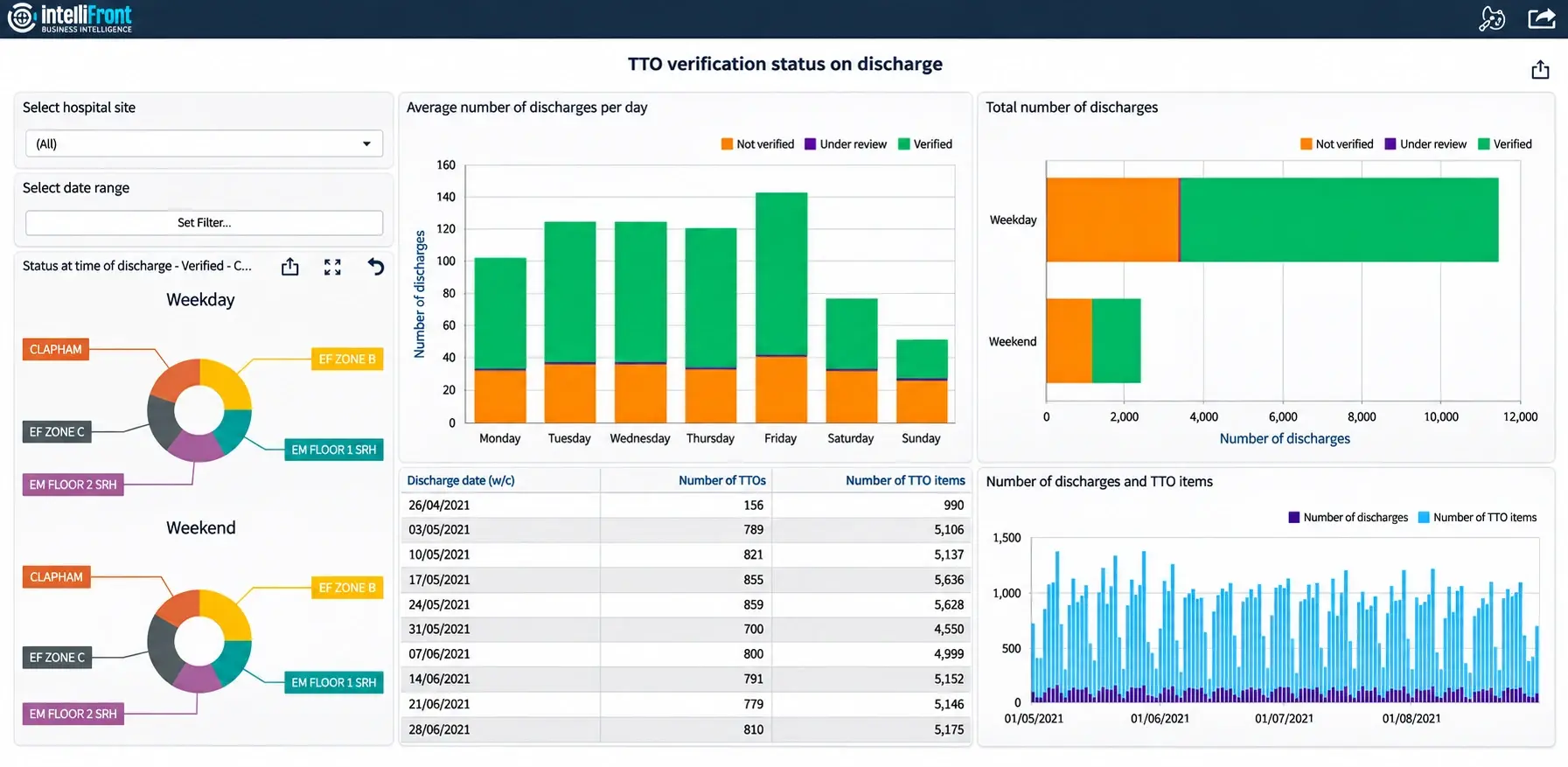
To measure the time D-41 took, the service lead still needs the timestamps for the request itself. Try matching one row to its pharmacy record. If the stages and times agree, the team can explain the figures when someone calls from the ward.

Show the selected scope
A visible ward, hospital site and date range help colleagues recognise which work the report covers. Keep that scope consistent with the supporting requests.
Use the Completed Journey in the Review
At 11:05 the pharmacy records that it supplied the medicines for D-41. When the reporting update picks up that entry, D-41 moves from the open queue to the completed list. Here’s what the service lead can now measure.
| Events measured | Elapsed time |
|---|---|
| Prescription recorded → supply recorded | 90 minutes |
| Pharmacy receipt → supply recorded | 65 minutes |
| Pharmacy receipt → review recorded | 20 minutes |
| Review recorded → supply recorded | 45 minutes |
The records show 90 minutes from the prescription entry to recorded supply, including 65 minutes from pharmacy receipt. For a review of work inside pharmacy, start with 65. The 45 minutes between review and supply show where to ask a follow-up question. The people who handled the request can explain what happened in that time.
Use the same start and end when you compare wards or weeks. And keep the patient’s actual discharge time separate. To report on that, you need the discharge record itself.
The ward’s next call may still come before the reporting update arrives. A dashboard using records through 11:00 will still show D-41 as open. Keep that time in view so the colleague knows when to check directly with pharmacy.
For a shared view of requests still waiting and work already completed, see NHS discharge pharmacy workload dashboards.
Contributors:
Christian Ofori-Boateng
CEO, ChristianSteven Software